In today’s connected home, your side table does more than hold a lamp and a cup of coffee. A side table with a charging station keeps your devices powered and within reach, eliminating cable clutter and dead batteries. Whether you need an end table with outlets for the living room, a bedside charging table, or a compact desk companion, choosing the right model involves more than just plug count.
This guide walks you through the key features to consider when buying a charging station table, from power specifications and cable management to material, size, and style. We’ll also highlight the VASAGLE Side Table with Charging Station as a practical example of what to look for.
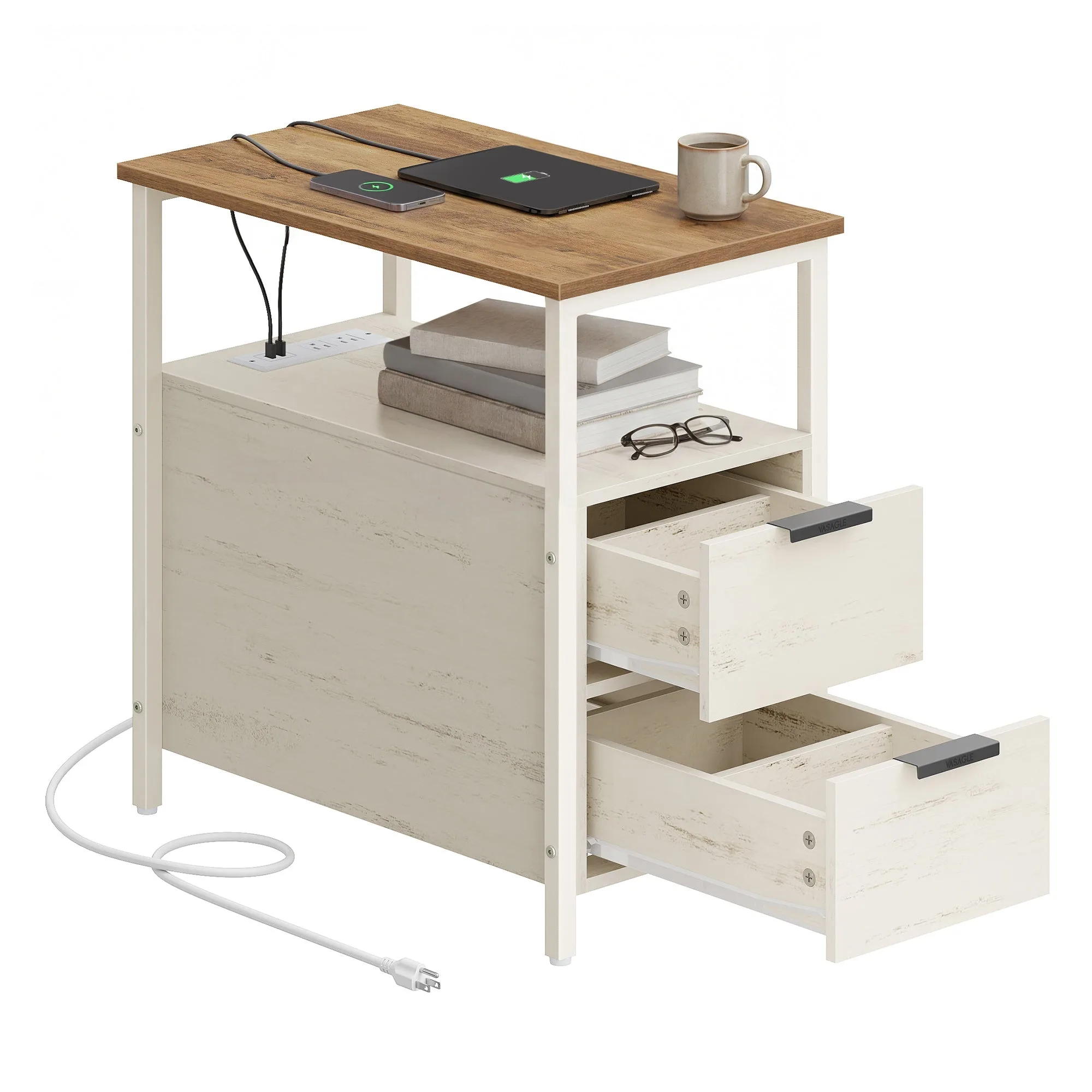
VASAGLE Side Table with Charging Station
Power Features: USB Ports, AC Outlets, and Wireless Charging
The heart of any charging side table is its power delivery system. Most models include a combination of standard AC outlets and USB-A or USB-C ports. When evaluating, check the total wattage or amperage: a USB port that delivers at least 2.4A per port ensures faster charging for tablets and smartphones. Some advanced tables also offer a USB-C Power Delivery (PD) port for laptops or fast charging.
Wireless charging pads are becoming popular on tabletop surfaces. If you own a Qi-compatible phone, a built-in pad can simplify your daily routine—just place your phone on the table and it charges. However, wireless charging is slower than wired and may not work through thick cases. The VASAGLE Side Table with Charging Station integrates both AC outlets and USB ports, giving you flexibility for different devices.
- Look for at least two USB ports and one AC outlet for everyday use.
- Consider USB-C PD if you need to charge a laptop or tablet quickly.
- Wireless charging is convenient but verify your phone case compatibility.
Cable Management: Keeping Wires Tidy
A charging station table can quickly become a tangled mess without proper cable management. The best designs incorporate hidden compartments, built-in cord channels, or rear cutouts that route cables from the power strip down the leg to the floor. Some tables even include a small shelf or cubby to hide a power strip or excess cord length.
When shopping, examine how the power module is integrated. Is it recessed into the tabletop or mounted on the side? Can you easily access plugs without moving the table? A table with a dedicated cable management system not only looks cleaner but also protects cords from being pulled or damaged.
- Check for rear cable cutouts or channels that guide cords out of sight.
- A hidden compartment for the power strip prevents dangling wires.
- Ensure the power cord is long enough to reach your nearest outlet.
Size, Shape, and Height: Finding the Right Fit
Side tables come in a range of dimensions, from slim end tables to larger console-style pieces. Measure your available space and consider the table’s height relative to your sofa or bed. Standard side tables are 20–24 inches tall, but you can find taller or shorter options for specific needs.
Shape matters too: a round table saves space and softens angular rooms, while a rectangular or square table offers more surface area. If you plan to place the table in a corner or tight hallway, look for a narrow profile. The VASAGLE Side Table with Charging Station is designed with a compact footprint, making it suitable for small living rooms, dorm rooms, or beside a recliner.
- Measure the height of your sofa arm or bed frame to ensure the table aligns comfortably.
- Choose a round table for tight spaces; rectangular for more surface area.
- Consider a C-table or sofa table if you need the table to slide over seating.
Material and Build Quality
Durability and aesthetics go hand in hand. Common materials include solid wood, engineered wood (MDF or particleboard with veneer), metal, and glass. Solid wood offers longevity and a classic look but is heavier and more expensive. Engineered wood with a laminate finish is budget-friendly and available in many colors. Metal frames add an industrial or modern touch, while glass tops feel airy but require more cleaning.
Check the weight capacity of the table, especially if you plan to place a heavy lamp or monitor on it. Also look for stability features like anti-tip brackets or leveling feet on uneven floors. A well-constructed table should feel sturdy when you lean on it or plug in a device.
- Solid wood or high-quality MDF with veneer offers the best balance of durability and cost.
- Metal legs with a powder-coated finish resist scratches and rust.
- Avoid glass tops if you have children or pets due to safety and smudges.
Style and Additional Storage
Your charging side table should complement your existing decor. Options range from minimalist modern with clean lines to rustic farmhouse with distressed finishes. Consider whether you want an open shelf, a drawer, or a cabinet for storing remote controls, books, or other items. Some tables combine a charging station with a magazine rack or a lower shelf for baskets.
A table with a drawer can hide smaller items like charging cables and earbuds, keeping the top surface clutter-free. Open shelves are convenient for frequently used items but require more organization. The VASAGLE Side Table with Charging Station often includes a lower shelf for additional storage, making it a versatile piece for living rooms or home offices.
- Match the finish to your existing furniture: black, white, walnut, or oak are common.
- A drawer helps conceal small accessories and reduce visual clutter.
- Open shelves work well for displaying decor or storing baskets.
Choosing the right side table with a charging station comes down to balancing power needs, cable management, size, material, and style. By prioritizing the features that matter most to your daily routine, you can find a table that keeps your devices charged and your space organized. Explore the VASAGLE Side Table with Charging Station to see how thoughtful design combines convenience with modern style.