Quick answer
Use a smart battery charger designed for simulation equipment to safely recharge NAR simulation batteries and keep your training gear ready for action.
Why a dedicated smart charger matters
Medical simulation devices rely on consistent power to run realistic scenarios. A standard charger may not deliver the right voltage or current, which can reduce battery life or cause charging failures. A smart charger like the NAR Simulation Smart Battery Charger is built specifically for simulation batteries, with circuitry that monitors charge levels and prevents overcharging.
Using the correct charger also helps you avoid downtime during training sessions. When you follow the proper charging routine, you extend the usable life of your batteries and reduce the need for replacements.
How to charge your simulation battery correctly
- Check battery compatibility: Confirm that your battery is compatible with the smart charger. The NAR Simulation Smart Battery Charger works with NAR simulation equipment batteries. Look for model numbers or voltage ratings on the battery label. Using an incompatible battery can damage both the charger and the battery.
- Connect the charger to power: Plug the smart charger into a standard wall outlet. Make sure the power source is stable and not shared with high-draw equipment that could cause fluctuations. Avoid extension cords or power strips that might introduce voltage drops.
- Attach the battery to the charger: Insert the battery into the charger slot or connect the charging cable, depending on your model. Ensure the connection is firm and the contacts are clean. Dirty or corroded contacts can interrupt charging and reduce efficiency.
- Monitor the charging indicator: Most smart chargers have LED lights that show charging status. A solid red or orange light usually means charging is in progress, while green indicates a full charge. Wait for the green light before removing the battery. Removing the battery early can leave it partially charged and shorten its lifespan.
- Disconnect and store properly: Once fully charged, unplug the charger from the wall, then disconnect the battery. Store the battery in a cool, dry place away from direct sunlight and extreme temperatures. Heat and humidity accelerate battery degradation even when not in use.
Product facts
-
NAR Simulation Smart Battery Charger: The NAR Simulation Smart Battery Charger is designed to keep your simulation equipment ready for training. It supports efficient power management for compatible batteries. You can trust that the charger will safely optimize battery performance, so your simulation gear is powered when you need it most.
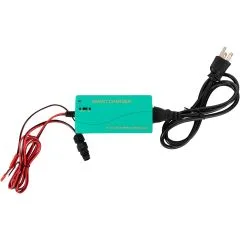
NAR Simulation Smart Battery Charger