Before You Start: What's in the Box
The Sofucor 52" Neo Wood Smart Ceiling Fan combines a whisper-quiet DC motor, adjustable LED lighting, and smart connectivity. Before you begin setup, confirm you have all components: the fan assembly with integrated 18W LED (supports dimming and three color temperatures: 3000K/4000K/5700K), real wood blades, remote control, and mounting hardware. The fan is available in three color options: Black / Walnut Wood, Brushed Nickel / Burly Wood, and White / Burly Wood.
This guide focuses on the smart features — app pairing, voice control, and remote setup. For physical installation, refer to the manufacturer's manual included with your fan.
Pairing the Fan with the Smart App
After your fan is installed and power is restored, follow these steps to connect it to the Smart App for full control.
- Download the Smart App: Search for the Smart App in your device's app store (iOS or Android). Install and create an account or log in if you already have one.
- Put the fan in pairing mode: Turn the fan on using the wall switch. Press and hold the 'Pair' button on the remote (or follow the app's on-screen instructions) until the fan's light flashes or you hear a beep — this indicates the fan is ready to connect.
- Connect via the app: Open the Smart App, tap 'Add Device' or the '+' icon. The app should automatically discover the fan. If not, select 'Ceiling Fan' from the device list and follow the prompts to connect to your 2.4 GHz Wi-Fi network. Enter your Wi-Fi password when prompted.
- Complete pairing: Once connected, the fan will appear in the app. You can now control fan speed (6 speeds), LED brightness, color temperature, and set timers (1H/4H/8H). The built-in memory function remembers your last settings for instant comfort.
Setting Up Amazon Alexa Voice Control
After the fan is paired with the Smart App, you can enable voice control through Amazon Alexa.
- Enable the Sofucor skill in Alexa: Open the Amazon Alexa app, go to Skills & Games, search for the Sofucor skill (or the Smart App skill used by your fan), and enable it. Log in with your Smart App account credentials.
- Discover devices: Say 'Alexa, discover devices' or tap 'Discover' in the Alexa app. The fan should appear as a new device.
- Control with voice: You can now use commands like 'Alexa, turn on the ceiling fan,' 'Alexa, set fan speed to 3,' or 'Alexa, dim the light.' The fan supports hands-free voice commands for convenient operation.
Using the Remote Control
The included remote control provides an alternative way to operate the fan without a smartphone.
- Install batteries: Open the remote's battery compartment and insert fresh batteries (type not specified — check the remote labeling).
- Pair the remote (if needed): If the remote does not control the fan immediately, refer to the fan's manual for pairing instructions. Typically, this involves pressing a pairing button on the fan or remote within a short time after powering on.
- Control functions: Use the remote to turn the fan on/off, adjust speed (6 speeds), toggle the light, change color temperature, and set the timer (1H/4H/8H). The remote works from anywhere in the room for convenient operation anytime, anywhere.
Year-Round Comfort with Reversible Airflow
The Sofucor 52" Neo Wood Smart Fan includes a reversible motor that lets you switch between forward and reverse modes. In summer, forward rotation creates a cooling breeze. In winter, reverse mode circulates warm air trapped near the ceiling, helping to reduce heating costs. Use the app or remote to toggle this setting easily.
Key Specifications at a Glance
-
Sofucor 52" Neo Wood Smart Ceiling Fan with Light: Integrated 18W LED supports dimming and three color temperatures (3000K/4000K/5700K). Lets you adjust light warmth from cozy warm white to bright daylight, matching the room's mood or task needs.
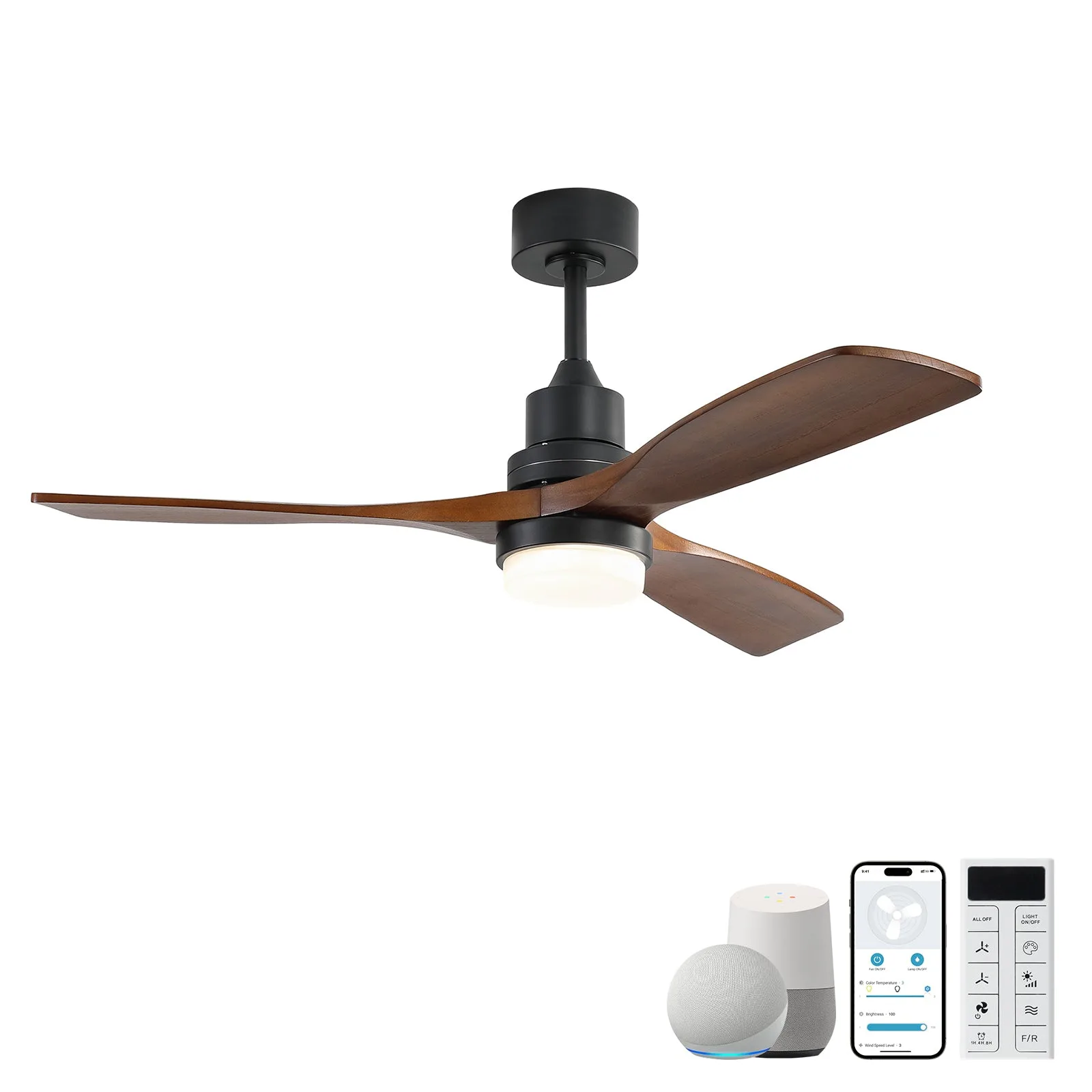
Sofucor 52" Neo Wood Smart Ceiling Fan with Light
-
Sofucor 52" Neo Wood Smart Ceiling Fan with Light: Whisper-quiet DC motor for powerful yet silent airflow. Ideal for bedrooms, living rooms, or any space where noise matters — you get strong airflow without disturbance.
-
Sofucor 52" Neo Wood Smart Ceiling Fan with Light: Smart control via Smart App and Amazon Alexa for voice commands and remote operation. Control the fan from your phone or with your voice, no matter where you are in the house.
Troubleshooting Tips
If the fan does not appear in the app, ensure your phone is connected to a 2.4 GHz Wi-Fi network (most smart home devices do not support 5 GHz). Restart the fan by turning the wall switch off, then on again, and retry pairing. If the remote stops working, replace the batteries and re-pair it following the manual. For persistent issues, contact Sofucor support with your model number.