Quick Answer
To maximize absorbency in your Solar OS pocket diaper, choose the right insert combo for your baby's needs and stuff it evenly through the pocket opening, ensuring the insert lies flat against the inner lining.
Why Stuffing Matters for Absorbency
The Solar OS pocket diaper uses a one-size design that fits babies from about 8 to 40 lbs. The pocket itself is a sleeve between the outer waterproof layer and the inner stay-dry lining. How you stuff that pocket directly affects how much liquid the diaper can hold and how evenly it absorbs.
A poorly stuffed diaper can lead to sagging, leaks at the legs or back, and premature saturation. Taking a few extra seconds to arrange the insert properly makes a real difference in performance.
Understanding Your Insert Options
The Solar OS diaper does not come with an insert included, so you have full control over what you use inside. Common choices include microfiber, cotton prefolds, hemp inserts, or bamboo blends. Each material absorbs differently: microfiber absorbs quickly but can compression-leak, while natural fibers like hemp hold more liquid over time but absorb slower.
For daytime use, a single microfiber or cotton insert often works well. For naps or longer stretches, pair a fast-absorbing layer (like microfiber) next to the baby with a slower, high-capacity layer (like hemp) underneath. This combo gives you both speed and volume.
Step-by-Step Stuffing Guide
- Step 1: Choose Your Insert Combo: Select one or two inserts based on your baby's age and how long you need the diaper to last. For newborns, a single small prefold or microfiber insert works. For older babies or overnight, pair a fast-absorbing insert (microfiber) on top with a high-capacity insert (hemp or bamboo) underneath. Common mistake: using only microfiber for long stretches can cause compression leaks when your baby sits or moves.
- Step 2: Open the Pocket: Locate the pocket opening at the back of the diaper, behind the inner lining. Gently stretch the elastic opening with your fingers to create enough space for your inserts. The Solar OS has a 5cm tummy panel with double back elastic, so the opening is secure but accessible. Checkpoint: avoid tearing the elastic by pulling gently rather than yanking.
- Step 3: Insert the Inserts Evenly: Push the insert(s) into the pocket one at a time. Use your fingers to spread the insert flat inside, making sure it reaches the front of the diaper and lies flat against the lining. If using two inserts, place them on top of each other or side by side, depending on the pocket width. Common mistake: stuffing the insert in a bunch or leaving it twisted creates uneven absorbency and can cause leaks.
- Step 4: Smooth and Adjust: After inserting, run your hand over the outside of the diaper to feel for any lumps or gaps. Smooth the insert from the front to the back. Make sure the insert is not poking out of the pocket opening. The inner lining should lie flat against the baby's skin. Checkpoint: if you feel a gap near the front, the insert may shift during wear; reposition it so it stays centered.
- Step 5: Snap and Test the Fit: Snap the diaper closed using the hip snaps and rise snaps appropriate for your baby's size. The Solar OS has dirty closure snaps that can also be used for additional sizing. Check that the leg elastics are snug but not tight, and that the tummy panel sits comfortably. Common mistake: over-stuffing can make the diaper too bulky, causing gaps at the legs. If the diaper won't snap easily, remove one insert or use a thinner option.
Product Details
-
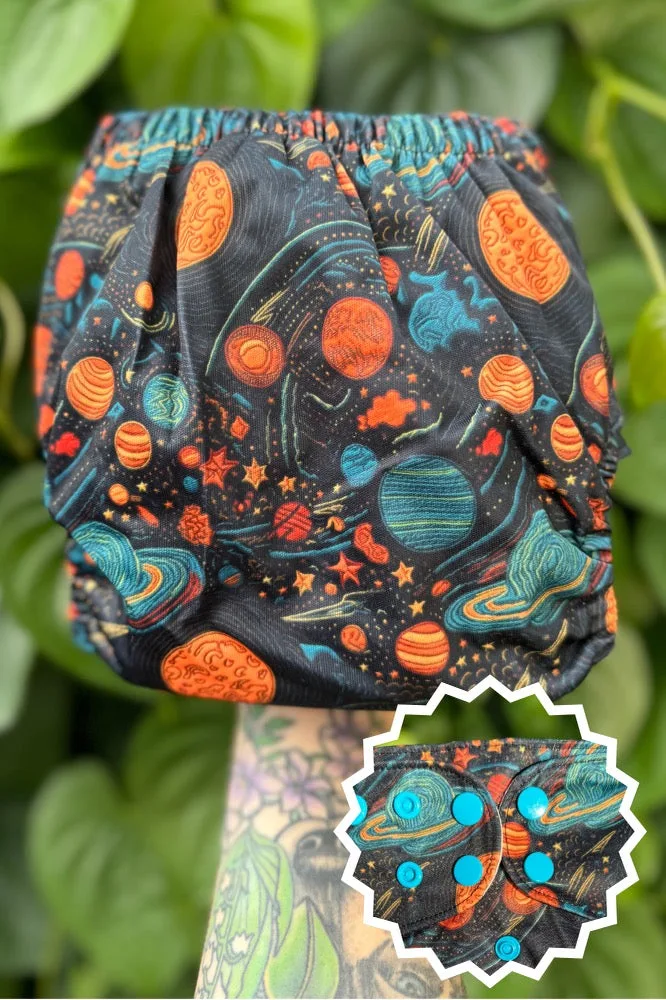
Solar-OS: One Size Pocket fits babies approximately 8-40 lbs. Inside Lining -Gray AWJ HIp Snaps Dirty Closure Snaps- Can be used to close up those stinky diapers or for additional sizing. 5cm Tummy Panel Double Back Elastic Opening Insert Not Included The adjustable sizing and tummy panel mean you can customize the fit as your baby grows, but you need to supply your own inserts, so choosing the right absorbency layers is entirely up to you.
Solar-OS