What Is the SpeakerCom for PS4?
The SpeakerCom for PlayStation 4 is a patented, headset-free audio accessory designed to clip directly onto your DUALSHOCK 4 controller. It replaces traditional gaming headsets with a built-in speaker and sensitive microphone, allowing you to chat with your team without wearing anything on your head. This means no more headset hair, ear fatigue, or feeling isolated from your surroundings.
It’s a practical solution if you prefer to stay aware of room sounds or want others in the room to hear the game chat along with you. The adjustable speaker volume lets you control how much of the conversation fills the space.
Key Features at a Glance
-
SpeakerCom for PlayStation®4: Designed to clip directly onto your DUALSHOCK®4 controller, it delivers high-quality voice chat without the heat, weight, or isolation of traditional headgear. This attachment method keeps your controller balanced and your gameplay uninterrupted, with no extra wires or straps.
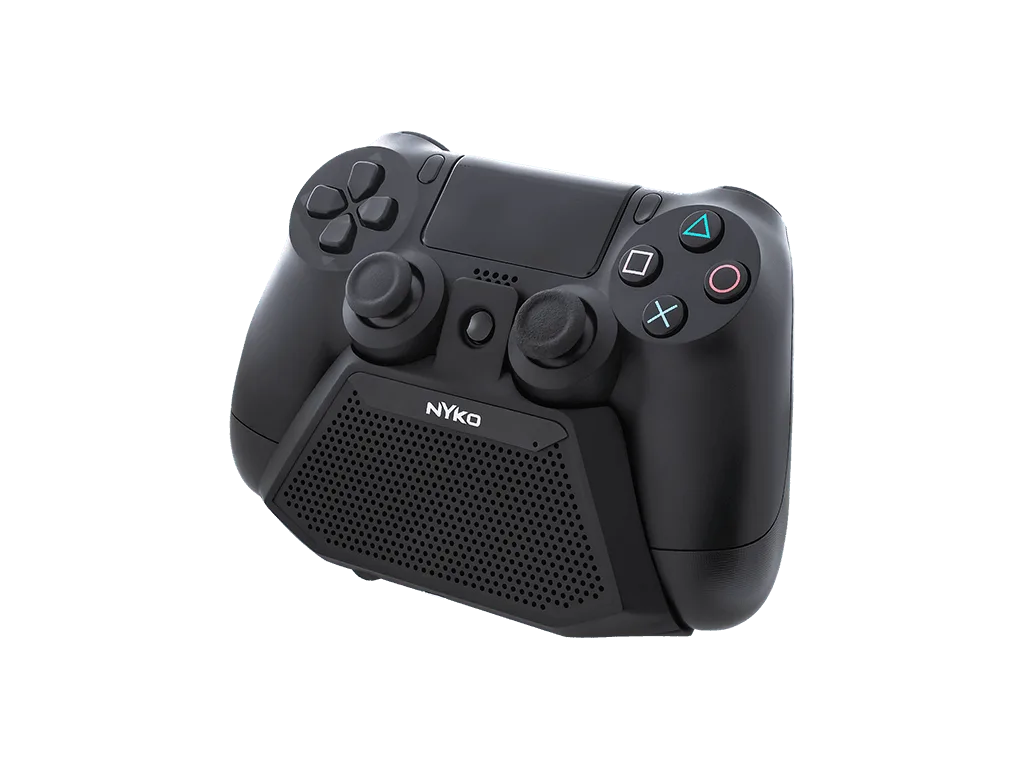
SpeakerCom for PlayStation®4
-
SpeakerCom for PlayStation®4: The easily accessible push-to-talk button ensures your team only hears what you want them to, keeping your hands right where they belong—on the triggers. Push-to-talk gives you full control over your microphone, preventing accidental background noise from reaching your squad.
-
SpeakerCom for PlayStation®4: On-Board Volume Control: Quick-access dial to adjust the chat volume on the fly. You can instantly turn down or mute the speaker without pausing the game or navigating system menus.
-
SpeakerCom for PlayStation®4: Shared Experience: Unlike a headset that cuts you off from the room, the adjustable speaker volume allows friends or family in the room to hear the tactical chatter right along with you. This makes it ideal for co-op gaming sessions or when you want to keep an ear on what's happening around you.
How to Set Up and Use the SpeakerCom
Setting up the SpeakerCom is straightforward. Here’s how to get started and use its main controls.
- Clip the SpeakerCom onto your DUALSHOCK 4 controller: Snap the accessory securely onto the bottom of your controller. The patented attachment ensures a snug, integrated fit that doesn’t interfere with your grip or button access.
- Plug the SpeakerCom into your PS4: Connect the SpeakerCom’s cable to your PlayStation 4 console or controller. The exact connection method depends on your setup; refer to the product packaging for the specific port.
- Adjust the on-board volume dial: Use the quick-access dial on the SpeakerCom to set your preferred chat volume. Turn it up to hear teammates clearly, or lower it to let others in the room follow the conversation.
- Use the push-to-talk button: Press and hold the push-to-talk button when you want to speak. Release it to mute your microphone. This keeps your communication clear and prevents unwanted noise from being transmitted.
- Position the speaker for best audio: The built-in speaker is designed to project sound outward. For optimal clarity, ensure the speaker grille is not blocked by your hands or clothing during gameplay.
Important Safety and Compatibility Notes
The SpeakerCom is designed exclusively for the PlayStation 4 and its DUALSHOCK 4 controller. It is not confirmed to work with other consoles or controllers.
Be aware that this product contains lead, a chemical known to the State of California to cause cancer and birth defects or other reproductive harm. For more details, visit www.P65Warnings.ca.gov. Wash hands after handling if you have concerns about exposure.
The supplied information does not include specific cleaning or storage instructions. To keep the SpeakerCom in good condition, wipe it gently with a dry cloth and store it in a cool, dry place when not in use.