Why a split speaker changes your setup
The iHome iBT430 is a Bluetooth speaker that works two ways: as a single unit, or twisted apart into two wirelessly paired speakers. That flexibility is the point, but it also means your setup has to match the mode you are in. A single speaker fills a room from one spot; a split pair can create left and right channels, which is what most people mean by true stereo separation.
This guide walks through pairing the halves, placing them for stereo, and using the enhanced bass feature without overdoing it. It also flags what the supplied product information does not confirm, so you can plan around real limits rather than guesses.
Pair the two halves for wireless stereo
- Start with both halves charged: The iBT430 is described as portable, so charge both sections before you begin. A split pair with one low half may drop out mid-pairing.
- Twist the speaker apart: Separate the two halves as designed. The iBT430 is built to transform from one speaker into two wirelessly paired speakers.
- Power on and let them find each other: Turn both halves on and give them a moment to link. The supplied information does not describe a manual pairing button sequence for the two halves, so rely on the automatic wireless pairing the product describes.
- Pair your phone to the set: Open your phone's Bluetooth settings and connect to the iBT430. Once connected, audio should play through both halves as a stereo pair.
- Test left and right: Play a track with clear stereo separation and confirm each half is producing its own channel. If both sound identical, the halves may not be paired; power them off and repeat the steps.
Place the halves for real stereo separation
True stereo speaker placement depends on distance and angle, but the iBT430's supplied information does not include recommended spacing. Use a practical starting point: place the halves at equal height, roughly an arm's length apart, and angle them slightly toward your listening position. From there, widen the gap until the stereo image feels natural without a hole in the middle.
Avoid placing both halves on the same shelf or directly against a wall. Separation is what makes the split mode worthwhile, and a wall behind the speakers can make bass sound boomy. Keep each half on a stable surface and clear of clutter that blocks the driver.
Desk setup: where each half should go
- Left and right of your monitor: A split speaker desk setup works best with one half on each side of your screen, at ear height if possible. This puts you in the middle of the stereo field.
- Keep cables and clutter away: The iBT430 is wireless, but nearby metal objects and crowded surfaces can affect Bluetooth stability. Leave a little breathing room around each half.
- Do not bury the bass: If a half sits in a bookshelf cubby or behind a monitor, the enhanced bass will sound muddy. Pull it forward so the driver has open air.
- Match the surfaces: Putting one half on a hollow desk and the other on a solid shelf can make the pair sound unbalanced. Similar surfaces keep the tone consistent.
Get more from enhanced bass without mud
The iBT430 is described as having enhanced bass performance for depth and clarity. That is a manufacturer claim about the speaker's tuning, not a guarantee of a specific result in your room. Placement does as much work as the tuning: a corner or a wall behind the speaker reinforces low frequencies, which can be too much in a small room.
Try the halves a little farther from the wall if bass sounds heavy, or closer if it sounds thin. Keep the volume moderate while you adjust placement, then raise it once you like the balance. If your source has an equalizer, small cuts in the low band can clean up a boomy desk setup without losing the enhanced bass character.
What the iBT430 gives you for a split setup
-
Bluetooth Split Speaker with Wireless Stereo and Enhanced Bass (iBT430): Use it as a single powerhouse speaker or twist it apart into two wirelessly paired speakers for room-filling, immersive stereo sound. This is the core feature behind wireless stereo split speaker pairing: one product covers both single-speaker and stereo-pair use.
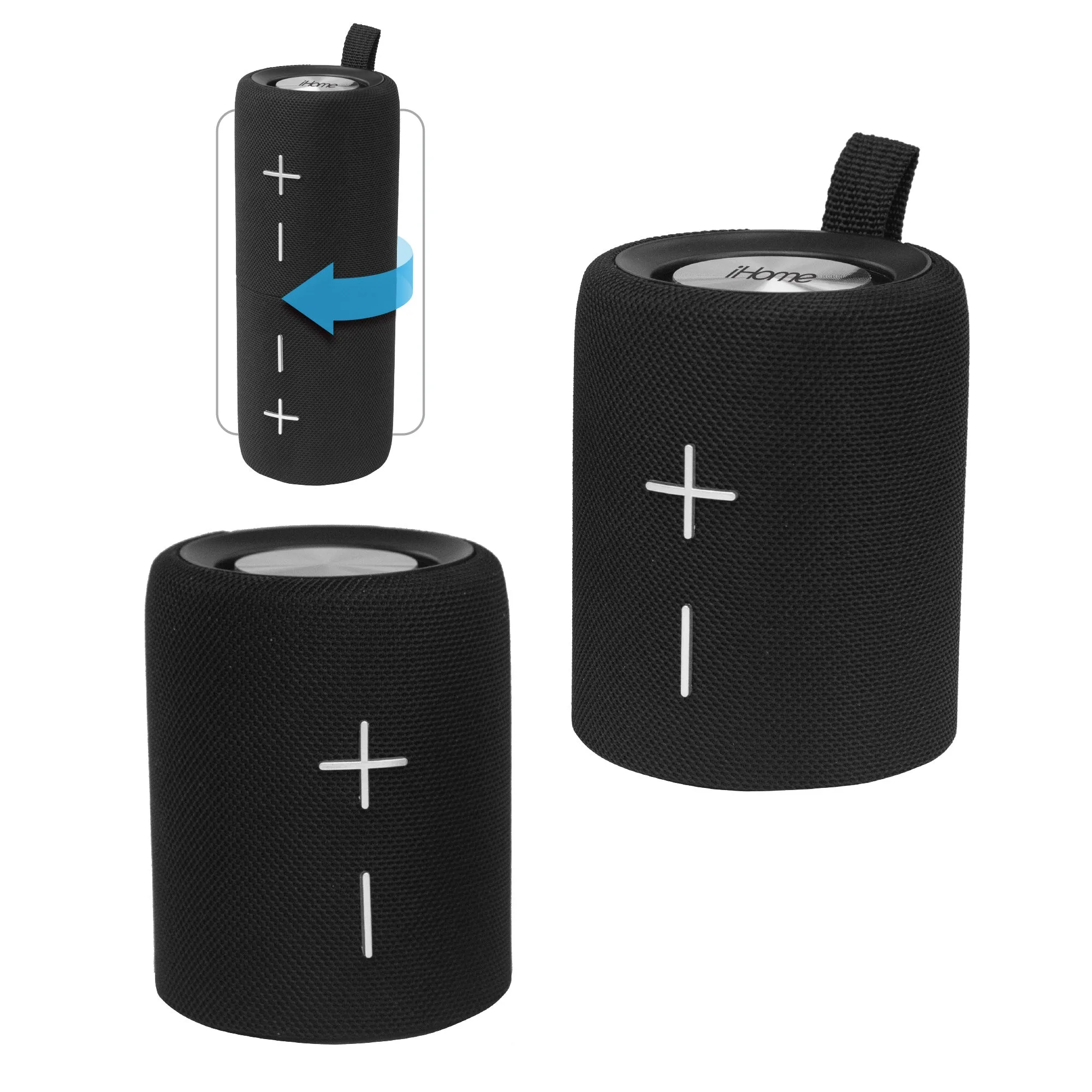
Bluetooth Split Speaker with Wireless Stereo and Enhanced Bass (iBT430)
-
Bluetooth Split Speaker with Wireless Stereo and Enhanced Bass (iBT430): Enhanced bass performance brings your audio to life with depth and clarity. Sets expectations for the low end, which placement and room position will shape more than any setting.
-
Bluetooth Split Speaker with Wireless Stereo and Enhanced Bass (iBT430): The iBT430 portable speaker is positioned for music lovers, outdoor adventurers, and anyone who wants powerful, flexible sound on the go. Confirms the speaker is designed to move between rooms and outdoors, so your stereo placement can be temporary rather than fixed.
Bluetooth range and stability for a stereo pair
- Keep your phone in the same room: The supplied information does not state a Bluetooth range for the iBT430. Treat the usual unobstructed room distance as your working limit and keep the phone nearby during setup.
- Separate the halves gradually: If you move the halves far apart, test for dropouts. Walls and metal furniture reduce Bluetooth range for stereo speakers, so a clear line of sight between the halves and your phone helps.
- Re-pair if one half goes silent: A half that stops playing usually means the wireless link between the halves dropped. Power both off, then repeat the pairing steps rather than troubleshooting your phone first.
What the supplied information does not confirm
The iBT430 record does not list battery life, charging time, Bluetooth version, supported codecs, or a recommended stereo spacing. It also does not include care or safety instructions. Those details may exist in the full manufacturer documentation, but they are not part of the information used here, so do not assume a specific runtime or range.
For a split speaker desk setup, that means planning around what you can observe: charge both halves before long sessions, keep the phone close, and adjust placement by ear. If you need a confirmed battery figure for all-day outdoor use, check the product documentation before you buy.