Quick answer
To apply Step2 Decal Sheet 2 (194093A02B) without bubbles, clean the surface thoroughly, position the decal dry for alignment, then use a squeegee or credit card to press from the center outward as you peel the backing. Work slowly and keep the decal slightly warm for best results.
Why surface prep decides the outcome
Most bubbles and peeling come from dust, oil, or moisture trapped under the decal. Step2 replacement decals adhere best to a clean, dry, and smooth surface. Avoid applying in direct sun or extreme cold, which can make the adhesive too soft or too stiff.
When to replace instead of reapply
If the old decal is cracked, faded, or missing edges, a new sheet restores the look more reliably than trying to re-stick a worn graphic. Check that the model number on your Step2 product matches 194093A02B before ordering.
Step-by-step bubble-free application
- Clean the surface: Wipe the area with a mild soap and water solution, then dry completely with a lint-free cloth. Avoid glass cleaners or oily products that leave residue. Check for remaining dust or lint by running a dry finger across the surface; it should feel perfectly smooth.
- Test-fit the decal: Peel back only a small corner of the backing and align the decal to the target area without pressing down. Use the edges of the Step2 product as guides. If the decal is not straight, lift it and reposition before any adhesive touches the surface.
- Anchor one edge: Press the exposed corner firmly in place, then slowly peel the rest of the backing while keeping the decal taut. Work from one side to the other to avoid trapping air pockets.
- Squeegee out air: Use a plastic squeegee or a credit card wrapped in a soft cloth. Starting from the center, press outward in smooth strokes to push air to the edges. If a bubble forms, lift the nearest edge and re-squeegee; do not puncture the decal.
- Check edges and cure: Run your finger along all edges to ensure full contact. Let the decal set for at least an hour before washing or using the product. Avoid water exposure for 24 hours to allow the adhesive to fully bond.
Product facts
-
Decal Sheet 2 (194093A02B): Genuine Step2 replacement part for model number 194093A02B. Ensures the decals are designed to fit your specific Step2 item, reducing alignment guesswork.
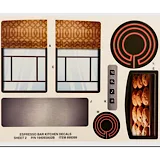
Decal Sheet 2 (194093A02B)