Start with the six designs, not the surface
Most sticker-placement advice begins with the object: laptop, phone case, water bottle. That is backwards for this pack. The Streets Sticker Pack contains six specific designs, and the fastest way to decide where they go is to match each one to a surface where it will actually be seen and understood.
The six designs are the Lighter Logo, Bus Stop Sign, Insufficient funds, Send Message to Dan, Who's Got the Bag, and A Grand Don't Come For Free album art. Each has a different level of detail and a different kind of joke, so they do not all belong in the same place. Treat the pack as six small decisions rather than one big one.
What the pack actually contains
-
Sticker Pack: Each pack comes with 6 x exclusive Streets stickers: Lighter Logo, Bus Stop Sign, Insufficient funds, Send Message to Dan, Who's Got the Bag, and A Grand Don't Come For Free album art. You are choosing placement for six named designs, not a generic assortment, so you can plan each sticker against a specific surface before you buy.
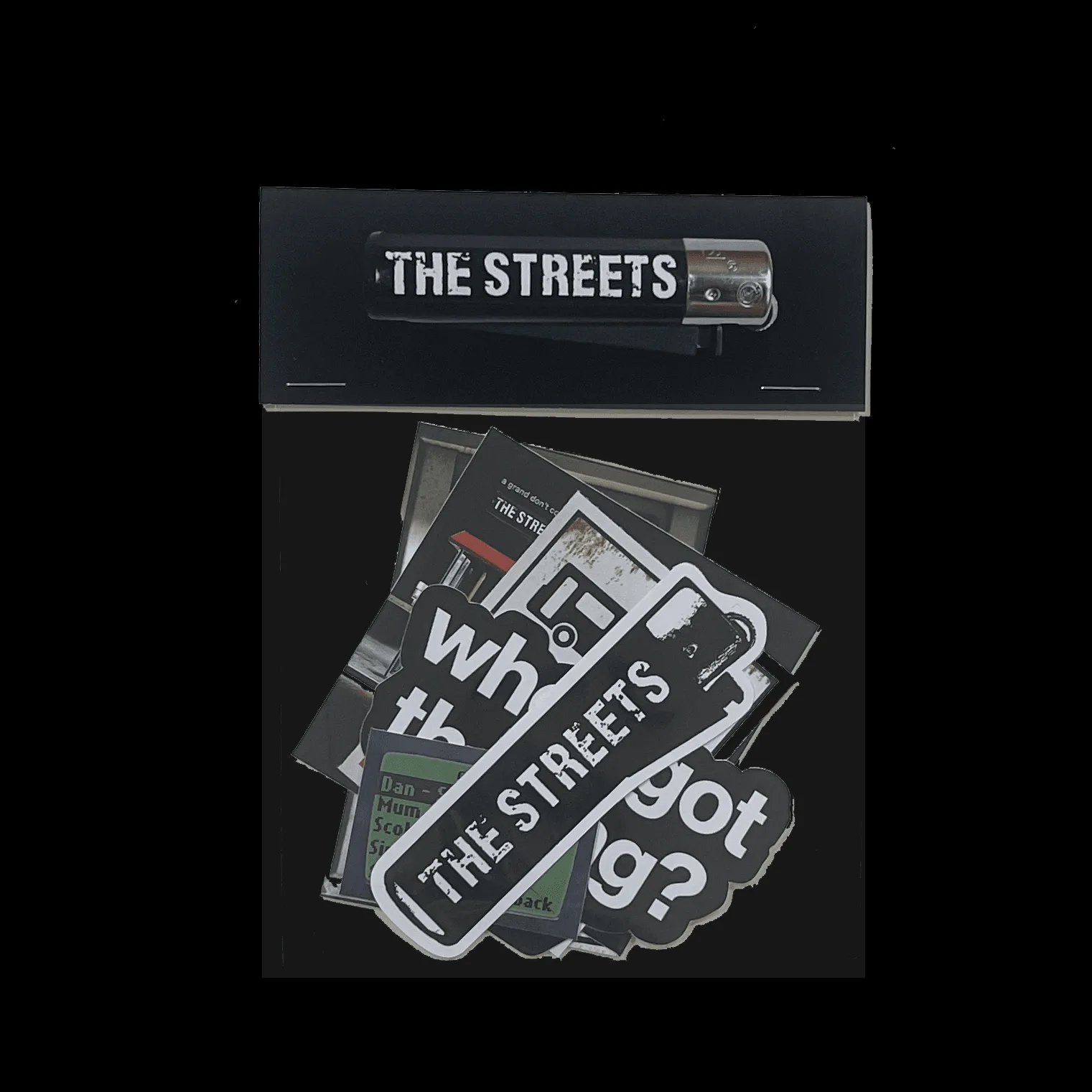
Sticker Pack
-
Sticker Pack: The pack is listed at USD 9.00, with a catalog comparison price of USD 12.00. At six stickers per pack, the price gives you a low-risk way to try placement ideas without committing a large amount to one surface.
Where each design earns its spot
These are placement suggestions based on the design names and typical sticker use, not manufacturer instructions. The listing does not specify a recommended surface, so treat the pairing as a starting point.
- Lighter Logo: A compact logo works well as an anchor sticker: the corner of a laptop lid, the back of a phone case, or the front of a hard-shell case. Put it down first and build the rest of the layout around it.
- Bus Stop Sign: A graphic with a recognizable silhouette suits a flat, high-visibility area such as a notebook cover or the lid of a laptop, where the shape reads clearly from a distance.
- Insufficient funds: A text-led joke sticker is best placed where people will actually read it: near a card reader on a case, on a laptop palm rest, or on a water bottle where it catches the eye during a break.
- Send Message to Dan: Another text-forward design. It works on a phone case or the back of a laptop where the message is visible to the person opposite you, rather than hidden against a wall.
- Who's Got the Bag: A phrase sticker pairs naturally with a tote, pouch or hard case, where it can sit alongside the object it refers to. Avoid curved surfaces if you want the text to stay straight.
- A Grand Don't Come For Free album art: The most detailed design in the pack. Give it the largest flat area you have, such as the center of a laptop lid or a notebook cover, so the artwork is not split across an edge or hinge.
Laptop sticker placement that survives daily use
A laptop lid is the most popular sticker surface and also the one most likely to be shoved into a bag. Keep stickers away from the hinge, the rubber feet and any ventilation area. The center of the lid is the safest zone for the album art; the corners suit the Lighter Logo and Bus Stop Sign.
Think about the lid as a composition before you peel anything. Lay all six stickers out dry, move them around, and photograph the arrangement. Once a sticker is down, repositioning is not something the listing confirms as possible, so the dry run is your only cheap edit.
If you use a hard-shell laptop case, decide whether the stickers go on the case or the laptop itself. Stickers on the case travel with the case and leave the laptop clean; stickers on the laptop stay if you remove the case. Pick one and commit rather than splitting a design across both.
Beyond the laptop: surfaces worth considering
- Phone case: Good for one or two small designs such as the Lighter Logo or Insufficient funds. A clear case lets you place a sticker underneath so it is protected, if the case is designed for that.
- Hard-shell case or travel case: A flat, rigid surface holds a straight text sticker better than a soft bag. The Bus Stop Sign and Who's Got the Bag designs suit this.
- Notebook or sketchbook cover: A low-commitment surface that lets you use the larger album art sticker without touching a device. Good if you want to try a layout before committing to a laptop.
- Water bottle: Curved surfaces distort long text and split detailed artwork. Use a single compact design such as the Lighter Logo, and accept that the sticker will follow the curve.
- Guitar case or instrument case: A large flat panel is ideal for the album art and Bus Stop Sign together, with smaller designs filling the gaps.
The waterproof question the listing does not answer
Many sticker buyers search for a waterproof sticker guide before committing. The supplied product information for this pack does not confirm whether the stickers are waterproof, vinyl, removable or UV-resistant. That is a real limitation, not a reason to avoid the pack.
The practical response is to match the placement to the uncertainty. If you want to use a sticker on a water bottle, bike frame or outdoor case, test one sticker first rather than applying all six to damp or high-wear surfaces. Keep the detailed album art for a dry, indoor surface such as a laptop lid or notebook until you know how the material behaves.
The same caution applies to removal. Because the listing does not confirm whether the adhesive is removable, avoid putting stickers on borrowed items, resale-prone devices or surfaces you cannot afford to mark.
A buying checklist for placement-led sticker shoppers
Before you buy, count your intended surfaces and match them to the six designs. If you have one laptop and one phone case, you have room for perhaps three or four stickers; the rest can wait for a notebook, case or bottle. Buying the pack is still sensible at USD 9.00 because the unused designs become spares, not waste.
Check the size question honestly: the listing does not supply sticker dimensions, so you cannot know in advance whether the album art will fill a laptop lid or sit small in the center. If size is critical, plan a layout that tolerates either outcome, such as centering the largest design and using the smaller ones as border accents.
Finally, decide whether you are decorating for yourself or for visibility. Text stickers such as Insufficient funds and Send Message to Dan reward placement where people read them; the Lighter Logo and album art reward placement where people see them. Sorting the six designs into those two groups makes the layout decision much faster.