Why the Super Macro Lens changes your approach
The SeaLife Super Macro Lens is a wet lens that lets you capture macro images and videos from a very close distance. Unlike a standard lens, it requires you to position the camera almost touching your subject. That means your usual shooting habits—framing from a foot away, then zooming—won't work. Instead, you'll need to move in slowly and carefully, using the lens's narrow focus range to your advantage.
Before you dive, confirm that your camera is compatible. The lens is designed for Micro-Series and RM-4K cameras, as indicated by the product name. If you're using a different model, check SeaLife's compatibility information first.
Focus range by camera
-
Super Macro Lens for Micro-Series & RM-4K: With the Micro 3.0 camera, the focus range is 4” to 6” (10cm to 15cm). This tells you exactly how close you need to be for sharp focus with the Micro 3.0.
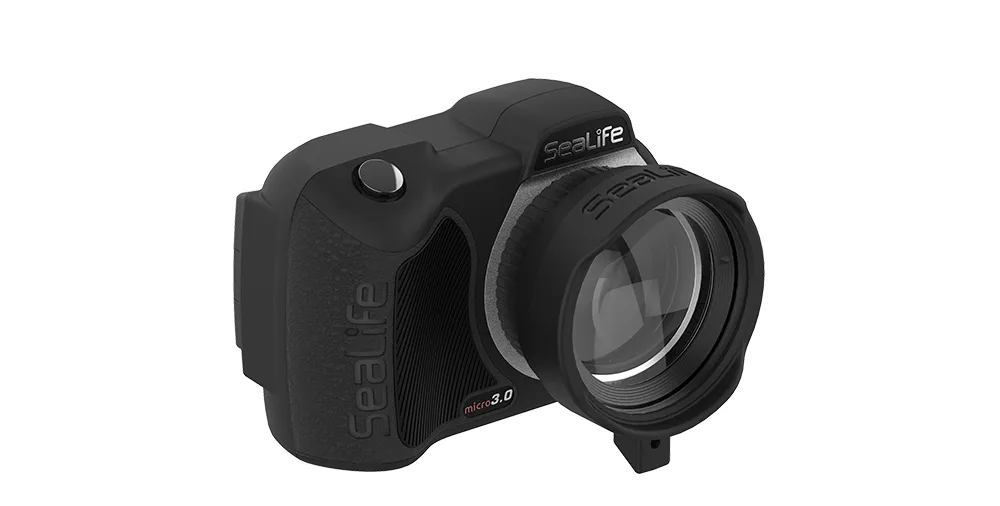
Super Macro Lens for Micro-Series & RM-4K
-
Super Macro Lens for Micro-Series & RM-4K: With SeaLife Micro HD, HD+, and 2.0 cameras, the focus range is 3.5” to 7” (9cm to 18cm). If you own one of these models, you have a slightly wider working range than the Micro 3.0.
-
Super Macro Lens for Micro-Series & RM-4K: The lens captures macro images and videos from 3.5” to 7” (9cm to 18cm). This is the general working distance for the lens, useful as a baseline before camera-specific adjustments.
Setting up for a macro dive
- Attach the lens securely: The Super Macro Lens uses a rubber press-on mount. Press it firmly onto your housing port until it sits flush. A loose lens will cause blurry images or may come off underwater.
- Set your camera to macro mode if available: Check your camera manual for a macro or close-up focus mode. If your camera doesn't have one, you can still use the lens, but you'll need to rely on careful positioning.
- Practice on land first: Before entering the water, practice focusing on small objects at the distances listed above. This helps you get a feel for how close you need to be.
- Stabilize your approach: Use a steady hand or a tripod if possible. The narrow focus range leaves little room for error, so bracing yourself against a rock or using a stick can help.
Shooting techniques for sharp close-ups
Once you're in the water, approach your subject slowly. Sudden movements will scare away small creatures and make framing difficult. Try to find a comfortable position where you can hold the camera steady at the required distance. Remember that water magnifies, so what looks like a few inches may be different—use the focus range as your guide.
Lighting is critical for macro. The lens's anti-reflective coating helps reduce glare, but you'll still need good light. Use a strobe or video light positioned to illuminate the subject without casting shadows. If you're using natural light, shoot in shallow water or on bright days.
The lens is constructed with anodized aluminum and optical-grade glass, so it's durable, but avoid knocking it against rocks or coral. Rinse it in fresh water after each dive and store it dry.
Lens construction and care
- Super Macro Lens for Micro-Series & RM-4K: The lens features a 2-element optical grade wet lens with anti-reflective coating. This helps maintain image quality and reduce flare, especially in bright water.
- Super Macro Lens for Micro-Series & RM-4K: It has anodized aluminum construction with a rubber press-on lens mount. The aluminum body is rugged, while the rubber mount makes it easy to attach and remove underwater.
Common pitfalls to avoid
One frequent mistake is trying to zoom. The Super Macro Lens is a fixed focal length accessory; zooming will likely move you out of the focus range. Instead, move the camera closer or farther to achieve focus.
Another issue is not accounting for the lens's minimum focus distance. If you're too close, the image will be blurry. If you're too far, the subject will be small. Practice finding the sweet spot before your dive.
Finally, don't forget to check your housing's port. The lens is designed to press onto the port, but if your housing has a different thread or bayonet, it may not fit. The product name indicates compatibility with Micro-Series and RM-4K, so verify your model.