RAM mounts are built to withstand the toughest conditions—whether you're bouncing down a construction site in a heavy-duty truck or navigating a busy warehouse floor. But even the most rugged gear benefits from a little TLC. With proper care, your RAM mount can deliver years of reliable service, saving you money and reducing downtime. In this guide, we'll share practical tips for cleaning, inspecting, and maintaining your RAM mounts to keep them performing like new.
From the RAM® X-Grip® High-Strength Composite Phone Mount with Drill-Down Base to the RAM® No-DrillTM Laptop Mount for Sprinter Van, each mount has unique components that need attention. By following these simple routines, you'll prevent common issues like loose balls, cracked rubber, or corroded hardware. Let's dive into the best practices for mount longevity.
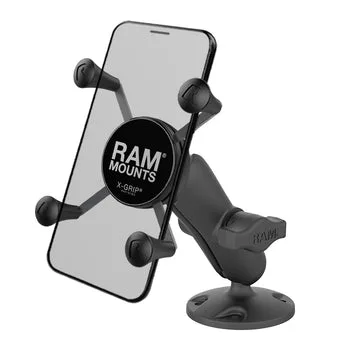
RAM® X-Grip® High-Strength Composite Phone Mount with Drill-Down Base
Regular Cleaning: The First Line of Defense
Dirt, dust, and grime are the enemies of any mounting system. Over time, debris can work its way into the ball-and-socket joints, causing friction that wears down the rubber and plastic components. For mounts used in off-road vehicles or industrial settings, a quick weekly wipe-down can make a huge difference. Use a mild soap and water solution with a soft cloth to clean the mount's arms, cradle, and base. Avoid harsh chemicals that may degrade the rubber grips.
For the RAM® X-Grip® High-Strength Composite Phone Mount with Drill-Down Base, pay special attention to the rubber tether and the four adjustable arms. These parts are designed to hold your device securely, but if they become caked with mud or oil, the grip strength can diminish. A soft brush can help dislodge stubborn particles from the rubber fingers. After cleaning, let the mount air dry completely before reinstalling your device.
- Use a soft brush for crevices around rubber grips.
Inspect for Wear and Tear
Even the best-built mounts have parts that can wear out. Every few months, take a few minutes to inspect your mount for signs of fatigue. Check the rubber ball covers for cracks or hardening, especially if your mount is exposed to extreme temperatures. Look at the plastic cradle for any cracks or deformation. If you notice the mount no longer holds your device as tightly as it used to, it may be time to replace the rubber components or the entire cradle.
For heavy-duty applications like the RAM® No-DrillTM Laptop Mount for Sprinter Van, the metal base and hardware should also be checked. Look for rust or corrosion on bolts and brackets, particularly if the mount is installed in a vehicle that sees road salt or moisture. A light application of silicone spray can keep the ball joints moving smoothly without attracting dust.
- Check for cracked rubber or loose ball joints.
Proper Installation and Adjustment
Many mount issues stem from improper installation or over-tightening. When you first install your RAM mount, follow the manufacturer's instructions carefully. Use the correct tools and torque specifications—over-tightening can strip threads or crack plastic components. For drill-down bases, ensure the mounting surface is clean and flat to avoid stress points.
Also, adjust the tension of the ball-and-socket system appropriately. The mount should hold your device firmly but still allow for easy repositioning. If it's too tight, you risk damaging the rubber ball covers; too loose, and your device may sag or vibrate. The RAM® X-Grip® High-Strength Composite Phone Mount with Drill-Down Base features a tension adjustment knob—turn it only until the mount holds your phone securely without excessive force.
- Don't overtighten—follow torque specs if available.
Protect Against Environmental Factors
UV rays, extreme heat, and cold can accelerate wear on plastic and rubber components. If your mount is in a vehicle that's parked outdoors for long periods, consider using a sunshade or parking in the shade when possible. In very cold climates, avoid flexing the rubber parts when they're frozen, as they can become brittle and crack.
For mounts used in humid or wet environments, such as in marine or agricultural settings, a stainless steel or coated metal version is ideal. RAM offers various materials to suit different conditions. If you already own a standard mount, applying a UV protectant spray to rubber parts can help prolong their life.
- Apply UV protectant to rubber components.
Replace Worn Parts Promptly
Don't wait until a mount fails to replace worn components. RAM sells replacement parts like rubber ball covers, cradles, and hardware kits. Keeping a few spares on hand can minimize downtime. If you notice the rubber on your RAM® X-Grip® High-Strength Composite Phone Mount with Drill-Down Base is losing its grip, order a new cradle assembly before it fails completely.
Similarly, if the ball joint becomes loose or squeaky, a new rubber cover can restore smooth operation. Investing in small replacement parts is far cheaper than buying a whole new mount. Check RAM's website for compatibility and part numbers specific to your model.
- Keep spare rubber covers and hardware kits in your vehicle.
By incorporating these simple maintenance habits into your routine, you can significantly extend the life of your RAM mounts. Whether you rely on a RAM® X-Grip® High-Strength Composite Phone Mount with Drill-Down Base for daily navigation or a heavy-duty laptop mount for work, a little care goes a long way. Start with a quick clean and inspection today, and your mount will thank you for years to come.