Quick answer
The TECKNET RGB Gaming Keyboard TK-KB025 is a wired 83-key compact keyboard with a volume knob and customizable RGB lighting. It suits gamers who want more mouse room on a small desk, but it is not a full-size board with a dedicated number pad.
What the 83-key layout changes for your desk
A compact 83-key layout removes the dedicated number pad and trims the frame, so the keyboard takes up less width than a full-size model. That extra space goes to your mouse hand, which matters most in low-sensitivity shooters or any game where you swing wide.
The trade-off is no separate number pad. If you regularly enter spreadsheets or use numpad keybinds, plan for an external pad or accept the top-row number keys.
Where the volume knob helps and where it does not
The knob gives you a physical control for volume without leaving the game or reaching for a headset inline dial. It is most useful when you switch often between game audio, voice chat, and music.
The catalog does not list a mute button or media-key layout, so treat the knob as a volume control rather than a full media hub. Check the product page if you need specific playback keys.
Wired only: what that means for your setup
This is a wired keyboard, so you will not deal with battery charging or wireless pairing. The cable also means the keyboard stays in one place, which is fine for a fixed desk but less convenient if you move between rooms.
The catalog does not specify cable length or connector type, so confirm those details on the product page before you plan cable routing.
TK-KB025 setup and buying FAQ
How do I set up the TK-KB025 on a small desk?
Place the keyboard so the volume knob sits within easy reach of your non-mouse hand, then angle the board slightly toward your mouse side to reclaim space. Connect the wired cable to a USB port on your PC or hub and let the system recognize it before adjusting lighting. Measure your desk width first; the compact frame only helps if your mouse path stays clear.
How do I use the volume knob?
Turn the knob to raise or lower system volume. The catalog does not list a push-to-mute function, so do not assume one; use your operating system's mute shortcut if you need silence quickly.
Can I change the RGB lighting?
Yes. The keyboard provides multiple illumination modes and adjustable brightness. Use the on-board controls to cycle modes, and set brightness to a level that keeps keys readable without washing out your screen in a dark room.
Is the 83-key layout hard to learn?
Most typists adjust within a few sessions because the letter keys stay in the standard positions. The main change is losing the number pad and relying on Fn combinations for some navigation functions. Give yourself a day of normal typing before judging it.
Does it work for office work as well as gaming?
It can, as long as you do not depend on a dedicated numpad. The compact width leaves more room for a mouse or notebook, but heavy spreadsheet users may prefer a full-size keyboard or a separate numpad.
What is not specified in the catalog?
Cable length, connector type, key switch type, and whether the knob supports push-to-mute are not listed. Check the product page or packaging for those details if they affect your purchase. If any of those details are deal-breakers, confirm them before ordering.
Product facts
-
TECKNET RGB Gaming Keyboard,Compact 83 Keys Wired Keyboard with Volumn Knob,TK-KB025: Space-saving 75% compact layout with an efficient 82-key layout that frees up desk space while retaining essential typing and navigation functions. This is the core reason to choose it for a small desk: you keep navigation keys but lose the numpad width.
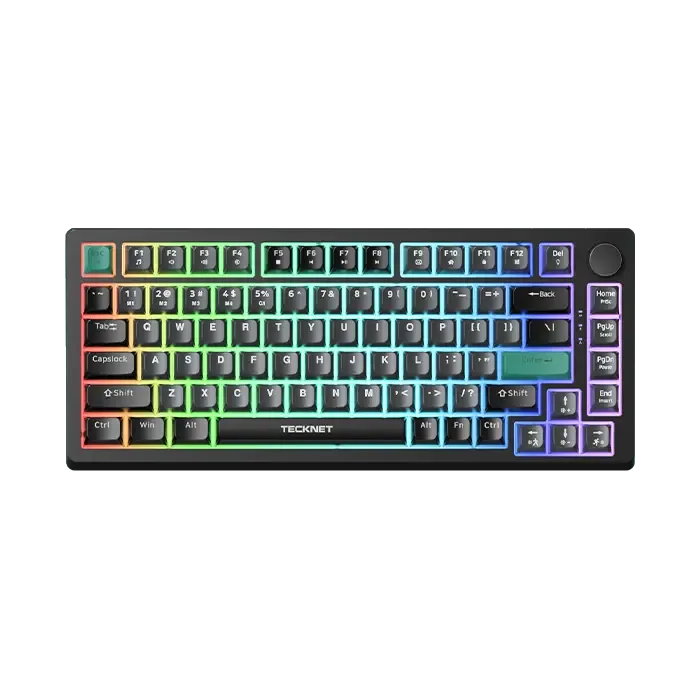
TECKNET RGB Gaming Keyboard,Compact 83 Keys Wired Keyboard with Volumn Knob,TK-KB025
-
TECKNET RGB Gaming Keyboard,Compact 83 Keys Wired Keyboard with Volumn Knob,TK-KB025: Customizable RGB backlighting with adjustable brightness and multiple illumination modes. You can tune brightness for a dark room or a bright desk without adding external lighting.