Quick answer
Attach the Quad Lock Universal Adaptor to your phone or case, then screw the Tripod Adaptor onto your tripod's 1/4"-20 thread and lock your phone in place. This gives you a secure, stable mount for filming or video calls.
Why a dedicated tripod adaptor beats a generic phone clamp
Generic spring clamps can block buttons or cameras and may not hold larger phones securely. The Quad Lock system uses a twist-and-lock mechanism that keeps your phone aligned and stable, and the adaptor is designed to work with standard tripod threads. This makes it a better choice for repeated setup and for filming where vibration or accidental bumps are a concern.
When this setup is not the right fit
If you need to mount your phone on a tripod that uses a non-standard thread, or if you want to use a phone case that is not compatible with the Universal Adaptor, this kit may not work. Also, for very small tripods or clamps, check that the adaptor's size does not interfere with the tripod head. In those cases, consider a different mounting solution.
Step-by-step: mounting your phone on a tripod
- Prepare your phone and adaptor: Clean the back of your phone or case with a lint-free cloth, then peel the backing from the Universal Adaptor and press it firmly in the center. Wait at least 24 hours before mounting to ensure a strong bond. Skipping the cleaning step is a common mistake that can cause the adaptor to peel off.
- Attach the tripod adaptor to your tripod: Screw the Tripod Adaptor onto your tripod's 1/4"-20 thread until snug. Do not overtighten, as this can damage the thread or the adaptor. Check that the adaptor sits flush against the tripod head; a gap means it is not fully seated.
- Mount your phone: Align the adaptor on your phone with the tripod adaptor and twist clockwise until you feel a positive click. Gently tug to confirm it is locked. A common mistake is not twisting far enough; the lock should feel secure and the phone should not rotate freely.
- Adjust for video calls or filming: For video calls, position the tripod so the camera is at eye level and the phone screen faces you. For filming, adjust the tripod head to frame your shot, then tighten all locks. For time-lapse, ensure the tripod is on a stable surface and avoid touching it during capture.
- Check stability and cable management: If using a charging cable, route it so it does not pull on the phone. Test the setup by gently tapping the tripod; the phone should not wobble. A wobbly mount often means the tripod legs are not fully spread or the adaptor is not tight.
Product facts
-
Tripod Adaptor Kits - Universal Fit: The Quad Lock® Universal Adaptor Tripod Adaptor Kit lets you securely attach your smartphone to a tripod. This provides a stable platform for low-light photography, steady video, and time-lapse without needing a separate clamp.
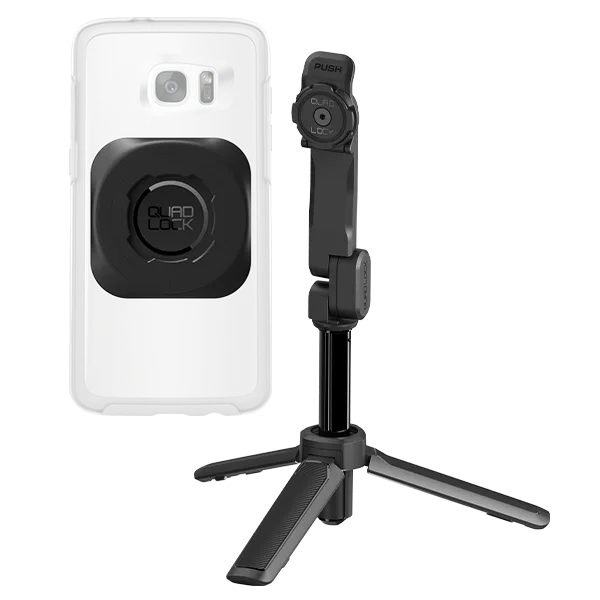
Tripod Adaptor Kits - Universal Fit