Whether you're commuting through the city, heading to a coffee shop, or traveling light for the weekend, a crossbody bag offers the perfect blend of accessibility and hands-free convenience. For tech users, the challenge is finding a bag that not only looks good but also protects your devices, organizes your cables, and keeps everything secure. This guide will walk you through the key factors to consider when choosing a crossbody bag for your tech essentials, from size and padding to material and security features.
At WaterField Designs, we understand that your tech carry is personal. That's why we've crafted crossbody bags that balance form and function, using premium materials like waxed canvas and full-grain leather. Whether you carry a laptop, tablet, gaming handheld, or just the essentials, the right crossbody bag can transform your daily routine. Let's dive into what makes a great tech crossbody bag.
Why a Crossbody Bag is Ideal for Tech Carry
A crossbody bag distributes weight evenly across your body, reducing strain on one shoulder and keeping your hands free. This is especially valuable when you're juggling a phone, coffee, and transit card. For tech users, the ability to quickly access a tablet, e-reader, or handheld console without setting the bag down is a game-changer. The sling-style design also keeps your belongings close to your body, deterring pickpockets in crowded areas.
Modern crossbody bags have evolved to include dedicated padded compartments for laptops and tablets, as well as organized pockets for cables, power banks, and accessories. This means you can carry a 13-inch laptop, an iPad, and your daily essentials without the bulk of a full backpack. The key is choosing a bag that matches the size of your primary device and offers enough organization for your workflow.
- Look for a bag with a padded laptop sleeve that fits your device snugly.
- Consider a bag with a quick-access front pocket for your phone and wallet.
- Check the strap width and padding for all-day comfort, especially if you carry heavy gear.
Key Features to Look for in a Tech Crossbody Bag
When shopping for a tech crossbody bag, start by evaluating the main compartment. It should be large enough to hold your laptop or tablet in a padded sleeve, with room for a notebook or e-reader. Look for internal organization pockets for cables, chargers, and a power bank. A dedicated pocket for your phone or sunglasses is a nice touch. The bag should also have a secure closure, such as a zipper or magnetic flap, to prevent items from falling out.
Material matters. Waxed canvas offers durability and a classic look, while full-grain leather ages beautifully and provides a professional aesthetic. Both are water-resistant to varying degrees, which is crucial for protecting electronics. Also, consider the strap: a padded, adjustable strap with a quick-release buckle makes it easy to put on and take off. For extra security, some bags feature a hidden back pocket for your phone or passport.
- Choose a bag with a padded laptop compartment that fits your device size (e.g., 13-inch or 16-inch).
- Look for multiple internal pockets to keep cables and accessories organized.
- Opt for water-resistant materials like waxed canvas or treated leather for device protection.
- A strap with a grip or non-slip material prevents the bag from sliding off your shoulder.
How to Match Your Tech Gear to the Right Crossbody Bag
If you carry a full laptop and tablet setup, you'll need a larger crossbody bag with a dedicated laptop sleeve and ample organization. For minimalists who only carry a tablet, e-reader, or gaming handheld, a compact sling may suffice. For example, the Relay Crossbody Bag is designed to hold a tablet or small laptop along with daily essentials, making it a versatile choice for commuters. Its multiple compartments keep your tech and personal items separate and easy to access.
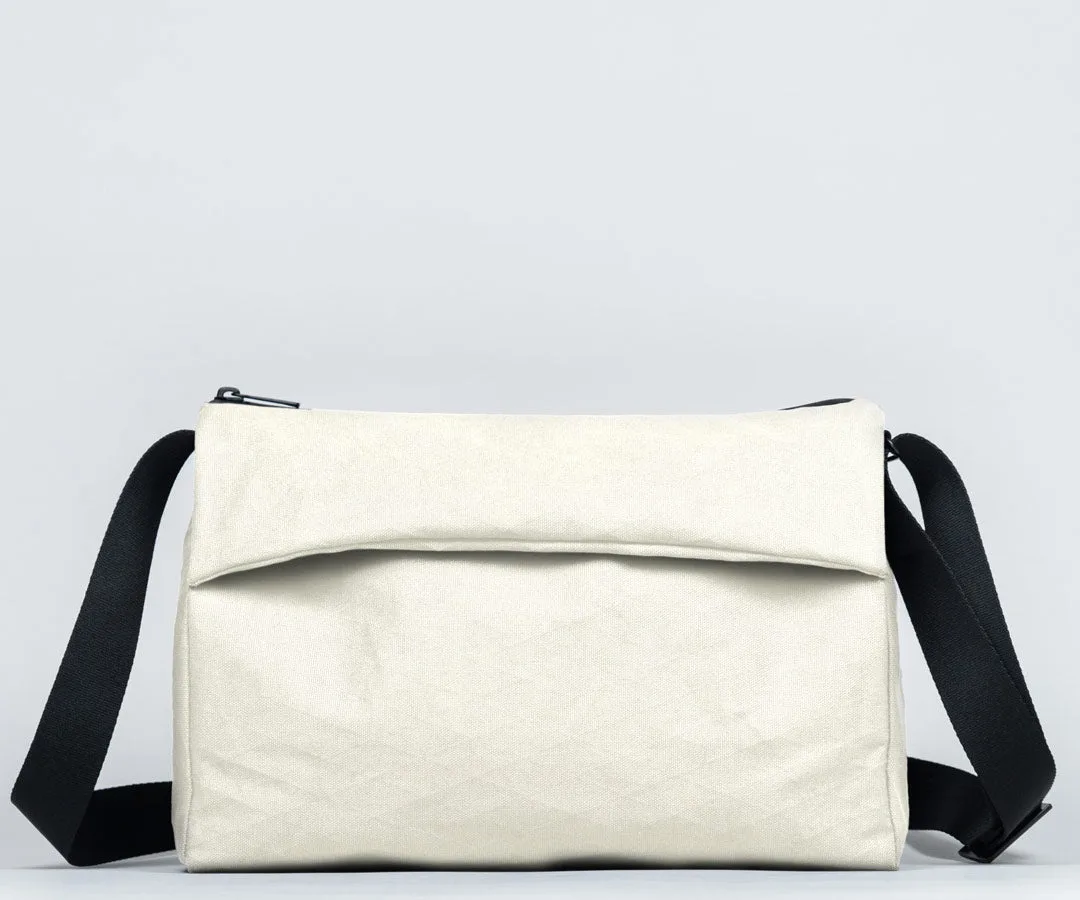
Relay Crossbody Bag
For those who carry a dedicated gaming handheld like the Steam Deck or a Lenovo Legion Go, consider a specialized case that can be slipped into a larger crossbody bag. The CitySlicker Case for Steam Deck offers padded protection and a slim profile, making it easy to slide into your everyday bag. Alternatively, if you prefer an all-in-one solution, look for a crossbody bag with a padded compartment specifically sized for your console. This way, you can grab your bag and go without extra cases.
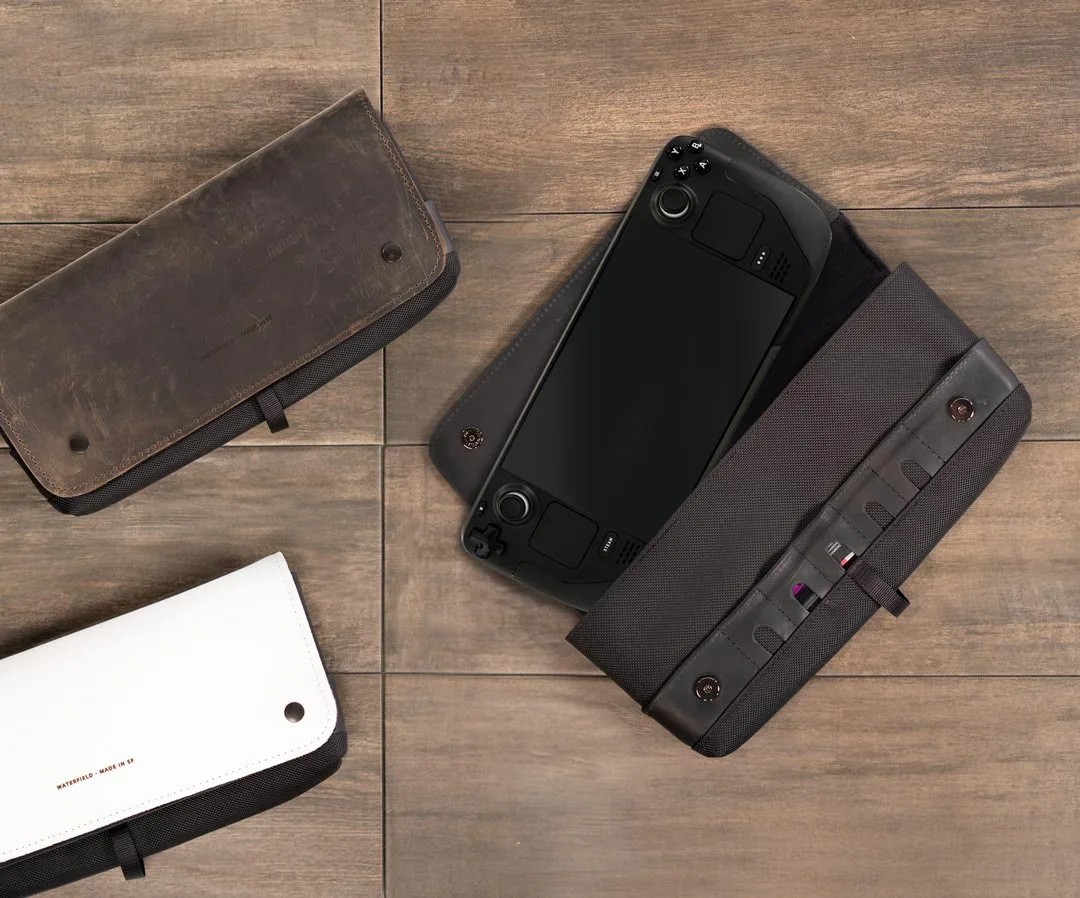
CitySlicker Case for Steam Deck
- Measure your primary device (laptop, tablet, or handheld) before choosing a bag size.
- If you carry multiple devices, look for a bag with separate padded compartments.
- Consider a modular approach: use a protective sleeve for your handheld and a crossbody bag for everything else.
Security and Comfort: The Unsung Heroes of Everyday Carry
A great tech crossbody bag not only organizes your gear but also keeps it safe. Look for bags with lockable zippers or hidden pockets that are difficult for thieves to access. A bag that sits snugly against your body, with the zipper opening facing inward, adds an extra layer of security. The Cam Lock Shoulder Strap is an excellent upgrade for any crossbody bag, as it allows you to quickly adjust the strap length and secure it in place, preventing the bag from being snatched off your shoulder.
Comfort is equally important. A wide, padded strap distributes weight evenly and prevents digging into your shoulder. Many crossbody bags also feature a quick-release buckle, making it easy to take the bag off when going through security or sitting down. If you plan to carry your bag for long periods, consider a bag with a breathable back panel to reduce sweat. The right combination of security and comfort will make your crossbody bag an indispensable part of your daily routine.
- Choose a bag with a zippered main compartment and a lockable zipper pull for added security.
- A padded, adjustable strap with a quick-release buckle enhances comfort and convenience.
- Consider a bag with a back pocket for items you need to access quickly, like your phone or transit pass.
Top Crossbody Bag Picks for Tech Users
WaterField Designs offers several crossbody bags that cater to different tech carry needs. For those who need to carry a laptop or tablet along with daily essentials, the Relay Crossbody Bag is a top choice. It features a padded laptop sleeve, multiple internal pockets, and a sleek design that works for both work and play. The bag is made from durable waxed canvas and leather, ensuring it looks great and lasts for years.
If you're a gamer who carries a handheld console, consider pairing a protective case like the CitySlicker Case for Steam Deck with a crossbody bag that has enough room for the case and your other gear. For a more minimalist approach, the Sutter Tech Sling offers a compact, hands-free carry solution that fits a tablet, phone, and accessories. Whichever bag you choose, make sure it aligns with your daily carry habits and device sizes.
- The Relay Crossbody Bag is ideal for professionals who carry a laptop or tablet.
- Gamers can use a CitySlicker Case for Steam Deck inside a larger crossbody bag for added protection.
- For ultra-minimalists, a tech sling like the Sutter Tech Sling offers a streamlined carry.
Choosing the right crossbody bag for your tech gear is about balancing protection, organization, and style. Whether you're a daily commuter, a weekend traveler, or a gamer on the go, a well-designed crossbody bag can simplify your life and keep your devices safe. Explore the Relay Crossbody Bag to find a versatile, hands-free solution that fits your tech essentials and your lifestyle.