Why Your Ultrasonic Lens Cleaner May Not Be Working
If your Ultrasonic Contact Lens Cleaner Pro isn't delivering the deep clean you expect, several factors could be at play. The device uses ultrasonic vibrations to create microscopic bubbles that lift away protein deposits and other residues. When it's not working properly, you may notice lenses still feel dirty or the cleaning cycle seems shorter than usual.
Before assuming the device is faulty, check the basics: is the unit charged or plugged in? Are you using enough solution? The cleaner needs liquid to transmit the ultrasonic waves effectively. Also, ensure the lens case is properly seated inside the cleaner — a loose fit can reduce vibration transfer.
What the Ultrasonic Contact Lens Cleaner Pro Can and Cannot Do
-
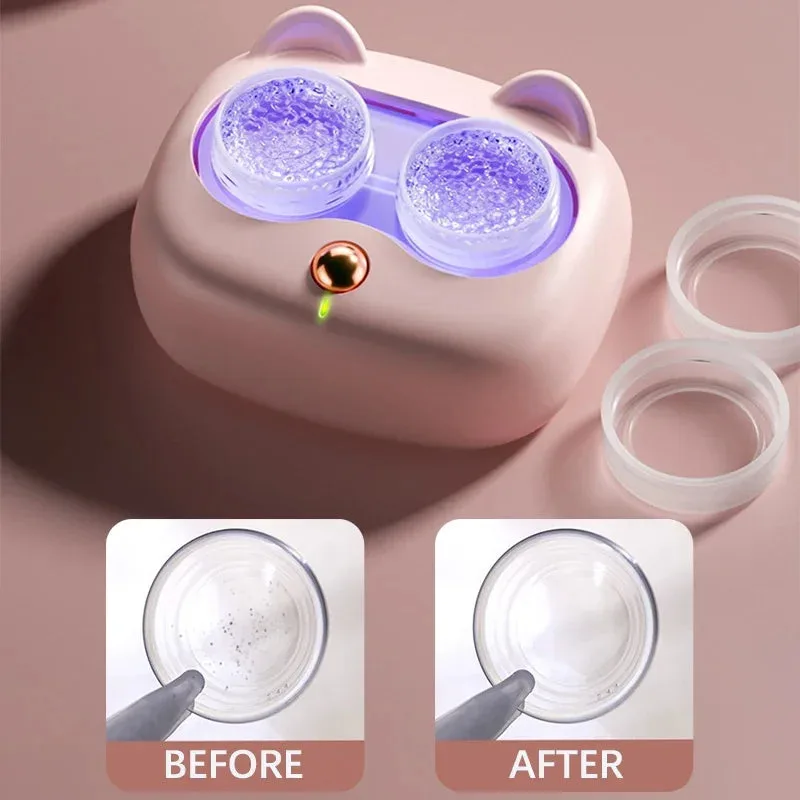
Ultrasonic Contact Lens Cleaner Pro: Ultrasonic vibrations create microscopic bubbles that agitate and lift away stubborn deposits like proteins, lipids, and other residues, ensuring a thorough clean. This explains the core cleaning mechanism. If the device isn't producing visible bubbles or the lens still feels dirty, the ultrasonic action may be blocked or the unit may need maintenance.
Ultrasonic Contact Lens Cleaner Pro
-
Ultrasonic Contact Lens Cleaner Pro: This reduces the risk of eye irritation and infections by eliminating particles that traditional cleaning might miss. The cleaner is designed to go beyond manual rubbing. If you're still experiencing irritation, the device might not be reaching all areas — consider checking the solution level and contact time.
Common Troubleshooting Steps
Try these practical checks before contacting support.
- Lens still feels dirty after cleaning: Make sure the lenses are fully submerged in solution inside the case. Insufficient liquid can dampen the ultrasonic effect. Also, confirm the cleaning cycle completed — some units have a timer that stops early if the battery is low.
- Device does not turn on or cycle is very short: Check the power source. If battery-operated, replace or recharge the batteries. If the unit uses a USB cable, ensure it's securely connected. A short cycle may indicate a low battery.
- No visible bubbles or vibration: The ultrasonic transducer may be blocked by debris. Gently clean the inside of the cleaner with a soft, dry cloth. Avoid using water or cleaning fluids inside the device unless specified in the manual.
- Lenses still cause discomfort after cleaning: If irritation persists, the lenses themselves may be damaged or have a coating issue. The cleaner removes deposits but cannot repair torn or expired lenses. Replace lenses according to your eye care professional's schedule.
Maintenance Tips to Keep Your Cleaner Working
Regular maintenance can prevent many common issues. After each use, empty the cleaning solution and rinse the lens case with fresh solution (not tap water). Dry the exterior of the cleaner with a soft cloth. Store the device in a cool, dry place away from direct sunlight.
If you use the cleaner daily, consider a deeper clean every few weeks. Wipe the interior chamber with a lint-free cloth to remove any residue buildup. Do not submerge the device in water — it is not waterproof. For stubborn deposits, a gentle wipe with a microfiber cloth can help restore performance.
The Ultrasonic Contact Lens Cleaner Pro is designed for portability, so it's easy to keep your lenses hygienic anywhere. But like any electronic device, it benefits from occasional care. If problems persist after these steps, refer to the manufacturer's instructions or contact customer support.