Quick Answer
The Uniden TCX905 is an accessory handset and charger that pairs with a compatible Uniden base system to add an extra cordless phone station with caller ID and intercom features.
What to Know Before You Start
The TCX905 is not a standalone phone; it requires a compatible Uniden base unit to function. Before setting up, ensure your base system supports expansion handsets and that the TCX905 is registered to it.
The handset uses 5.8 GHz frequency, which provides better range and less interference than older 2.4 GHz models. However, if your home has many 5.8 GHz devices, you may still experience occasional interference.
Uniden TCX905 Setup Steps
- Charge the Handset: Place the TCX905 handset on the charging base and let it charge for at least 15-20 hours before first use. The battery is built-in and non-removable. Don't skip the full initial charge; a partial charge may cause short battery life.
- Register the Handset to Your Base: On your Uniden base system, press and hold the 'handset locator' or 'page' button for about 4 seconds until the base beeps. Then, on the TCX905 handset, press the 'menu' key, navigate to 'Register', and follow the on-screen prompts. If registration fails, move the handset closer to the base and try again. Walls and distance can interfere.
- Test the Handset Functions: Make a test call to confirm the handset works. Check caller ID by viewing the call log. Use the DirectLink intercom feature by pressing the intercom button and selecting another registered handset. If caller ID doesn't appear, ensure your phone service includes caller ID and that the base is set to display it.
Product Facts
-
Uniden TCX905 Accessory Handset and Charger with Call Waiting and Caller ID: 5.8 GHz frequency provides extended range and reduced interference compared to older cordless phone frequencies. This means you can use the handset farther from the base and in areas with more wireless devices without dropped calls.
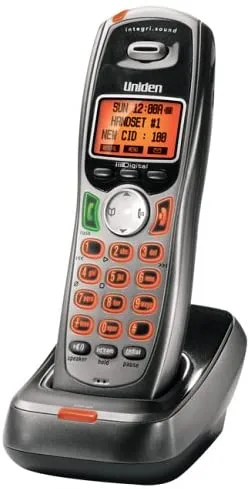
Uniden TCX905 Accessory Handset and Charger with Call Waiting and Caller ID