Why a hub can pass power but still leave your laptop at 'not charging'
When your laptop reports 'not charging' while connected through a USB-C hub, the first instinct is to blame the hub. That's understandable, but power delivery is a chain: charger, cable, hub, laptop. A weak link anywhere in that chain produces the same symptom.
USB-C Power Delivery (PD) is a negotiation, not a simple wire. The charger advertises what it can supply, the hub passes that capability through, and the laptop decides how much it will draw. If any part of the chain doesn't support the needed profile, the laptop may refuse to charge or charge slowly. The hub itself is often just the messenger.
The subtel 8-in-1 USB-C hub in this guide lists PD 3.0 passthrough among its features. That means it is designed to accept power from a charger and pass it to the host laptop. It does not mean the hub generates power, and it does not guarantee a specific wattage will reach your laptop. The supplied listing does not state a maximum passthrough wattage, so treat any specific number you see elsewhere with caution.
What the subtel 8-in-1 hub actually lists
-
8-in-1 USB Splitter Hub - Adapter voor USB-C naar HDMI, 4K en 60Hz, USB-C, 3x USB-A PD 3.0, SD, micro-SD & ethernet - USB-C-dongel voor Mac OS, Window: 8-in-1 USB-C splitter for Mac OS and Windows with USB-C to HDMI 4K, USB-C hub, 3x USB-A 3.0 PD 3.0, SD, micro-SD and ethernet. This is the full port set from the listing. Knowing which ports exist helps you separate a charging problem from a display or data problem.
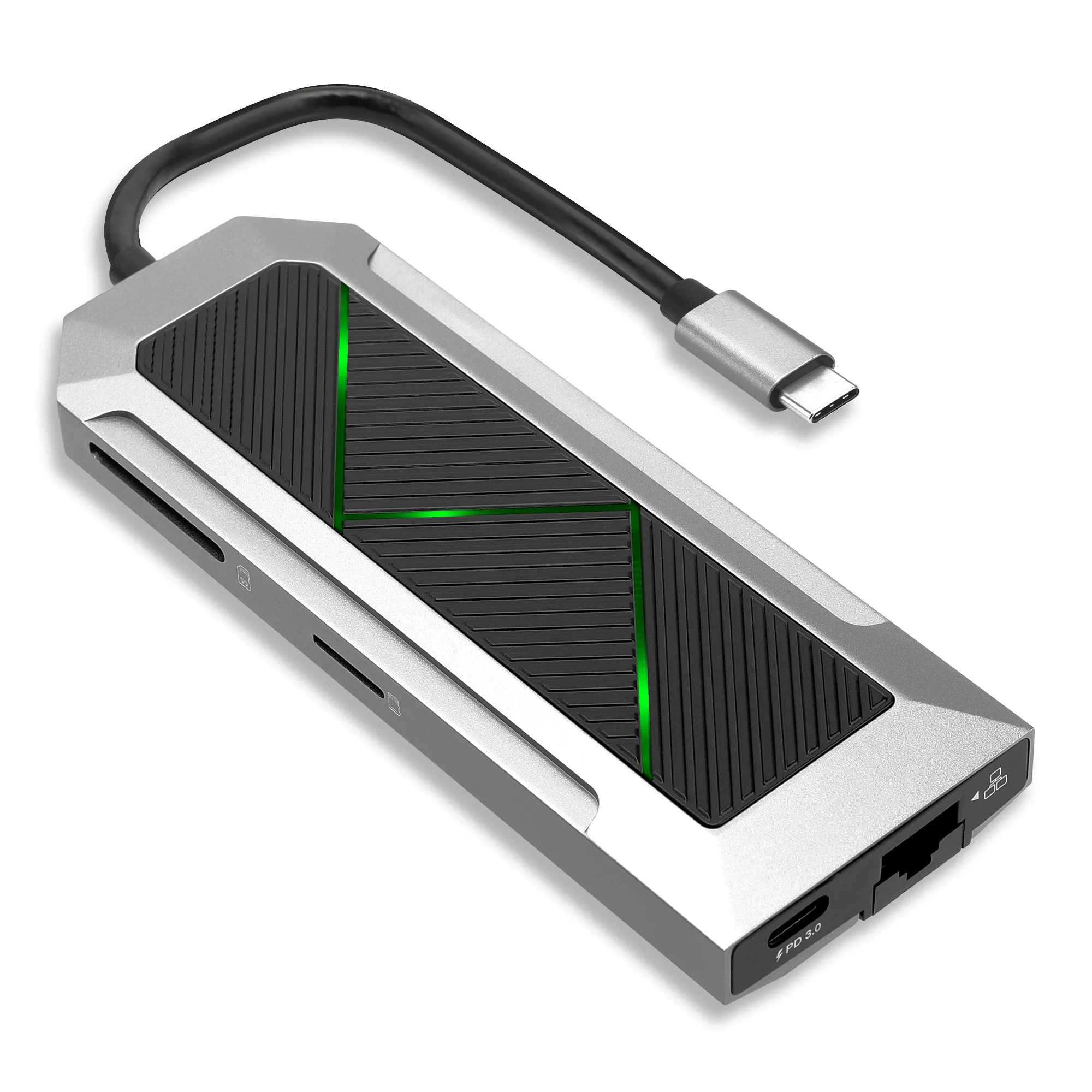
8-in-1 USB Splitter Hub - Adapter voor USB-C naar HDMI, 4K en 60Hz, USB-C, 3x USB-A PD 3.0, SD, micro-SD & ethernet - USB-C-dongel voor Mac OS, Window
-
8-in-1 USB Splitter Hub - Adapter voor USB-C naar HDMI, 4K en 60Hz, USB-C, 3x USB-A PD 3.0, SD, micro-SD & ethernet - USB-C-dongel voor Mac OS, Window: The listing describes HDMI output as 4K and 60Hz. If your monitor issue is resolution or refresh rate rather than charging, this confirms what the HDMI port is advertised to support.
-
8-in-1 USB Splitter Hub - Adapter voor USB-C naar HDMI, 4K en 60Hz, USB-C, 3x USB-A PD 3.0, SD, micro-SD & ethernet - USB-C-dongel voor Mac OS, Window: The hub is listed for Mac OS and Windows. Compatibility is stated at the operating-system level. The listing does not name specific laptop models, so check your own laptop's USB-C capabilities before assuming full support.
Checks to make before you replace the hub
Work through these in order. Each one isolates a different part of the power chain so you don't replace a hub that was never the problem.
- Confirm your laptop charges from the charger directly: Plug the charger straight into the laptop, bypassing the hub. If it still won't charge, the issue is upstream of the hub.
- Use the charger and cable the laptop expects: A charger that works with a phone may not deliver enough for a laptop. Try the laptop's own charger and its original cable first.
- Check which port on the hub accepts power input: The listing describes PD 3.0 support but does not specify which physical port is the power-input port. If your hub has a marked PD port, use that one; if it isn't marked, the supplied information doesn't identify it.
- Test the hub's other functions separately: If HDMI, ethernet or the SD card reader work while charging doesn't, that points to the power path rather than a dead hub. If nothing works, the hub or the laptop port may be the issue.
- Try a different USB-C port on the laptop: Not every USB-C port on a laptop supports charging or display output. The listing does not map hub functions to specific laptop ports, so test what your machine offers.
What PD 3.0 passthrough does and does not promise
PD 3.0 is a USB Power Delivery specification. When a hub lists it, the hub is built to participate in that negotiation. What the specification does not do is guarantee that your particular charger, cable and laptop will agree on a charging rate.
The subtel listing does not state a maximum passthrough wattage, a required charger wattage, or a minimum laptop requirement. Without those figures, you cannot calculate from the listing alone whether your charger will be enough. The honest answer is that the supplied information stops short of that detail.
This matters because a hub that passes power through can also introduce its own small overhead, and some laptops are picky about the charger they accept. If your laptop charges fine directly but not through the hub, the most useful next step is to try a higher-capacity charger you already own, then compare. If that changes the result, the charger was the limiting factor, not the hub.
When the problem isn't charging at all
Sometimes 'not charging' is a symptom of something else. If the laptop is running on battery and the hub's HDMI output also drops, the laptop may be limiting power to the port or the hub may be drawing more than the charger supplies.
The listing describes the hub as an 8-in-1 splitter with HDMI 4K 60Hz, three USB-A 3.0 ports, USB-C, SD, micro-SD and ethernet. Running several of those at once, especially HDMI and ethernet, increases the hub's own power draw. The supplied information does not give a power budget for the hub, so it's not possible to say from the listing how much headroom your charger needs. If unplugging accessories restores charging, that's a useful clue about the balance between supply and demand.
For display-specific problems, the hub's HDMI port is listed at 4K and 60Hz. If your monitor shows a lower resolution or refresh rate, that's a separate negotiation between laptop, hub and monitor, not a charging fault.
The hub in this guide
- 8-in-1 USB Splitter Hub - Adapter voor USB-C naar HDMI, 4K en 60Hz, USB-C, 3x USB-A PD 3.0, SD, micro-SD & ethernet - USB-C-dongel voor Mac OS, Window: 8-in-1 USB-C splitter with HDMI 4K 60Hz, USB-C, 3x USB-A 3.0 PD 3.0, SD, micro-SD and ethernet, listed for Mac OS and Windows. This is the exact configuration to compare against your own laptop's ports and your charger's capabilities.
What to do if the hub still won't charge your laptop
If you've confirmed the charger works directly, tried the laptop's own charger and cable, tested the hub's other ports, and tried another USB-C port, you've isolated the problem as far as the supplied information allows. At that point, the remaining variables are the hub's power path and your laptop's requirements, and the listing doesn't give enough detail to distinguish them.
That's the point to consider whether the hub suits your setup. The subtel 8-in-1 hub is listed for Mac OS and Windows with PD 3.0 passthrough, HDMI 4K 60Hz, three USB-A 3.0 ports, SD and micro-SD readers, and ethernet. If your laptop needs a specific charger profile that the listing doesn't confirm, ask before buying rather than assuming. And if you already own the hub and charging is the only failure, the checks above are the honest limit of what the product information can tell you.