What ScanSmart means for your checkpoint routine
The Wenger Ibex ScanSmart Laptop Backpack is built around a simple idea: make it easier to separate your laptop from the rest of your gear when you reach airport security. The bag's Triple Protect padded laptop compartment and dedicated tablet pocket keep your tech protected in transit, and the ScanSmart layout is designed to help you present the laptop compartment at the checkpoint without unpacking everything else.
That said, the exact procedure depends on the screening equipment and the officer on duty. The Ibex does not change the rules—it just gives you a more organized way to follow them. The walkthrough below focuses on what the bag's features support and where you should stay flexible.
A checkpoint walkthrough for the Ibex
Use this sequence as a starting point, then adjust to the instructions you receive at the airport.
- Before you leave for the airport: Pack the laptop in the Triple Protect compartment and the tablet in the dedicated tablet pocket. Keep chargers, cables, and small accessories in the essentials organizer so they do not shift around. This makes the next steps faster and reduces the chance of loose items in the security bin.
- As you approach the checkpoint: Have your boarding pass and ID ready. If you plan to use the ScanSmart feature, familiarize yourself with how the laptop compartment opens before you are at the front of the line—practice at home or at the gate.
- At the bin station: Follow the officer's directions. If they ask for laptops out, open the ScanSmart compartment and lay the bag flat so the laptop section is accessible. If they say electronics can stay in the bag, keep the laptop zipped in its padded compartment. The Ibex's stabilizing base helps the bag stand or lie flat without tipping, which can make this step less awkward.
- After screening: Rezip the laptop compartment fully and check that the tablet pocket is closed. Use the airflow back padding and shock-absorbing shoulder straps to settle the bag comfortably for the walk to your gate.
Laptop backpack airport security tips that apply to any bag
Even with a ScanSmart design, a few habits make security smoother. Wear shoes that are easy to remove, empty your pockets into your personal item before you reach the bins, and keep liquids and gels in a clear bag at the top of your backpack or personal item. The Ibex's essentials organizer can hold small items, but remember that anything flagged by screening may need to come out separately.
Also, avoid overpacking the laptop compartment. The Triple Protect padding is there to cushion your device, but a tightly stuffed bag can make it harder to open the compartment quickly. Leave a little slack so the zipper runs freely.
Ibex features that support the security routine
-
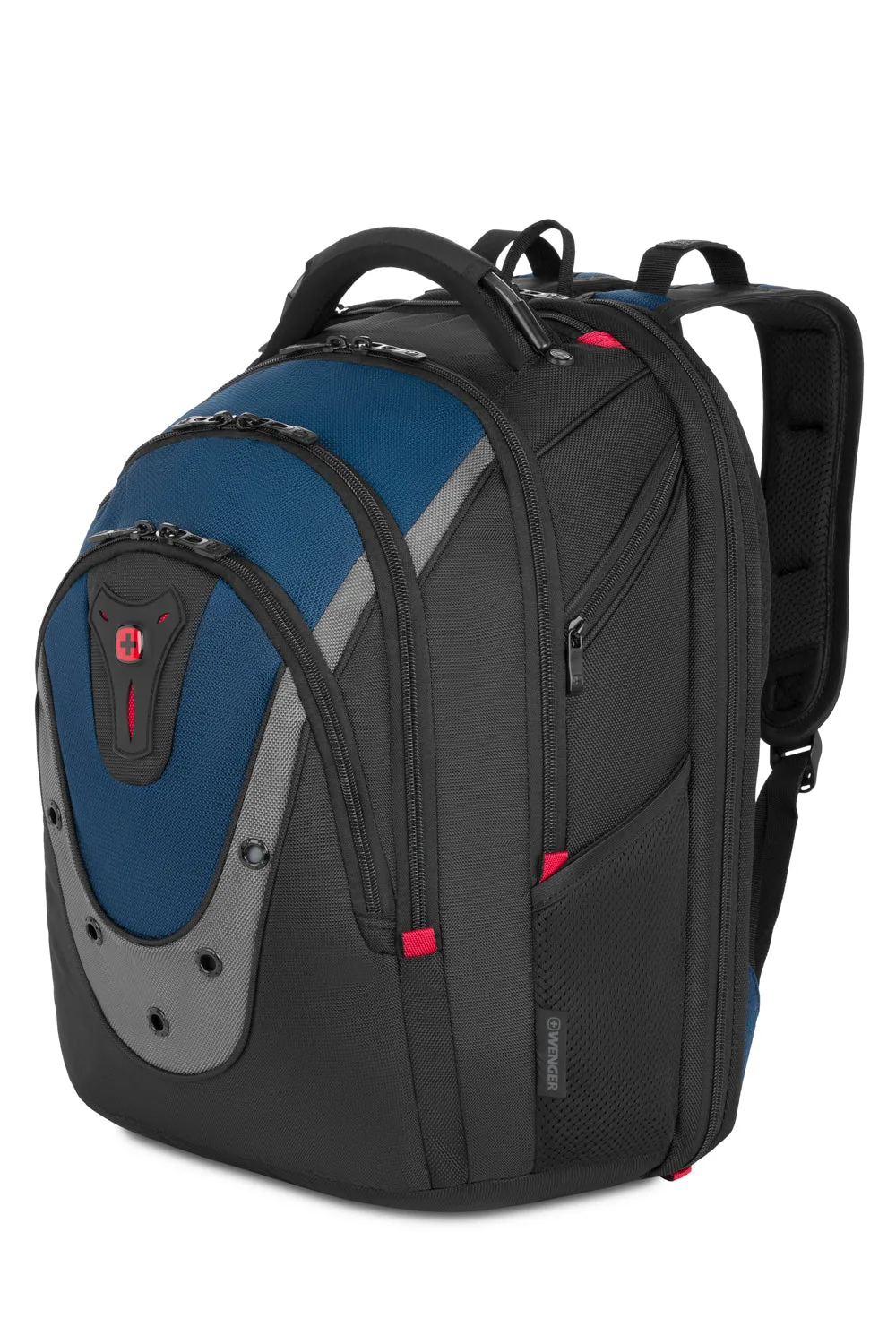
Wenger Ibex ScanSmart Laptop Backpack: Triple Protect padded laptop compartment and dedicated tablet pocket These compartments keep your devices separated and protected, so you can access the laptop section without disturbing the rest of your pack.
Wenger Ibex ScanSmart Laptop Backpack
-
Wenger Ibex ScanSmart Laptop Backpack: Stabilizing base A bag that stands or lies flat is easier to manage at the bin station, especially when you need to open the laptop compartment one-handed.
-
Wenger Ibex ScanSmart Laptop Backpack: Essentials organizer Keeps small items like cables, adapters, and travel documents in order, reducing last-minute digging at security.
-
Wenger Ibex ScanSmart Laptop Backpack: Airflow back padding and shock-absorbing shoulder straps Comfort matters when you are moving through a busy terminal; these features help the bag carry well after the checkpoint.
What the Ibex does not guarantee at security
The supplied product information does not include specific instructions for airport security procedures, nor does it confirm that the bag is approved by any particular screening authority. ScanSmart is a design approach, not a universal pass. Always follow the directions of security personnel, and be prepared to remove your laptop if asked.
The Ibex is made from durable ballistic polyester, which suggests it can handle the wear of frequent travel, but the catalog does not provide care instructions or a warranty statement. Treat the bag well, and check with the retailer or manufacturer for care guidance if needed.
Is the Ibex the right backpack for your security routine?
If you want a bag that keeps your laptop and tablet organized and offers a thoughtful layout for checkpoint access, the Wenger Ibex ScanSmart Laptop Backpack is a solid choice. Its padded compartments, stabilizing base, and comfort features make it practical for frequent flyers and commuters alike. The black/blue/grey colorway is the only variant currently listed.
Just keep your expectations realistic: no backpack can bypass security rules. The Ibex helps you stay organized, but you still need to follow instructions and be ready to adapt. If you regularly carry a laptop and tablet and want a bag that supports a smoother security experience, the Ibex is worth considering.