
Quick answer
Choose the ATTACK SHARK X75 if you prioritize a premium, rigid aluminum build and don’t mind a wired setup. Choose the ATTACK SHARK X66 if you want a compact wireless keyboard with a softer, quieter feel.
Build quality: aluminum vs. gasket-mounted plastic
The X75’s CNC machined aluminum body gives it a solid, premium feel that resists flex during intense typing or gaming. In contrast, the X66 uses a 65% plastic frame with an upgraded leaf spring gasket mount. That doesn’t mean the X66 feels cheap—the gasket structure adds a soft bounce that many typists enjoy—but it won’t match the X75’s rigidity.
If you prefer a heavy, stable keyboard that stays put on your desk, the X75’s aluminum construction is the clear winner. If you like a lighter board you can move around or take to a LAN party, the X66’s plastic build is more practical.
Sound and typing feel: creamy vs. crisp
The X66 is designed for a creamy, quiet typing experience thanks to its 5 layers of sound-dampening foam and gasket mount. That makes it a good choice for shared spaces or late-night sessions. The X75, with its aluminum body, tends to produce a crisper, more resonant sound—some people love that feedback, others find it too loud.
There’s no right answer here; it depends on whether you prefer a muted, soft keystroke or a more audible, tactile response.
Layout and desk space: 66 keys vs. 75%
The X66’s 66-key layout saves significant desk space while keeping all essential keys. The X75, as a 75% board, includes a function row and arrow keys, which is more convenient for productivity but takes up more room. If you have a small desk or want to keep your mouse close, the X66’s compact footprint is a major advantage.
Also note: the X66 includes a sleek aluminum CNC knob for volume control, while the X75’s knob availability isn’t specified—so if a knob is essential, the X66 is the safer bet.
Wireless freedom vs. wired reliability
The X66 is a triple-mode keyboard, meaning it supports wireless connections (likely Bluetooth and 2.4GHz) plus USB wired. That flexibility lets you switch between devices or declutter your desk. The X75, as a full aluminum keyboard, appears to be wired-only—no wireless option is mentioned. If you need a clean, cable-free setup, the X66 is the obvious choice; if you don’t mind a cable and want maximum build quality, the X75 won’t disappoint.
Trade-offs at a glance
- Build rigidity: X75’s aluminum frame is stiffer and more premium; X66’s plastic frame is lighter but more flexible. If you hate any board flex, pick the X75.
- Sound profile: X66 is designed to be creamy and quiet; X75’s aluminum body likely produces a crisper, more resonant sound. Test your tolerance for noise in shared spaces.
- Wireless capability: X66 supports triple-mode (wireless and wired); X75 appears wired-only. If you need Bluetooth or 2.4GHz, the X66 is your only option here.
Product facts
-
ATTACK SHARK X66 Wireless Mechanical Keyboard with Side Printed PBT Keycaps: Compact 65% layout with upgraded leaf spring gasket mount and 5 layers of sound-dampening foam. This gives the X66 a soft, quiet typing feel and a smaller footprint—ideal for shared spaces or small desks.
ATTACK SHARK X66 Wireless Mechanical Keyboard with Side Printed PBT Keycaps
ATTACK SHARK X66 Wireless Mechanical Keyboard with Side Printed PBT Keycaps
-
ATTACK SHARK X75 Full Aluminum Keyboard: CNC machined aluminum body with anodized finish and electrophoresis treatment for durability. The rigid aluminum build offers a premium, stable typing platform that resists flex and wear over time.
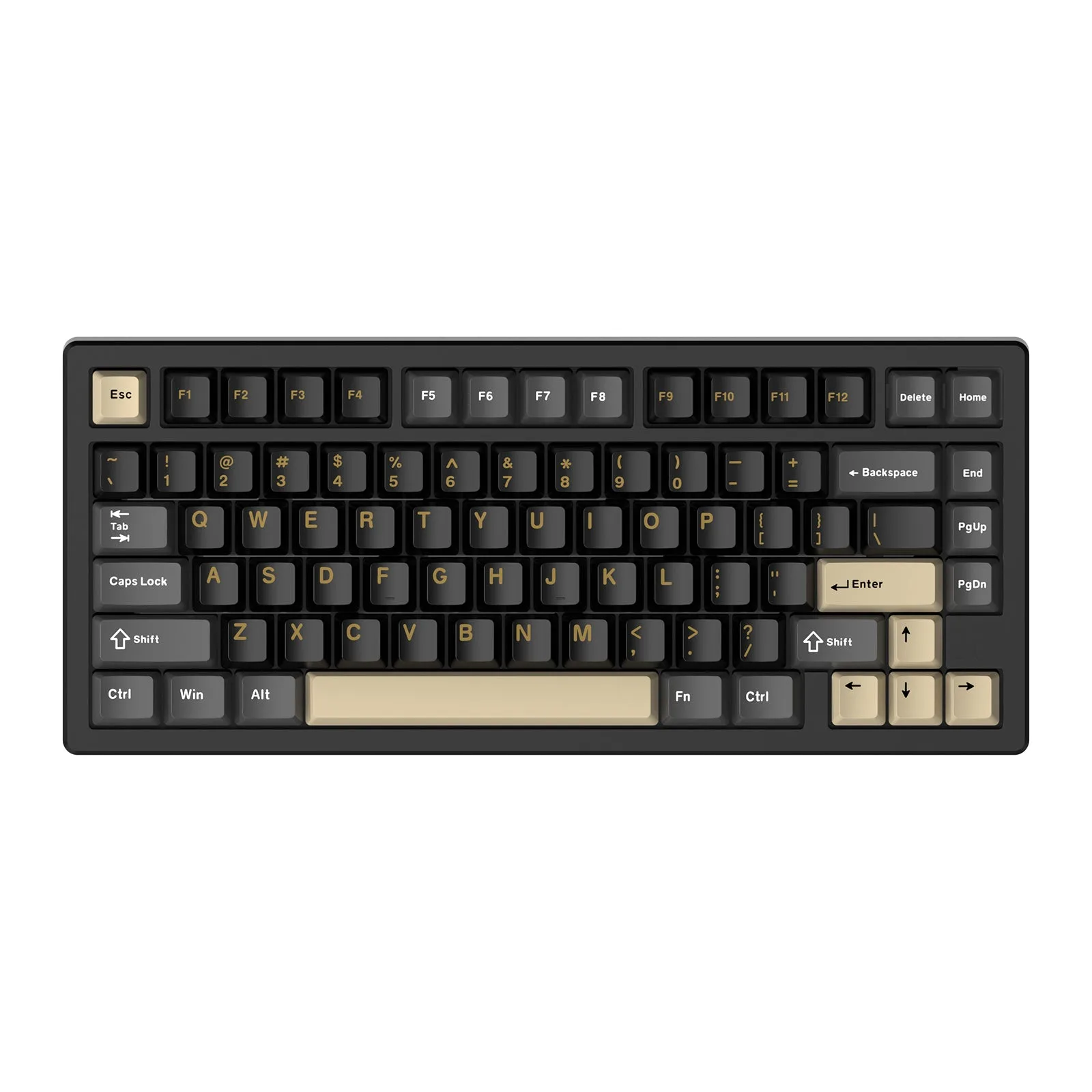
ATTACK SHARK X75 Full Aluminum Keyboard
Which one fits you?
Best for
- Gamers and typists who want a premium, rigid build and don’t mind a wired connection
- Users who prefer a crisp, audible keystroke and a larger 75% layout with function row
Not for
- Those who need wireless freedom or a compact desk setup—choose the X66 instead
- Users who prefer a quiet, soft typing feel—the X66’s gasket mount is better suited