Quick Answer
For most gamers, a 27-inch monitor with 1440p resolution, a 144Hz or higher refresh rate, and an IPS panel offers the best balance of sharpness, smoothness, and color. Prioritize these specs over extras like HDR or RGB.
Why 27 Inches Is the Sweet Spot
A 27-inch screen gives you more immersive gameplay than 24-inch models without the desk space demands of 32-inch ultrawides. At this size, 1440p (2560 x 1440) is the ideal resolution: it's noticeably sharper than 1080p, yet less demanding on your GPU than 4K, so you can still hit high frame rates in demanding titles.
Resolution vs. Refresh Rate: The Trade-Off
The biggest decision is between resolution and refresh rate. A 4K 27-inch monitor offers stunning detail but requires a powerful graphics card to run smoothly. A 1080p monitor with a high refresh rate is easier to drive but looks softer on a 27-inch screen. 1440p with a 144Hz or 240Hz refresh rate is the balanced choice for most gamers, giving you sharp visuals and responsive motion without breaking your GPU budget.
Panel Type Matters More Than You Think
IPS panels are the current sweet spot for gaming: they offer vibrant colors and wide viewing angles, and modern IPS panels have response times fast enough for competitive play. TN panels are cheaper but have poor color and viewing angles. VA panels offer deeper blacks but can have slower response times and smearing in dark scenes. Unless you're on a strict budget, IPS is the safest recommendation.
Decision Rules for Choosing a 27-Inch Gaming Monitor
- Resolution: Choose 1440p for the best balance of sharpness and GPU load. Pick 1080p only if your GPU is older or you play at low settings for maximum frame rates. Choose 4K only if you have a high-end GPU and prefer visual fidelity over frame rate. If you're unsure, 1440p is the safe default.
- Refresh Rate: For competitive shooters, aim for 240Hz. For casual and single-player games, 144Hz is sufficient and more affordable. Remember that refresh rate only matters if your GPU can produce those frame rates. Check your GPU's performance in the games you play before buying a 240Hz monitor.
- Panel Type: Choose IPS for the best color and viewing angles. Avoid TN unless you're on a tight budget. VA is acceptable if you prioritize contrast, but watch for response time issues. IPS is the best all-rounder for gaming.
- Connectivity: Use DisplayPort for high refresh rates (144Hz+). HDMI 2.0b is limited to lower refresh rates at 1440p, so if your monitor has HDMI 2.1, that's a bonus for next-gen consoles. Ensure your GPU and cable support the refresh rate you want.
Monitor Specs at a Glance
-
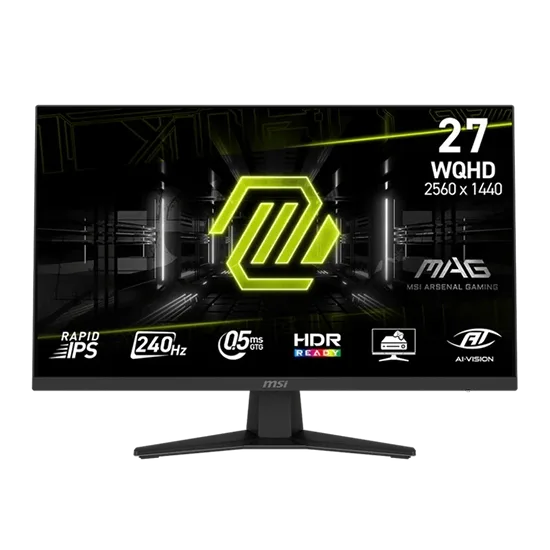
27" MSI MAG 274QF X24 IPS Monitor: The MSI MAG 274QF X24 features a 27-inch Rapid IPS panel with 2560x1440 resolution, 240Hz refresh rate, and 0.5ms response time. This combination delivers sharp visuals and extremely smooth motion, ideal for fast-paced esports and immersive single-player games.
27" MSI MAG 274QF X24 IPS Monitor
-
27" MSI MAG 274QF X24 IPS Monitor: It covers 93% Adobe RGB and 96% DCI-P3 color gamuts, with HDR Ready support. Good color coverage makes games look vibrant and accurate, while HDR Ready adds contrast for more dynamic scenes—though full HDR requires higher brightness.
-
27" MSI MAG 274QF X24 IPS Monitor: Ports include 2x HDMI 2.0b and 1x DisplayPort 1.4a. DisplayPort 1.4a supports the full 240Hz at 1440p; HDMI 2.0b is limited to lower refresh rates, so use DisplayPort for the best experience.
Who Should Buy What
Best for
- Gamers who want a versatile monitor for both competitive and single-player games
- Those with a mid-range to high-end GPU that can handle 1440p at high frame rates
Not for
- Budget-conscious buyers who prioritize maximum frame rates over image quality (consider 1080p)
- Console gamers who need HDMI 2.1 for 4K 120Hz (look for a 4K HDMI 2.1 model)