Quick answer
You can add a grab handle to your Sutter Tech Sling by selecting the option during checkout. This simple customization makes your sling easier to grab and carry.
Why add a grab handle?
A grab handle gives you a quick way to pick up your Sutter Tech Sling without unclipping the strap or digging for the shoulder strap. It is especially useful when you are in a hurry or need to pass the bag to someone else.
The handle attaches securely to the sling, adding a practical carrying point without changing the bag's overall look or function.
How to add a grab handle to your Sutter Tech Sling
- Select the grab handle option: On the Sutter Tech Sling product page, look for the 'Add Grab Handle' option and click 'Add to Cart'. Common mistake: Skipping this step and assuming the handle comes standard. It is an add-on, not included by default.
- Proceed to checkout: Go to your cart and click 'Checkout'. You will see the grab handle listed as a separate item in your order. Checkpoint: Verify the grab handle appears in your cart before entering payment details.
- Complete payment: Enter your credit card or PayPal information and finalize the purchase. The grab handle will be added to your Sutter Tech Sling before shipping. Common mistake: Using an unsupported payment method. Only credit cards and PayPal are accepted for this customization.
Product facts
-
Add Grab Handle To Sutter Tech Sling $25: Add a grab handle to your Sutter Tech Sling order. Steps: 1. Click 'Add to Cart' 2. Continue with the Checkout Process using your Credit Card or Paypal. You can easily customize your sling bag during checkout without needing any tools or post-purchase modifications.
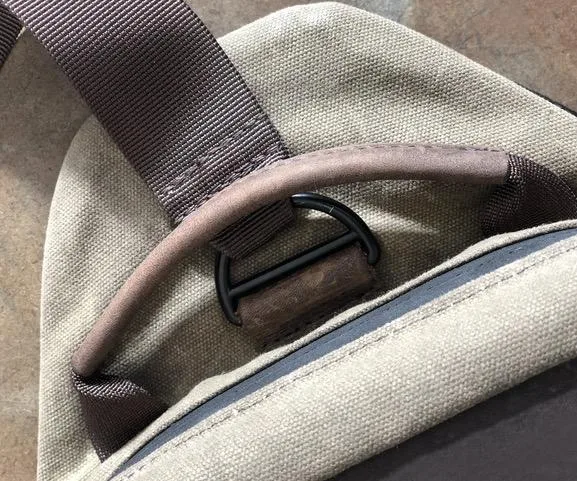
Add Grab Handle To Sutter Tech Sling $25