Quick answer
Attach the Aile Striker pack to the back of your Robot Spirits Strike Gundam, then add the effect parts to the wing joints for dynamic poses.
What’s in the set?
The Robot Spirits AQM/E-X01 Aile Striker & Effect Parts Set ver. A.N.I.M.E. is a dedicated add-on for the GAT-X105 Strike Gundam figure. It includes the shoulder-mounted Aile Striker unit, effect parts for the wings and weapons, and additional hands. The anniversary release features improved shoulder articulation for wider posing range.
Before starting, make sure your Strike Gundam figure has the standard back connector. This set is not compatible with other Mobile Suit figures or model kits.
Equip setup steps
- Remove the backpack cover: Gently pull off the small cover piece on the Strike Gundam’s back. It clips into a single peg; do not twist it off to avoid breaking the peg. Keep the cover in a safe place – it’s easy to lose.
- Attach the Aile Striker unit: Align the two pegs on the back of the Striker with the holes on the figure’s back. Push straight in until you hear a soft click. If the fit feels loose, check that the pegs are fully seated. Do not force the pegs if they don’t align – you may need to adjust the angle slightly.
- Add the effect parts to the wing ports: Slide the clear effect part into the slot on each side of the Aile Striker wing. They snap into place with a small tab. Use the long thrust effects for running poses or the burst effects for stationary firing. Make sure the tab is fully engaged so the effect part doesn’t fall off during posing.
Product facts
-
Robot Spirits AQM/E-X01 Aile Striker & Effect Parts Set ver. A.N.I.M.E.: The Aile Striker's shoulder parts have a unique structure to allow wider arm movement. This means you can pose the Strike Gundam in more dynamic combat stances without the pack blocking the arms.
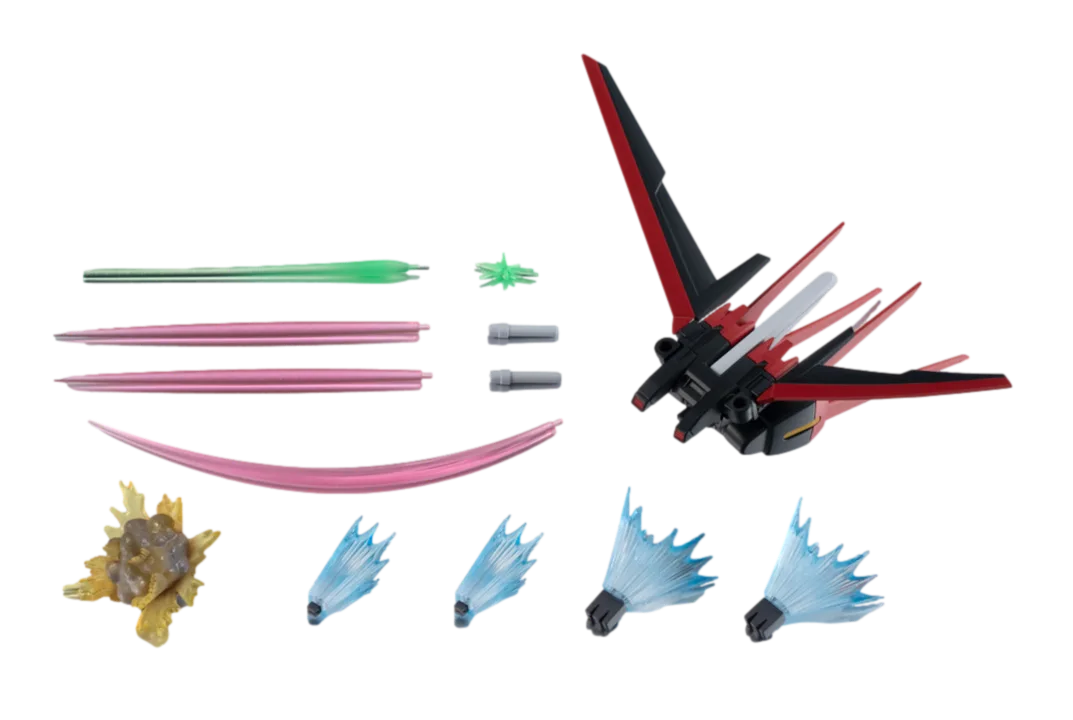
Robot Spirits AQM/E-X01 Aile Striker & Effect Parts Set ver. A.N.I.M.E.