Start with the three chambers, not the cables
The AIR 5400 LX-R RGB is a three-chamber mid-tower ATX case with a wraparound glass exterior, dual airflow channels, a dedicated 360mm AIO chamber, and compatibility with reverse-connector motherboards. Each of those features changes how you plan iCUE LINK fan wiring and RGB lighting before you mount a single fan.
The wraparound glass is the biggest planning constraint. It puts your cable routes and lighting on display, so the cleanest iCUE LINK setup is the one you design around the chambers rather than the one you tidy up afterward.
What the case gives you to work with
-
AIR 5400 LX-R RGB iCUE LINK Dreikammer-Mid-Tower PC-Gehäuse: Three-chamber mid-tower ATX case with a wraparound glass exterior and dual airflow channels. The separate chambers let you isolate the 360mm AIO and its fans from the main board area, which keeps iCUE LINK fan wiring out of the glass display zone.
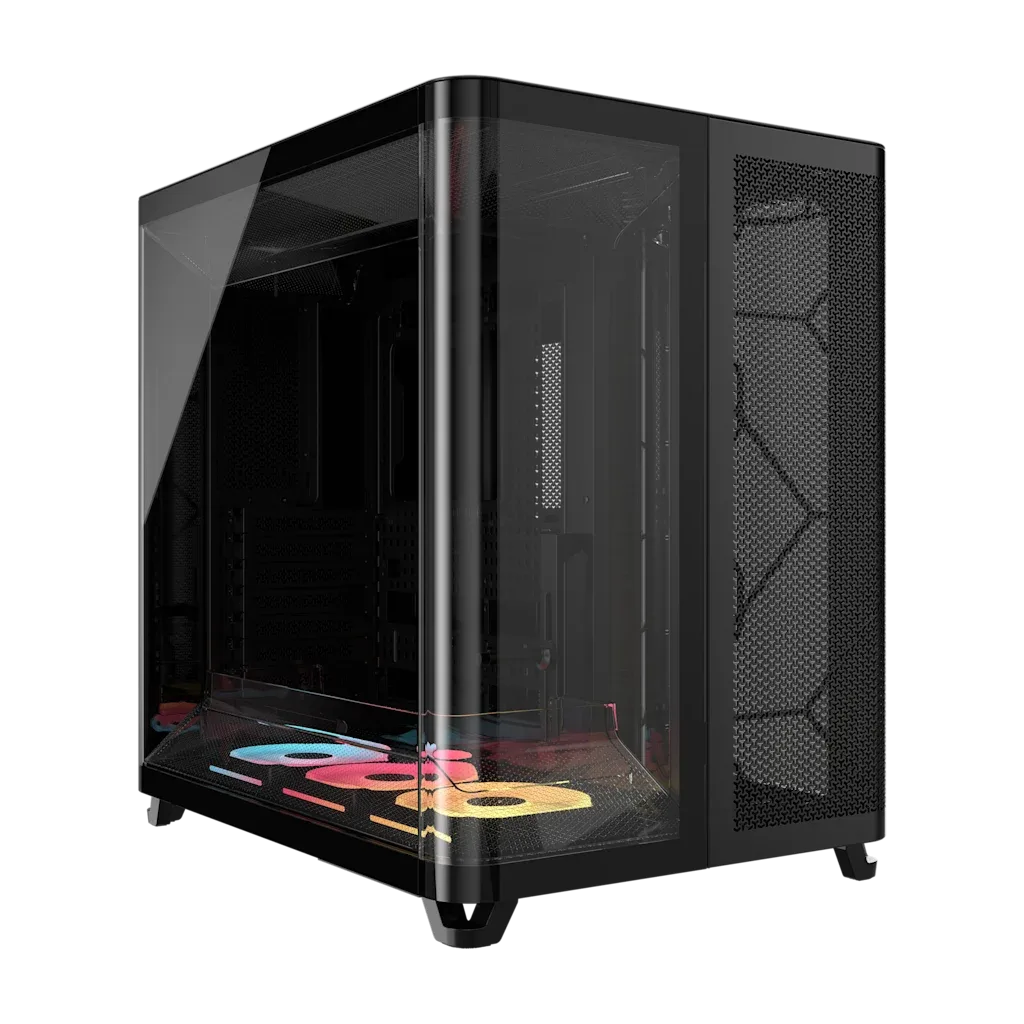
AIR 5400 LX-R RGB iCUE LINK Dreikammer-Mid-Tower PC-Gehäuse
-
AIR 5400 LX-R RGB iCUE LINK Dreikammer-Mid-Tower PC-Gehäuse: Dedicated 360mm AIO chamber. Radiator fans and their iCUE LINK connections can live in their own space, so plan that chamber's fan chain first.
-
AIR 5400 LX-R RGB iCUE LINK Dreikammer-Mid-Tower PC-Gehäuse: Compatible with reverse-connector motherboards. If you use a reverse-connector board, most front-side cables disappear, leaving iCUE LINK fan and lighting runs as the main visible wiring to manage.
A chamber-by-chamber iCUE LINK setup sequence
Treat this as a planning order, not a manufacturer instruction. The supplied product information confirms the case layout but does not include a step-by-step build manual, so check your fan and hub documentation for the actual connection and power requirements.
- 1. Map the AIO chamber first: Decide where the 360mm radiator and its fans sit before anything else. Because that chamber is separate, its iCUE LINK fan chain can be planned as one run rather than threaded through the main compartment.
- 2. Decide where the iCUE LINK hub lives: Pick a hub location that shortens the total fan-chain length and stays reachable. The supplied case information does not specify a hub mounting point, so choose a spot that suits your hardware and keeps the hub out of direct view through the glass.
- 3. Route the main-chamber fans as one chain: Use the dual airflow channels to separate intake and exhaust fan groups. Keep each group's iCUE LINK chain continuous so you are not crossing the case with individual fan cables.
- 4. Run lighting links along the same path as fan links: iCUE LINK carries fan and lighting data on the same chain, so plan one route per group instead of separate fan and RGB paths. Fewer parallel runs means less to hide behind the glass.
- 5. Use reverse-connector compatibility to simplify the board edge: On a reverse-connector motherboard, the front-side cable clutter is reduced, so the iCUE LINK runs become the dominant visible wiring. Route them deliberately along chamber edges rather than letting them cross open space.
- 6. Check clearances before final tightening: Confirm fan and radiator fit in each chamber before you commit to cable lengths. The supplied information does not list specific clearance figures, so measure against your own components.
Where iCUE LINK wiring usually goes wrong in a glass case
- Chains that cross chambers: Running one continuous link from the AIO chamber into the main compartment adds visible length. Keep each chamber's chain self-contained where your hardware allows.
- Hub placed for convenience, not concealment: A hub that is easy to reach but sits in the middle of the glass display area undoes the clean look. Balance access against visibility.
- Lighting treated as an afterthought: Because iCUE LINK combines fan and lighting on one chain, decide your lighting groups at the same time as your fan groups. Changing the grouping later means rerouting.
- Ignoring the reverse-connector advantage: If your board supports reverse connectors, you have already removed most front cabling. Use that headroom to route iCUE LINK links more cleanly instead of leaving them loose.
What the supplied information does not settle
The catalog confirms the three-chamber layout, wraparound glass, dual airflow channels, 360mm AIO chamber, and reverse-connector motherboard compatibility. It does not list included fans, iCUE LINK hub contents, maximum fan counts, or specific cable lengths. Those details are not confirmed by the supplied information, so verify them against the product page and your own iCUE LINK hardware before buying additional parts.
The AIR 5400 LX-R RGB is listed at USD 207.84 against a catalog comparison price of USD 329.90. If you are still deciding whether the case suits your build, confirm the fan and radiator configuration you plan to run before committing to an iCUE LINK layout.