Quick answer
To use the Aquaria Microflora Dial Promo, place the red dial near the main board, shuffle the new card into the goal deck, and be the first to achieve its goal to rotate the dial.
What the promo includes and why it matters
The Aquaria Microflora Dial Promo adds a new card and a red Microflora Dial to your game. The dial is a physical tracker that only the first player to meet the card's goal can rotate, making it a race element that changes how you prioritize actions.
Because the promo is not part of the base game, it introduces a new win condition layer. You can choose to include it or leave it out depending on your group's preference for competitive side objectives.
Common setup mistake to avoid
A frequent error is placing the dial on the main board instead of near it. The dial is a separate tracker, not a board space, so keep it within easy reach but not overlapping any game area. Also, ensure the new card is shuffled into the goal deck before the game starts, not added mid-game.
How to set up and use the Microflora Dial Promo
- Shuffle the new card into the goal deck: Before the game begins, take the promo card and shuffle it into the existing goal deck. Do not look at it first—keep it face-down for a fair draw. If you forget to add the card, the dial has no trigger. Double-check the deck before dealing.
- Place the red dial near the play area: Set the red Microflora Dial next to the main board, within easy reach of all players. It does not occupy a board space; it's a separate tracker. Avoid placing it on top of any board space or card area—it can cause confusion during play.
- Announce the promo goal when drawn: When the promo card is revealed as the current goal, read it aloud so everyone knows the specific condition. The first player to meet that condition rotates the dial. If multiple players achieve the goal simultaneously, the active player (or next in turn order) gets the dial. Check your group's tiebreaker rule.
- Rotate the dial immediately upon achieving the goal: As soon as you fulfill the card's condition, rotate the red dial to indicate you claimed it. No other player can rotate it afterward for that goal. Do not wait until the end of your turn—rotate it right away to avoid disputes.
- Return the dial to neutral for the next game: After the game, reset the dial to its starting position (usually the 0 or neutral mark) so it's ready for the next session. Store it with the promo card. Leaving the dial rotated can cause confusion in future games. Always reset it before storing.
Product details
-
Aquaria – Microflora Dial Promo: This Promo for Aquaria consists of a new card and red Microflora Dial, only achievable by being the first player to achieve the goal listed on the card. The red dial gives a tangible reward for racing to a specific goal, adding urgency and a new strategic layer to your Aquaria games.
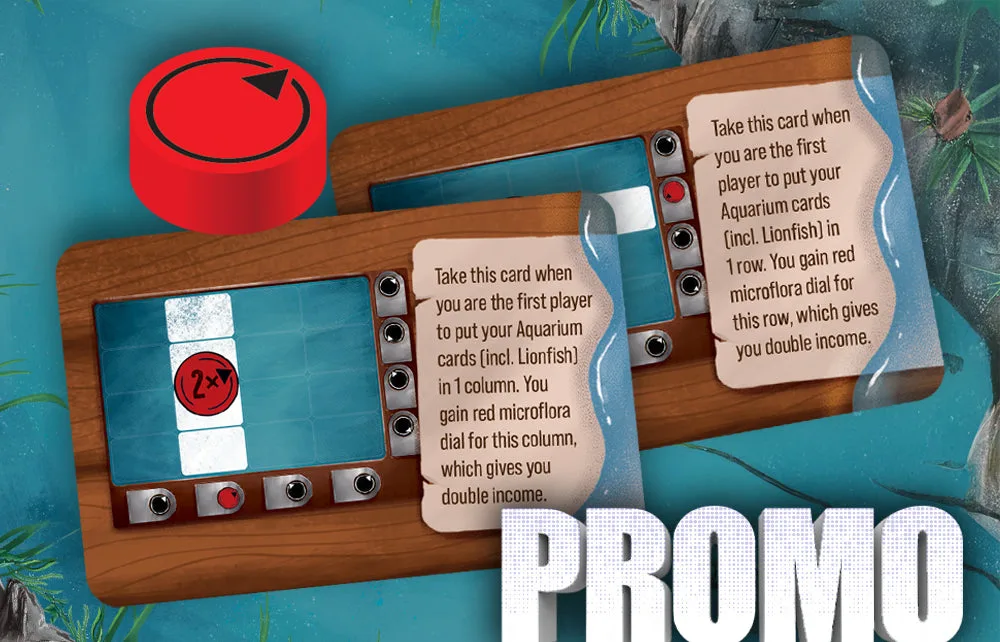
Aquaria – Microflora Dial Promo