Compatibility and software questions
Will the B737 Desktop MIP Panel work with MSFS2020 and MSFS2024?
The panel is compatible with major B737 simulation models on Windows platforms, including leading flight simulation software environments. The product title specifically lists MSFS2020/2024 and X-Plane, so it is designed to integrate with those simulators. For exact setup steps, refer to the documentation provided with your simulator and the panel.
Does it support X-Plane?
Yes, the product title includes X-Plane, and the broad compatibility statement covers leading flight simulation environments. As with any hardware, check that your X-Plane version and aircraft add-on are supported.
What simulator software do I need?
You need a Windows-based flight simulator that supports the B737, such as MSFS2020, MSFS2024, or X-Plane. The panel does not include simulator software; you must already have a compatible simulator installed.
Physical setup and mounting
How do I mount the panel?
The panel has pre-drilled standard mounting points that allow integration with common MCP and EFIS hardware for future system expansion. You can use these points to secure the panel to your desk or cockpit frame. No specific mounting hardware is included beyond what is needed for the panel itself.
What are the dimensions and weight?
The panel measures 61.2 x 16.9 x 14.5cm and weighs 5300g. The package weighs 5500g and measures 65.2 x 18.5 x 16.6cm. These dimensions are important for planning your desktop space.
What is included in the box?
The package includes the B737 Desktop MIP Simulator Panel and its electronic components. It comes in a cardboard box. No additional accessories are listed.
Controls and functionality
What controls are on the panel?
The panel features a landing gear lever with realistic physical resistance and operational logic, an independent auto-brake system, and a dedicated brightness adjustment knob for instrument lighting. It also supports independent lighting test functions for full panel verification.
Does the display show flight data?
Yes, the built-in high-refresh, high-definition screen minimizes tearing and latency. It supports seamless switching between Primary Flight Display (PFD) and Navigation Display (ND) modes with real-time flight data synchronization.
Can I adjust the backlight?
Yes, there is a dedicated brightness adjustment knob that allows manual instrument lighting control based on ambient conditions.
Key specifications at a glance
-
B737 Desktop (MIP)Simulator Panel for MSFS2020/2024, X Plane: 1:1 Precision Scale Recreation with 1:1 molded knob caps, engraved acrylic panels, and a metal rear housing. Ensures authentic cockpit aesthetics and tactile feedback for immersive simulation.
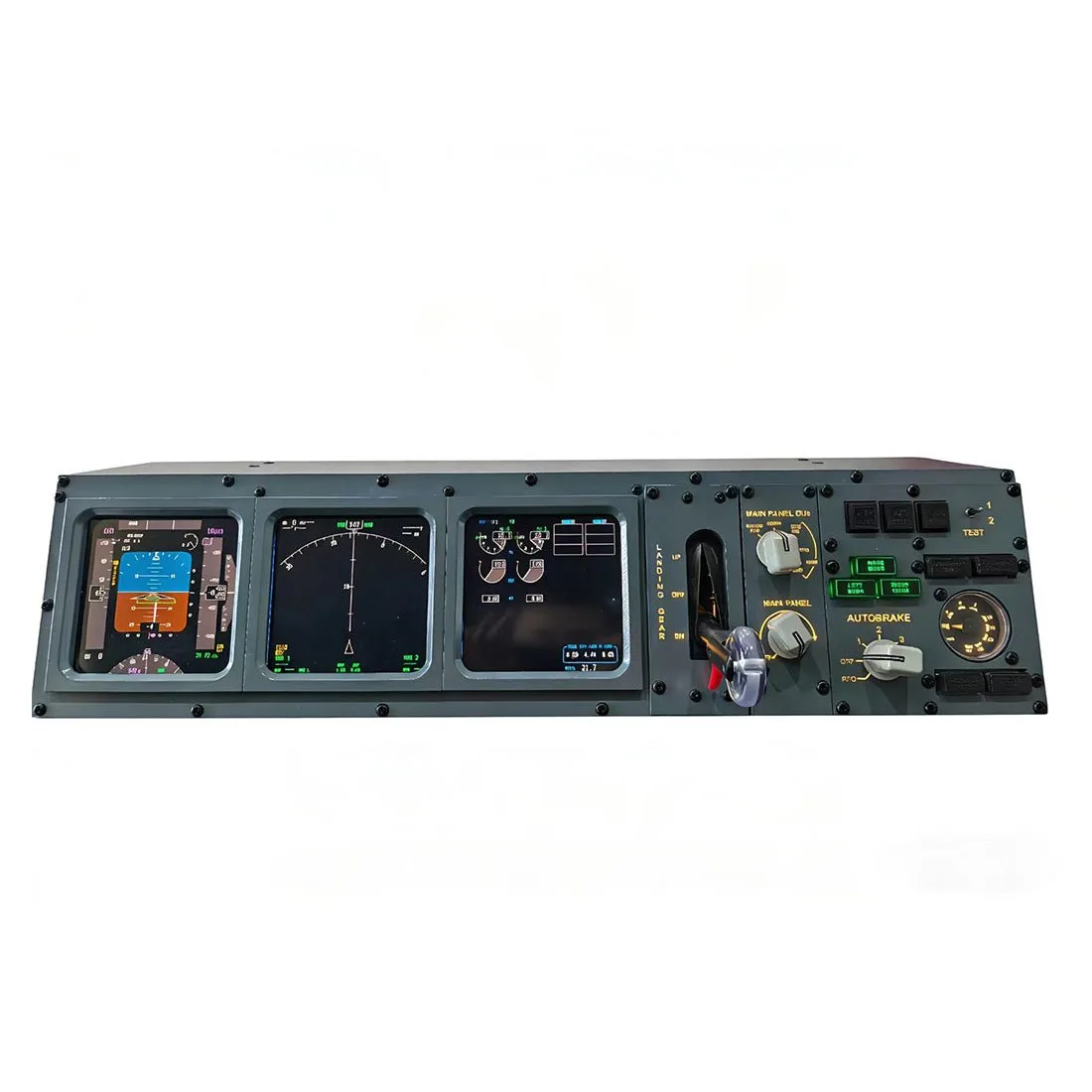
B737 Desktop (MIP)Simulator Panel for MSFS2020/2024, X Plane
-
B737 Desktop (MIP)Simulator Panel for MSFS2020/2024, X Plane: High refresh rate and high-definition screen minimizes tearing and latency. Provides smooth and responsive display of flight data.
-
B737 Desktop (MIP)Simulator Panel for MSFS2020/2024, X Plane: Supports seamless switching between PFD and ND modes with real-time flight data synchronization. Allows you to monitor critical flight information without switching windows.
-
B737 Desktop (MIP)Simulator Panel for MSFS2020/2024, X Plane: Landing gear lever with realistic physical resistance and operational logic. Adds procedural accuracy and tactile immersion to gear operations.
-
B737 Desktop (MIP)Simulator Panel for MSFS2020/2024, X Plane: Independent auto-brake system replicates functional interaction for procedural accuracy. Enhances realism during taxi, takeoff, and landing.
-
B737 Desktop (MIP)Simulator Panel for MSFS2020/2024, X Plane: Dedicated brightness adjustment knob for manual instrument lighting control. Lets you adapt the panel to different lighting conditions.
-
B737 Desktop (MIP)Simulator Panel for MSFS2020/2024, X Plane: Pre-drilled standard mounting points for integration with common MCP and EFIS hardware. Facilitates expansion and secure mounting in your cockpit setup.
Age and usage questions
Is this suitable for children?
The panel is rated for ages 16 and up. It contains electronic components and small parts, so it is not intended for young children.
Can I use it with other B737 hardware?
Yes, the pre-drilled mounting points allow integration with common MCP and EFIS hardware for future system expansion. This means you can build a more comprehensive cockpit setup over time.