Quick answer
To set up your BRAUN Black400 4G scouting cam remotely, insert a compatible SIM card, install the app, configure the camera, and place it in the field with a clear view of the area you want to monitor.
Why choose a 4G LTE scouting cam?
A cellular trail camera like the BRAUN Black400 4G lets you receive images and videos directly to your phone without visiting the camera. This is ideal for remote hunting areas, property surveillance, or wildlife research where frequent trips are impractical.
The Black400 4G uses a 4G (LTE) connection and a SIM card to transmit data via the cloud. You can check activity from anywhere with cellular coverage, saving time and reducing disturbance to wildlife.
What you need before starting
Before you begin, ensure you have a compatible nano SIM card with an active data plan. The camera supports 4G LTE networks, so check coverage in your intended location. You also need a smartphone with the BRAUN app installed and a microSD card (not included) for local storage.
The Black400 4G has a 4MP CMOS sensor and captures photos up to 32MP and video up to 2.7K. Its 60° field of view and 0.4-second trigger time make it suitable for capturing fast-moving animals.
Step-by-step setup guide
- Insert the SIM card and SD card: Open the camera housing and insert a nano SIM card with an active data plan into the SIM slot. Then insert a microSD card (up to 32GB recommended) into the card slot. Close the housing securely to keep out moisture. Common mistake: using a SIM card without a data plan or with insufficient credit. Verify the plan supports MMS or data transmission.
- Install and configure the BRAUN app: Download the BRAUN app from your app store. Create an account and follow the in-app instructions to pair the camera. You will need to enter the camera's ID (found on the device label) and set up cloud storage preferences. Checkpoint: ensure your smartphone has a stable internet connection during pairing. A weak signal can cause the camera to fail to register.
- Set up the camera in the field: Mount the camera on a tree or post at the desired height (typically 3-5 feet). Point it toward the area you want to monitor, avoiding direct sunlight and reflective surfaces. Use the test mode in the app to verify the field of view and signal strength. Common mistake: placing the camera too low or too high, which can miss animal activity. Adjust the angle so the detection zone covers the trail or feeding area.
- Configure trigger and capture settings: In the app, set the trigger interval (e.g., 1 minute) to avoid excessive images of the same animal. Choose photo or video mode, and adjust resolution (up to 32MP for photos, 2.7K for video). Enable night mode for 24/7 monitoring. Checkpoint: a short trigger interval can drain the battery faster. Balance capture frequency with battery life based on your monitoring needs.
- Test the remote transmission: Walk in front of the camera to trigger it. Wait a few minutes, then check the app for the received image or video. If nothing appears, verify the SIM card signal and data plan. You may need to move the camera to a location with better cellular coverage. Common mistake: assuming the camera transmits immediately. Allow up to 2 minutes for the image to upload, depending on network speed.
Product highlights
-
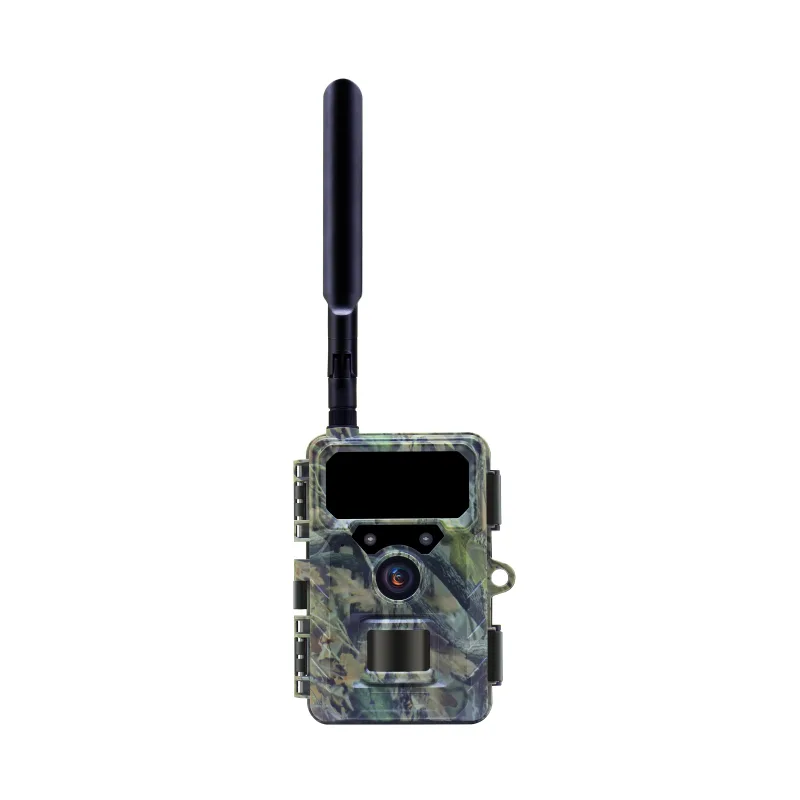
BRAUN Scouting Cam BLACK400 4G: The Braun Scouting Cam Black400 4G features 4G (LTE) and cloud connectivity via SIM card and app. This allows you to receive images remotely without physically retrieving the SD card, saving time and reducing disturbance.
BRAUN Scouting Cam BLACK400 4G