Quick Answer
Mount the BRAUN Bird Cam 130 Solar on a tree or post, ensure the solar panel gets direct sun, insert a microSD card, and adjust the aim to cover your feeder area.
Solar Power: Placement Matters
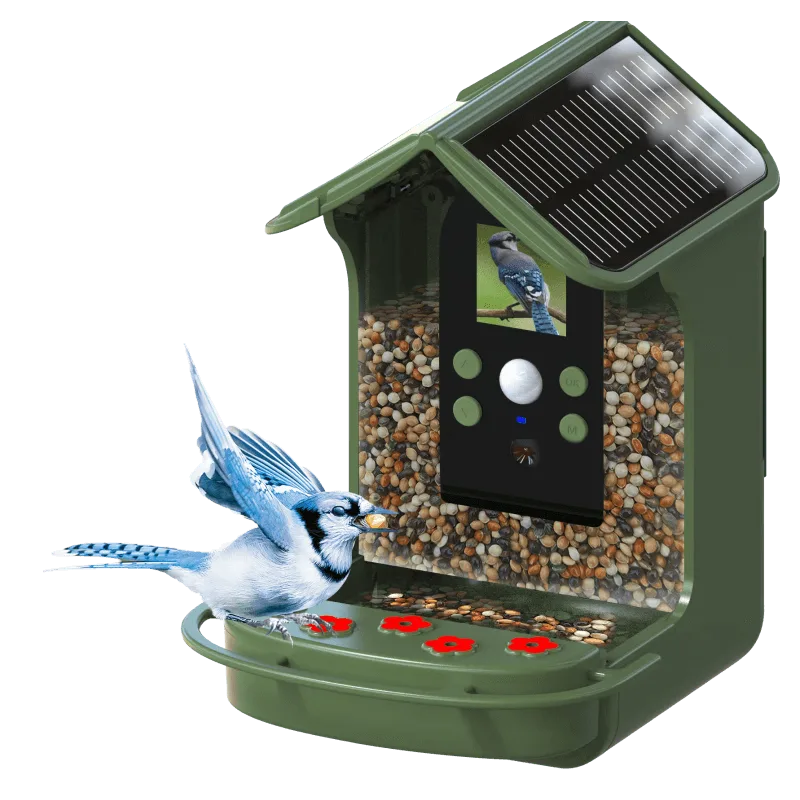
The Bird Cam 130 Solar has a built-in solar roof that keeps the battery charged. For reliable operation, mount the camera where the solar panel receives at least 4-5 hours of direct sunlight daily. Avoid deep shade under dense tree canopies or north-facing walls.
If the camera is placed in a spot with only indirect light, the battery may drain during cloudy periods, especially in winter. You can supplement with a USB power bank via the micro-USB port (not included) for extended use.
PIR Sensor: Trigger Zone
The camera’s PIR sensor detects motion up to 3 meters away. To avoid false triggers from swaying branches or passing cars, aim the sensor so it only sees the feeder area. The trigger time is 0.8 seconds, which is fast enough to catch birds in flight, but not instant—position the camera 1–2 meters from the feeder for best results.
Keep in mind that the PIR sensor works best when the bird is moving across the field of view, not directly toward the camera. If you get many empty shots, try repositioning the camera slightly to the side.
Setup Steps
- 1. Insert a microSD card and batteries: Open the side compartment and insert a microSD card (up to 32GB, Class 10 recommended). Then insert 4x AA batteries (NiMH rechargeable work best with the solar panel). Close the compartment securely. Use rechargeable batteries to maximize solar benefit.
- 2. Mount the camera: Use the included mounting bracket to attach the camera to a tree, post, or fence. Aim the camera at the feeder area, about 1–2 meters away. Ensure the solar panel faces upward and south (northern hemisphere) for maximum sun exposure. Check that the mounting bracket is tight and the camera won't shift in wind.
- 3. Power on and check display: Press and hold the power button until the 1.44" color display lights up. Use the display to frame your shot. If the image is too dark or too bright, adjust the camera angle slightly. The display is small but useful for initial framing; fine-tune later using the photos.
- 4. Set the PIR detection zone: Walk in front of the camera at different distances to test the PIR sensor. Adjust the camera angle so the sensor only covers the feeder area. Avoid pointing it at roads, sidewalks, or trees that move in the wind. A common mistake is aiming too wide, resulting in many false triggers.
- 5. Configure recording mode (optional): If the camera has a menu button, you can set it to photo, video, or photo+video mode. For birds, photo mode with a 1-second interval often works best. Video mode gives 1080p clips but uses more battery and card space. Start with photo mode to save battery and storage; switch to video once you know the setup is stable.
- 6. Final placement check: Wait 24 hours and review the first set of images. If you see many empty shots, move the camera closer or adjust the angle. If the battery is low after a cloudy day, consider a USB power bank as backup. The solar panel needs direct sun; if the battery drains, reposition the camera.
Product Facts
-
BRAUN Bird Cam 130 Solar: 1.3MP image sensor, photos up to 12MP, 1080p full HD videos, PIR motion detection up to 3 meters, 0.8 second trigger time, 1.44" color display. The 0.8-second trigger time is fast enough to capture birds landing on a feeder, but you need to place the camera within 3 meters for reliable detection.
BRAUN Bird Cam 130 Solar