Quick Answer
Format a Class 10 microSD card (up to 512GB) in the camera, mount the Black800 at chest height on a sturdy tree, and set the PIR sensitivity to High for active trails or Low for feeders to avoid false triggers.
Why the Black800 Classic Works for Day and Night Monitoring
The BRAUN Scouting Cam Black800 records up to 4K video and 32 MP photos, making it suitable for identifying individual animals even in low light. Its 8MP CMOS sensor and infrared LEDs provide clear night footage without visible flash, so wildlife is less likely to be spooked.
The 0.2-second trigger time and 15-meter trigger distance mean the camera catches fast-moving animals like deer or coyotes before they leave the frame. The IP66 rating protects against rain and dust, so you can leave it out for weeks without maintenance.
Trade-Off: Detection Angle vs. Coverage Area
The Black800 uses a 110° PIR detection angle. This is narrower than some 120° or 140° models, which means you need to aim the camera more precisely. If you mount it too high or point it at a wide clearing, animals walking at the edges may not trigger a recording.
For best results, position the camera so the detection zone covers the trail or feeder you want to monitor. A 110° angle is ideal for a single trail or a feeder, but not for a large open field.
Step-by-Step Setup Guide
- 1. Prepare the microSD Card: Insert a Class 10 or faster microSD card (up to 512GB) into the slot. Power on the camera and use the menu to format the card. Formatting inside the camera prevents file system errors. Always format a new card in the camera, not in a computer, to avoid compatibility issues.
- 2. Set Date, Time, and Time-Lapse Mode: Navigate to the settings menu and enter the current date and time. If you want to monitor a feeding site or construction area, enable time-lapse mode and set an interval (e.g., 1 minute). This captures periodic images regardless of motion. A wrong date stamp makes it hard to correlate footage with actual events. Double-check the time zone.
- 3. Choose Photo or Video Mode: Select Photo for high-resolution stills (up to 32 MP) or Video for 4K clips. For most scouting needs, a 10-second 1080p video with a 1-second interval between triggers balances detail and storage. Longer video clips drain batteries faster. Keep clips under 30 seconds unless you need extended observation.
- 4. Mount the Camera at the Right Height: Attach the Black800 to a tree or post using the included strap. Position it at chest height (about 1.5 meters) and angle it slightly downward. The 110° PIR sensor works best when the animal walks across the detection zone, not directly toward the lens. Mounting too high or pointing at open sky can cause false triggers from wind-blown branches or passing clouds.
- 5. Adjust PIR Sensitivity for Your Location: In the menu, set PIR sensitivity to High on active trails with frequent animal movement. Use Low near feeders or bait sites to avoid recording every bird or falling leaf. Medium works for general scouting. High sensitivity on a windy day may fill your card with false triggers. Check the first 24 hours of footage and adjust if needed.
- 6. Test the Detection Zone: Walk across the camera’s field of view at different distances (5, 10, and 15 meters). Review the test images or videos to confirm the camera triggers reliably. Adjust the angle or sensitivity if you see missed triggers. A quick walk test saves you from returning to the site only to find blank cards.
Product Facts
-
BRAUN Scouting Cam Black800: The BRAUN Scouting Cam Black800 has a trigger time of 0.2 seconds and a trigger distance up to 15 meters. This fast reaction time helps capture animals that move quickly, reducing the chance of empty frames or partial shots.
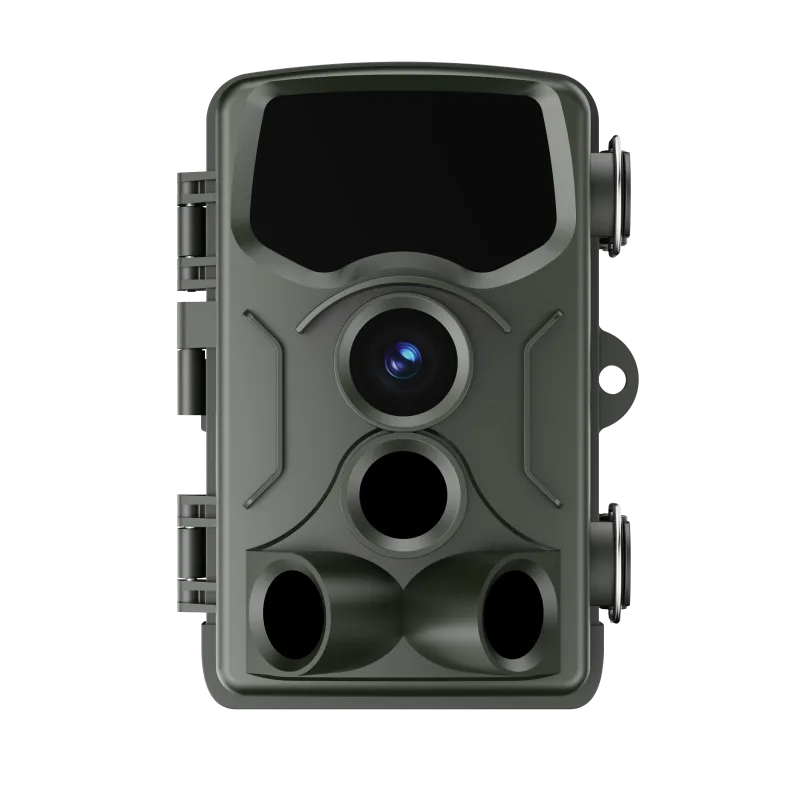
BRAUN Scouting Cam Black800
-
BRAUN Scouting Cam Black800: It supports microSD cards up to 512GB and has an IP66 protection class. You can store weeks of footage without swapping cards, and the weatherproof housing lets you leave the camera outdoors in rain or dust.