Quick answer
Installing a ceiling fan with light and remote is a straightforward DIY project if you follow the correct sequence: mount the bracket, assemble the fan, wire it safely, attach the blades, and pair the remote.
Why choose a fan with light and remote?
A ceiling fan with integrated light and remote control simplifies your room's look and operation. You avoid pulling chains or reaching for a separate wall switch, and the remote lets you adjust speed and dim the light from anywhere in the room. Many modern fans, like the 52" Tibuh Modern Crystal Chandelier Ceiling Fan, combine these features in one fixture, saving ceiling space and wiring effort.
Downrod vs. flush mount: what to know
Most ceiling fans with lights can be installed with a downrod or as a flush mount. Downrod mount fans (like the 36" Pickett Industrial Downrod Mount Ceiling Fan) work best for rooms with ceilings 8 feet or higher, as they allow better airflow. For low ceilings, a flush mount keeps the fan close to the ceiling. If you need a custom downrod length, some manufacturers offer custom options—just be aware that custom orders can take 20 days to 2 months to arrive, so plan ahead.
Step-by-step installation tips
- Turn off power and choose the right mounting: Switch off the circuit breaker for the existing light fixture. Remove the old fixture and inspect the ceiling box—it must be rated to support a ceiling fan (usually marked 'fan-rated'). Decide whether to use a downrod or flush mount based on your ceiling height. For downrod mount fans, ensure the downrod is long enough so blades sit at least 7 feet above the floor. Common mistake: using a non-fan-rated box can cause the fan to wobble or fall. Always check the rating.
- Assemble the fan motor and light kit: Follow the manual to attach the downrod (if using) to the motor housing. Thread the fan wires through the downrod. Secure the motor to the mounting bracket. Then attach the light kit to the bottom of the motor—most models use a simple twist-lock or screws. Do not install the blades yet; they are easier to add after the fan is wired. Checkpoint: make sure all screws are tight but not over-torqued to avoid stripping the threads.
- Wire the fan and light to the house supply: Connect the fan's wires to your house wiring: typically white to white (neutral), black to black (live), and green or bare copper to ground. If your fan has a separate light wire (often blue), connect it to the same black live wire unless you want separate switches. Use wire nuts and wrap with electrical tape. Tuck all wires neatly into the ceiling box. Common mistake: mixing up the live and neutral wires can cause the remote or light to malfunction. Double-check with a voltage tester before turning power on.
- Attach the blades and install the light bulbs: Screw each blade to the blade arms, then attach the arms to the motor. Tighten evenly to avoid wobble. Install light bulbs (check the fan's specification for bulb type—many use E12 or E26 base). For example, the Tibuh fan uses 4x40W E12 bulbs (not included). Do not exceed the rated wattage. Checkpoint: after attaching blades, spin them by hand to ensure they clear the ceiling and light kit without rubbing.
- Pair the remote control and test: Insert batteries into the remote. Turn the power back on at the breaker. Usually, the remote pairs automatically, but if not, press the 'pair' or 'learn' button on the receiver (inside the fan canopy) and then a button on the remote. Test all functions: fan speeds, light on/off, and dimming (if supported). If the fan does not respond, check the receiver dip switches match the remote settings. Common mistake: forgetting to set the same dip switch code on both the remote and receiver. If the fan still doesn't work, try replacing the remote batteries.
Product facts
-
52" Tibuh Modern Crystal Chandelier Ceiling Fan with Led Light And Remote Control 5 Blades Chrome: The 52" Tibuh Modern Crystal Chandelier Ceiling Fan uses an AC motor, 5 reversible plywood blades, and includes a remote control. It is rated for dry locations only. This fan is a good choice for living rooms or bedrooms where you want both a chandelier look and reliable cooling, but it cannot be used outdoors or in damp areas.

52" Tibuh Modern Crystal Chandelier Ceiling Fan with Led Light And Remote Control 5 Blades Chrome
-
36" Pickett Industrial Downrod Mount Ceiling Fan with Lighting and Remote Control: The 36" Pickett Industrial Downrod Mount Ceiling Fan has retractable plastic blades that hide when the fan is off, and uses an AC motor with remote control. It is also for dry locations only. Its retractable blades make it ideal for rooms where you want a clean, industrial look when the fan is not running, but the smaller 36-inch span is best for compact spaces.
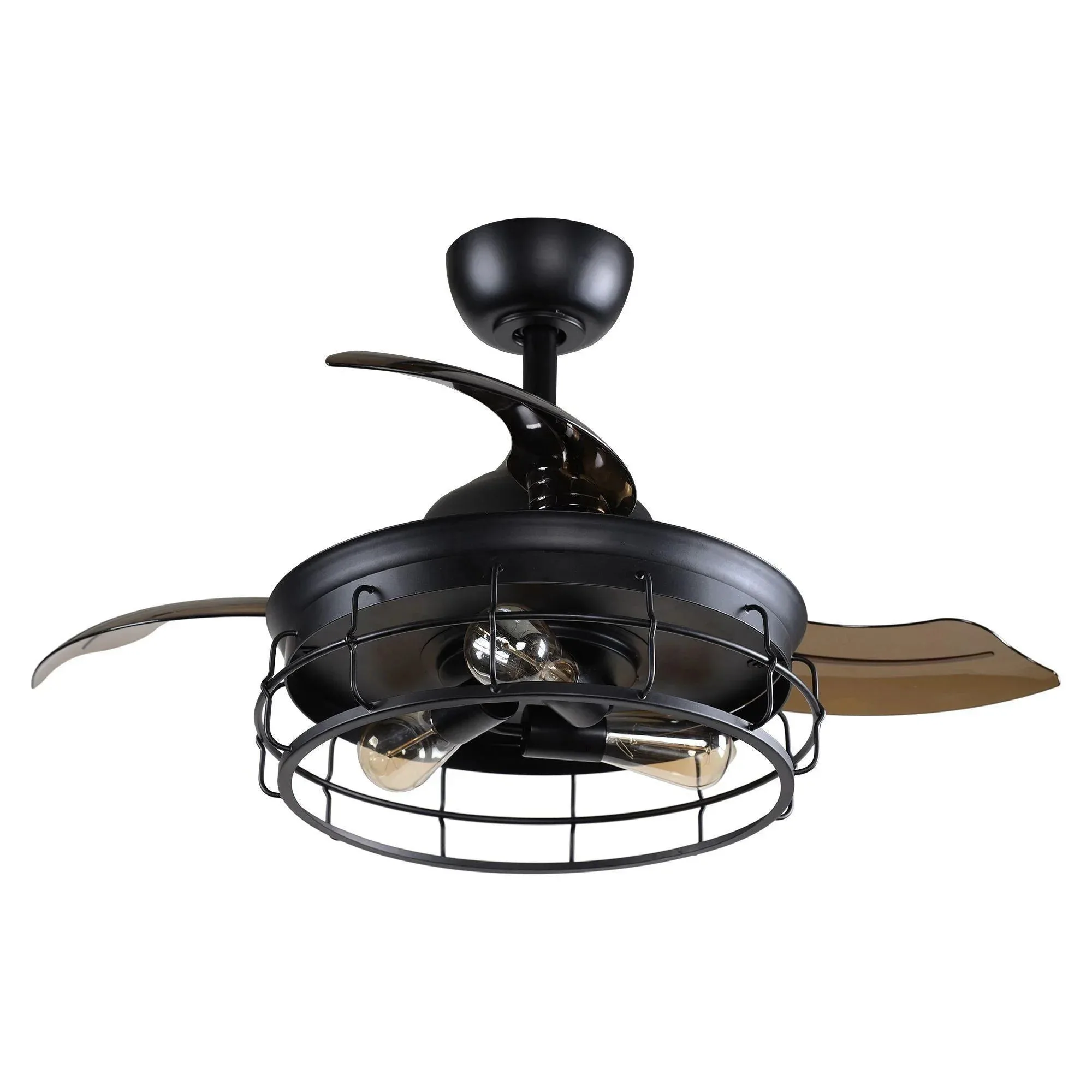
36" Pickett Industrial Downrod Mount Ceiling Fan with Lighting and Remote Control


