What the Belkin Creator Kit Includes
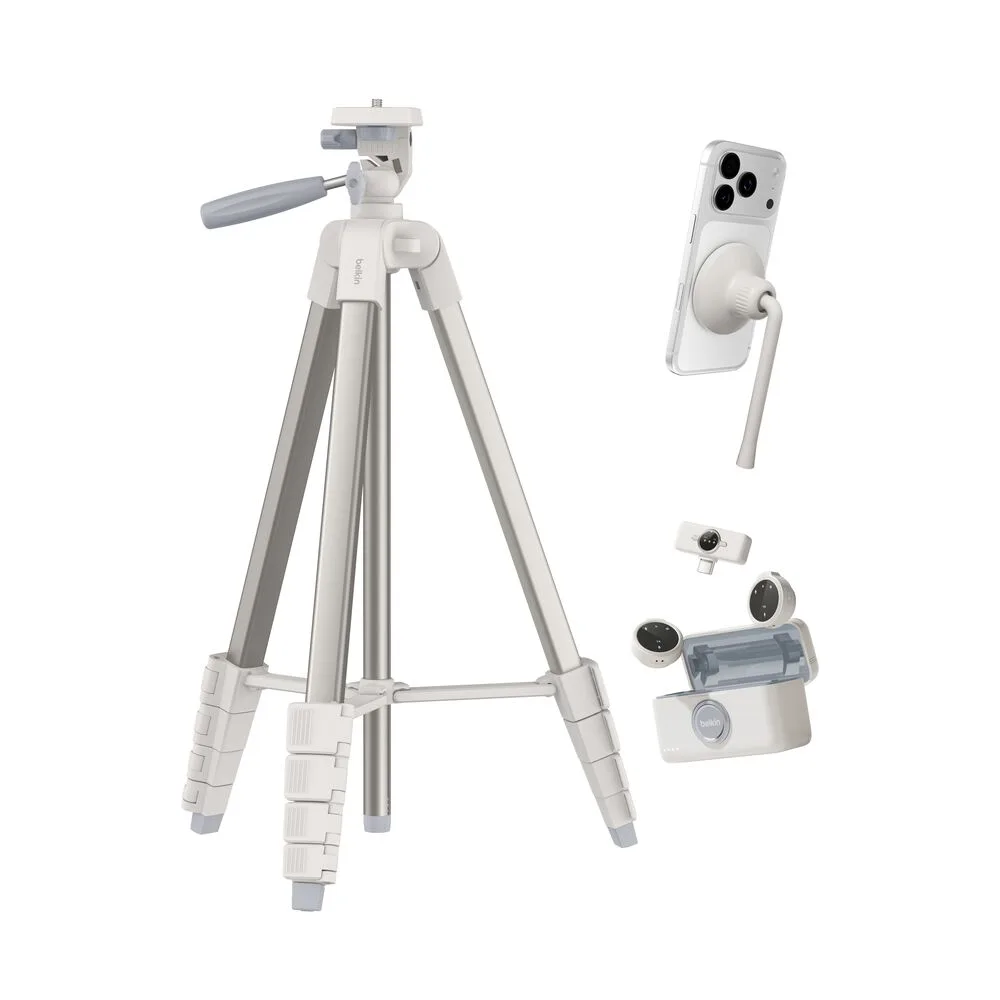
The Belkin Creator Kit combines three essential tools for mobile content creation: a tripod, a magnetic phone mount, and wireless microphones. Packaged in a sand color finish, it's designed for creators who need a portable, all-in-one setup without carrying separate accessories.
Kit Contents at a Glance
-
Creator Kit: Tripod, Magnetic Phone Mount & Wireless Mics: Includes a tripod for stable hands-free shooting The tripod eliminates shaky handheld footage, giving you steady framing for interviews, product demos, or vlogs.
Creator Kit: Tripod, Magnetic Phone Mount & Wireless Mics
-
Creator Kit: Tripod, Magnetic Phone Mount & Wireless Mics: Features a magnetic phone mount for quick and secure attachment You can attach or detach your phone in seconds without fiddling with clips or screws, speeding up your setup between takes.
-
Creator Kit: Tripod, Magnetic Phone Mount & Wireless Mics: Comes with wireless microphones to capture clear audio Built-in phone mics often pick up room echo or handling noise. The wireless mics let you capture crisp, focused sound from a distance.
Setting Up Your Creator Kit
These steps help you get the kit ready for your first recording session. No special tools are needed.
- Unfold and position the tripod: Extend the tripod legs on a flat surface. Adjust the height by loosening the leg locks, setting the desired height, then tightening them again. The tripod provides a stable base for hands-free shooting.
- Attach the magnetic phone mount: The magnetic mount attaches to the tripod's standard screw thread. Once secured, place your phone on the mount—the magnets hold it firmly in place. No case or adhesive is required.
- Pair the wireless microphones: Turn on the receiver (connected to your phone via the included cable or adapter) and then power on the transmitter microphone. They should sync automatically. Check the manufacturer's instructions for any initial pairing steps.
- Position the microphone for best audio: Clip the transmitter mic near the speaker's mouth, ideally on a collar or lapel. Keep the receiver within a few feet for a reliable wireless connection. Avoid placing the mic behind fabric or near wind sources.
Tips for Better Mobile Content
Use the tripod at eye level for natural-looking shots. For interviews, place the camera (phone) at the subject's eye height and position the wireless mic close to both speakers if possible. The magnetic mount lets you quickly switch between portrait and landscape orientation, which is useful for platforms like TikTok (vertical) and YouTube (horizontal).
Since the Creator Kit is designed for creators on the go, it packs into a compact bundle. Carry it in your bag and set up in under a minute once you're familiar with the process.
What This Setup Does Not Cover
The Creator Kit does not include a lighting accessory or external battery for the microphones. For low-light scenes, add a separate LED panel. For extended recording sessions, check the microphone battery life beforehand. The kit is best suited for short to medium-length shoots where portability matters most.