Quick answer
The 70mai A810 Gift Box is a complete dash cam bundle that includes the A810 front cam, RC12 rear cam, hardwire kit, 256GB memory card, CPL filter, canvas bag, and stickers. This guide walks you through unboxing, installing the hardwire kit for parking mode, attaching the CPL filter, and pairing the rear cam.
Why choose the Gift Box over a standalone dash cam?
Buying a dash cam bundle saves you the hassle of matching accessories separately. The A810 Gift Box comes with everything needed for a complete setup: front and rear recording, 24/7 parking surveillance via hardwire, glare reduction with the CPL filter, and a 256GB card so you don't have to buy one. It also includes a canvas bag for storage and decorative stickers, making it a thoughtful gift for new car owners or tech enthusiasts.
The only trade-off is that the hardwire kit requires a permanent connection to your vehicle's fuse box. If you prefer a simpler plug-and-play installation, you might opt for a USB-powered setup, but you'll lose parking mode capability.
How to set up the A810 Gift Box step by step
- Unbox and check all components: Open the gift box and verify you have the A810 dash cam, RC12 rear cam, hardwire kit, 256GB microSD card (pre-installed or separate), CPL2 filter, canvas bag, and sticker set. Also check for the adhesive mounts, power cables, and the hardwire kit's fuse tap connectors. Missing any item? Contact 70mai support before starting installation.
- Install the hardwire kit for parking mode: Locate your vehicle's fuse box (usually under the dashboard or hood). Connect the hardwire kit's positive wire to a constant 12V fuse (e.g., for interior lights) and the negative wire to a ground point. Route the cable along the windshield edge to the A810 dash cam. Plug the hardwire kit's USB-C connector into the dash cam. This powers the camera and enables motion-detection recording when the car is off. Use a multimeter to confirm the fuse is always live — tapping a switched fuse will disable parking mode.
- Attach the CPL filter to the front cam: Twist the CPL2 filter onto the lens of the A810 dash cam until it clicks. Rotate the filter ring while looking at the live view on the dash cam screen or app. Stop when reflections from the windshield, dashboard, or headlights are minimized. The filter reduces glare and improves clarity in bright conditions. The CPL filter works best when rotated to match the angle of the light source — it's not a one-time setting.
- Mount and connect the rear cam: Clean the rear window area and attach the RC12 rear cam using the adhesive mount. Run the included 6-meter cable along the ceiling or floor edge to the front camera. Plug the cable into the A810's rear cam port. The dash cam should automatically detect the rear camera and begin recording in dual-channel mode. Test the rear cam's field of view before finalizing placement — it should cover the lane behind you without obstruction.
- Format the memory card and test recording: Insert the 256GB microSD card into the A810 (if not pre-installed). Power on the dash cam and use the settings menu to format the card. Set the recording resolution (4K for front, 1080p for rear), enable loop recording, and turn on parking mode. Drive a short distance and check that both front and rear footage are saved. Format the card inside the dash cam, not on a computer — this ensures correct file system and partition alignment.
- Secure cables and tidy up: Use the included cable clips or adhesive cable guides to secure the hardwire kit and rear cam cables along the windshield edge, door frame, or floor. Avoid routing cables near moving parts like seat rails or pedals. Tuck excess cable behind trim panels if possible. Loose cables can interfere with driving or get damaged — take time to route them neatly.
What's in the box
-
A810 Gift Box: Front Cam + Rear Cam + Memory Card + Hardwire Kit + CPL Filter + Canvas Bag + Sticker Set: The A810 Gift Box includes an A810 dash cam, RC12 rear cam, parking hardwire kit, 256GB microSD card, CPL2 filter, canvas bag, and decorative stickers. You get a complete system in one purchase — no need to buy a memory card, rear cam, or filter separately, and the hardwire kit enables 24/7 parking surveillance.
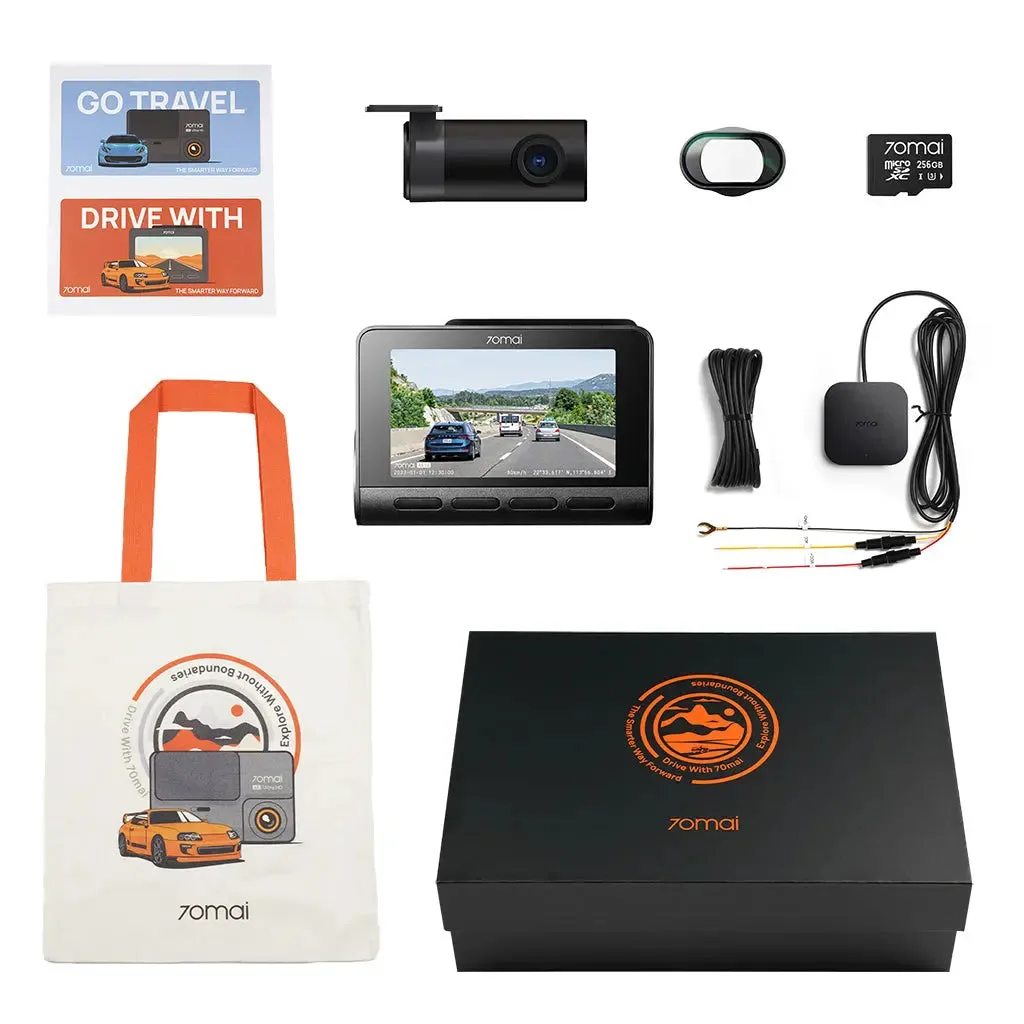
A810 Gift Box: Front Cam + Rear Cam + Memory Card + Hardwire Kit + CPL Filter + Canvas Bag + Sticker Set