Quick answer
The Dead by Daylight 3 inch logo sticker works best on clean, smooth, non-porous surfaces like laptops, water bottles, notebooks, and phone cases. Proper surface prep and careful placement keep it looking sharp for years.
Why surface choice matters for your logo sticker
A 3 inch round sticker is versatile but not universal. Porous surfaces like raw wood, textured plastic, or fabric will trap air and cause the adhesive to fail over time. Smooth, non-porous materials give the vinyl the best grip and prevent peeling at the edges.
The sticker's black color and round logo design stand out best on light or solid-color backgrounds. Avoid applying it over existing stickers, dirt, or greasy spots, as those weaken the bond and create an uneven look.
Heat and moisture considerations
Vinyl stickers handle normal indoor use well, but extreme heat (like a car dashboard in summer) can soften the adhesive and cause the sticker to slide or bubble. Repeated moisture exposure, such as on a water bottle that goes through the dishwasher, will shorten its lifespan. Hand wash only if you apply it to a reusable bottle.
For outdoor use, choose a spot that's not directly blasted by sun or rain for hours. A laptop lid or notebook cover is usually safe, while a bumper sticker on a car might fade or peel faster.
How to apply your Dead by Daylight sticker for best results
- Clean the surface thoroughly: Wipe the area with rubbing alcohol or a mild soap solution to remove dust, oil, and residue. Let it dry completely. A common mistake is applying the sticker to a surface that still feels slightly damp, which traps moisture and causes bubbles. Check for any leftover lint or fingerprints before peeling the backing.
- Position the sticker without touching the adhesive: Peel the sticker from its backing slowly, holding it by the edges. Place it gently on the surface and slide it slightly if needed before pressing down. Avoid touching the sticky side with your fingers, as skin oils reduce adhesion. Use a piece of tape on the top edge to hinge the sticker if you want a perfectly centered placement.
- Press from the center outward to remove air bubbles: Use a credit card or your thumb to smooth the sticker from the middle toward the edges. If a small bubble remains, prick it with a pin and press flat. A common mistake is pressing too hard and stretching the vinyl, which can distort the logo. Work slowly; you have about 10–15 seconds before the adhesive sets permanently.
- Let the adhesive cure for 24 hours: Avoid moving, washing, or exposing the sticker to moisture for a full day after application. The bond strengthens over time. A common mistake is using the item immediately, which can cause the sticker to peel off at the edges. If you applied it to a water bottle, wait a day before filling it with cold water.
Product details
-
3" Logo Sticker - Black: This black 3 inch round sticker features Dead By Daylight branding and is designed for personalizing everyday items like laptops, water bottles, and notebooks. Its compact size and simple design make it easy to place on a variety of flat surfaces without overwhelming your gear.
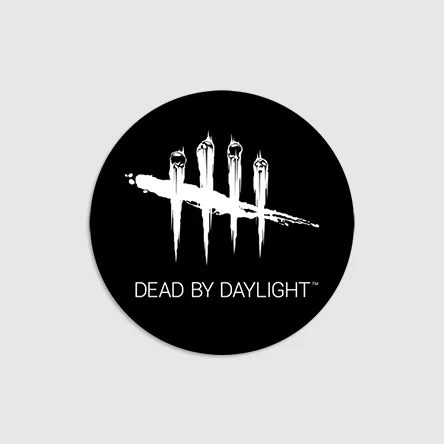
3" Logo Sticker - Black