Quick Answer
Set up your desktop nano aquarium starter kit by rinsing the tank, installing the filter and LED light, adding substrate and water, cycling, and then introducing fish gradually.
Why a Bow Front Tank Changes the Setup
The curved front panel on a bow front nano tank gives a wider, more immersive view than a flat-front tank of the same footprint. That shape also means you need to be a little more careful when positioning hardscape—rock or wood placed too close to the curve can create awkward reflections or push the glass. Keep the center of the bow clear for the best sightline.
Trade-Offs of a Starter Kit
A complete starter kit bundles the tank, filter, and light, which removes the guesswork of matching parts. The trade-off is that the included filter and light are sized for the tank, so you won't be able to keep demanding plants or heavy-stocking fish. Treat the kit as a solid foundation and upgrade components only if your goals change.
Step-by-Step Setup Process
- Rinse Everything: Rinse the tank, substrate, and decorations with plain water. Do not use soap, which leaves residues that are toxic to fish. Check that the filter media is rinsed separately in dechlorinated water to avoid killing beneficial bacteria later.
- Place the Tank: Set the tank on a level, sturdy surface that can support the filled weight. A desktop near a power outlet works well. Confirm there is enough clearance above the tank for the light and for reaching the filter during maintenance.
- Install Filter and Light: Attach the filter to the back or side of the tank as directed, and position the LED light securely. Make sure cords are routed safely. Plug in the filter and light to confirm they work before adding water.
- Add Substrate and Hardscape: Spread a layer of rinsed substrate, then arrange rocks or wood. Keep hardscape away from the curved front to avoid stress on the glass and to keep the view clear. Avoid stacking rocks against the bow front; use a stable base to prevent shifting.
- Fill with Water: Fill slowly using a plate or your hand to break the flow, so you don't disturb the substrate. Use dechlorinated water. Leave enough headroom (about 1 inch) for water displacement when you add fish later.
- Cycle the Tank: Run the filter and light for several days to establish beneficial bacteria. Add a source of ammonia (fish food or pure ammonia) and test water parameters until nitrite and ammonia drop to zero. Do not add fish until the cycle is complete; this is the most common mistake for beginners.
- Add Fish Gradually: Introduce only a few small fish or shrimp at a time, and float the bag for 15-20 minutes to equalize temperature before releasing. Quarantine new fish in a separate container if possible to avoid introducing disease.
Product Facts
-
Desktop Nano Aquarium Fish Tank Bow Front Complete Starter Kit: This desktop nano kit includes filtration, LED lighting, and filter media, and is designed for nano fish and shrimp keepers. You get everything needed to start a small tank out of the box, so you can focus on aquascaping and cycling rather than sourcing separate equipment.
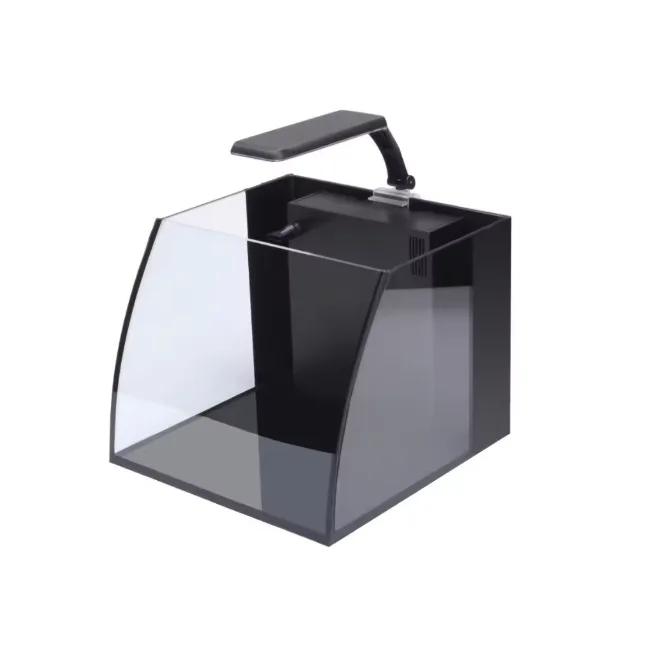
Desktop Nano Aquarium Fish Tank Bow Front Complete Starter Kit