The mistakes that actually scratch screens
Most scratched displays are not the result of one dramatic accident. They come from repeated small choices: grabbing a tissue, spraying liquid directly on glass, pressing hard on a dry surface, or using a cloth that has been sitting in a bag with grit. The problem is rarely the screen itself; it is the method.
A safer routine starts with removing loose particles before any contact with the glass, then using a cleaner that does not introduce liquid. The DigiKlear Black Series is built around that idea: a retractable dust removal brush and a non-liquid cleaning element designed to never dry out. That combination addresses the two most common causes of fine scratches, which are grit dragged across the surface and liquid seeping where it should not.
Five habits worth changing
These are the recurring mistakes we see in screen and lens care. Each one is easy to fix once you know what to replace it with.
- Spraying liquid directly on the screen: Liquid can run into edges and seams. A non-liquid cleaning element avoids that risk entirely, which is why the DigiKlear uses one.
- Skipping the dust brush: Wiping over loose grit is the fastest way to create fine scratches. Brush first, then clean the glass.
- Pressing hard to remove a smudge: Pressure does not dissolve residue; it just increases friction. Let the cleaning tip do the work with light contact.
- Using the same cloth for lenses and screens: A cloth that has touched a lens or a bag can carry grit. Keep a dedicated tool for glass and LCD surfaces.
- Ignoring the corners: Dirt collects where the screen meets the bezel. A cleaning tip shaped to reach corners helps you avoid grinding debris into that edge.
How the DigiKlear Black Series fits a safer routine
-
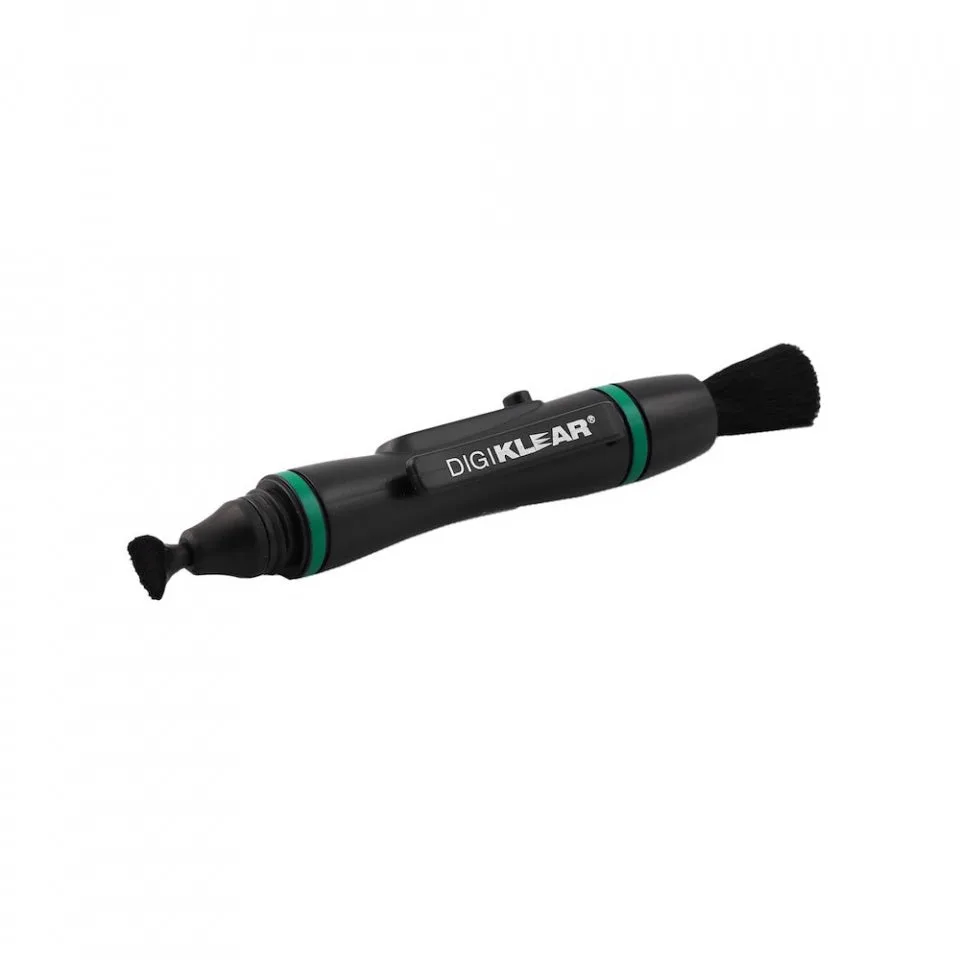
DigiKlear™ Black Series: DigiKlear is designed specifically for cleaning the small digital glass and LCD screens on the backs of digital cameras. That focus makes it a sensible default for the screen you check most often, without reaching for household cloths.
DigiKlear™ Black Series
-
DigiKlear™ Black Series: The DigiKlear features a retractable dust removal brush and a special non-liquid cleaning element designed to never dry out. The brush handles the grit-removal step, and the non-liquid element avoids the runoff risk of sprays.
-
DigiKlear™ Black Series: The cleaning tip is semi-triangular shaped for cleaning into the corners of the screen. Corners are where debris hides; a shaped tip lets you clean them without pressing hard on the flat glass.
-
DigiKlear™ Black Series: DigiKlear is 11cm long with a round cleaning tip measuring 12mm in diameter. That size suits small camera screens and is easy to keep in a bag, so you are less tempted to improvise.
A screen-safe sequence for camera, phone and tablet glass
The order matters more than the tool. Follow this sequence on any small glass or LCD screen, including the back of a digital camera, a phone, a tablet, or a drone controller screen.
- Brush off loose dust first: Extend the retractable brush and sweep gently across the screen. This removes grit before anything touches the glass.
- Switch to the cleaning tip: Use the non-liquid cleaning element with light pressure. The semi-triangular shape lets you work into corners without forcing.
- Check the result and repeat if needed: If a smudge remains, brush again and repeat. Avoid pressing harder; friction is the enemy here.
- Retract the brush and store the tool: Keeping the brush retracted protects it from picking up grit in your bag, which keeps the next cleaning safe.
Where this tool stops and judgment begins
The DigiKlear is described for small digital glass and LCD screens, and also for other optical devices and drones. That is a broad but not unlimited scope. The supplied information does not confirm compatibility with every screen coating, nor does it give operating instructions for unusual surfaces. If a screen has a soft or unusual finish, test in a small area first or follow the device maker's guidance.
Also note what the record does not include: there are no supplied preparation steps, no specified number of uses, and no cleaning times. Those absences are not flaws in the product; they simply mean you should rely on the sequence above and your own observation rather than invented rules. The goal is to remove grit and residue without adding liquid or pressure, and the DigiKlear's brush-and-tip design supports exactly that.
Choosing between a dedicated screen cleaner and a general cloth
A microfiber cloth can be part of a safe routine, but it is not a complete one. Here is how the trade-offs look for common screen care situations.
- Dedicated non-liquid cleaner (DigiKlear Black Series): Best when you want to avoid sprays and reach corners. The brush handles dust and the tip handles residue, with no liquid to run into seams.
- Microfiber cloth alone: Useful for a quick wipe, but it does not remove grit first and can spread it. Keep it clean and use it as a supplement, not a substitute for brushing.
- Spray and cloth: Effective on some surfaces, but riskier near edges and on small camera screens. The DigiKlear's non-liquid element avoids that runoff concern.