Quick answer
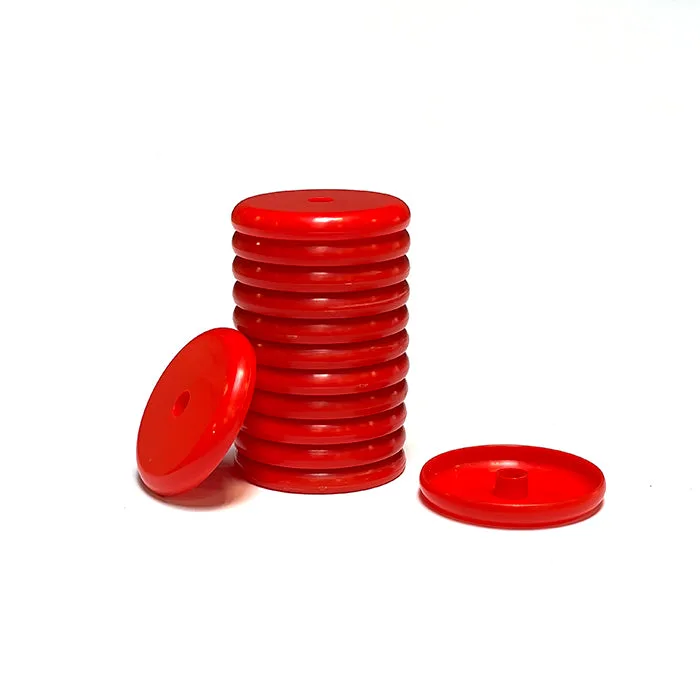
Replace a disc when it shows visible damage—cracks, deep gouges, or a bent edge—or when clean discs consistently fly shorter than they used to. If you are losing discs to the couch or want to modify a huge hopper, a disc launcher refill pack is the simplest fix. For normal wear, inspect discs every few weeks and replace the whole set when more than a couple are compromised.
How to tell a worn disc from a dirty one
Before you buy replacements, clean your discs. Dust, carpet fuzz, and sticky residue add friction and can make shots fall short. Wipe each disc with a damp cloth and mild soap, then dry completely. If performance improves, you just needed maintenance. If a disc still flies poorly after cleaning, check for physical damage: hold it up to light and look for cracks, nicks, or warping. A damaged disc will never shoot straight again.
What causes discs to wear out faster
Discs wear from friction and impact. Launching off rough surfaces like concrete or asphalt scuffs the edges. Leaving discs in a hot car can warp them. Stacking them loosely in a toy bin leads to bent rims. To extend life, launch from smooth surfaces, store discs flat in a container, and keep them out of direct sun. If you modify a hopper to hold more discs, make sure they feed without jamming—forcing a stuck disc can damage its edge.
When a refill pack beats 3D printing
CrunchLabs offers a free STL file so you can 3D-print your own discs at home. That is a great option if you have a printer, filament, and want to experiment with custom colors or weights. But if you want consistent performance without tuning a printer, the Disc Launcher Discs Refill Pack gives you ready-to-use discs. It also makes sense if you have lost a lot of discs and want a quick restock. The refill pack ships free in the US.
How many discs should you keep on hand
A good rule: keep at least twice as many discs as your launcher holds. That way you can keep playing while a set is drying after cleaning or while you search for lost ones. If you often host friends or siblings, aim for three times the capacity. The refill pack is inexpensive, so having a spare set avoids interruptions.
Disc launcher care FAQ
How often should I replace discs?
Inspect discs every few weeks. Replace any disc with cracks, deep gouges, or a bent edge. If more than two discs in a set are damaged, replace the whole set for consistent flight. Set a recurring reminder to check discs before a play session.
Can I fix a warped disc?
No. Warping changes the disc's aerodynamics and usually cannot be reversed. A warped disc will fly unpredictably, so retire it. Store discs flat and away from heat to prevent warping.
Why does my launcher shoot shorter than before?
Short shots usually mean dirty or damaged discs, not a broken launcher. Clean the discs first. If that does not help, check the launcher's moving parts for debris or wear. Rule out discs before assuming the launcher is at fault.
Is it worth buying a refill pack if I only lost a few discs?
Yes, if you want to keep a full set on hand. The refill pack is affordable and ensures you are not caught short. Alternatively, 3D print replacements if you have a printer. Buy a refill pack when you want a quick, reliable restock.
Product facts
- Disc Launcher Discs Refill Pack (Build Box): Disc Launcher Discs Refill Pack (Build Box) – catalog price USD 6.17 (comparison price USD 9.95). Includes free shipping in the US. A free STL design file is available for 3D printing your own discs. At this price, a refill pack is a low-cost way to restore performance without dealing with 3D printing. Free shipping removes the usual small-order penalty.