Why a reorder deserves a fresh fit check
A reorder is not a copy-paste of your last order. Bodies change, team rosters shift, and the custom details you approved last season may need a second look. The Fade Custom Men's Premium Racerback Singlet is built from your chosen gradient colors and text, so any change to the design or the wearer means you should verify the fit and the artwork before you commit.
This checklist focuses on what you can confirm from the supplied catalog information and what you should confirm with your team before placing a repeat order. It does not replace a physical try-on or a conversation with the supplier about measurements.
What the catalog confirms about this singlet
-
Men's Full Custom Uniforms Fade Custom Men's Premium Racerback Singlet. (x 1): Men's Full Custom Uniforms Custom Men's Premium Racerback Singlet Fade, catalog price USD 51.00 (comparison price USD 75.00). Confirms the exact product to reference when you reorder, so the fit check applies to the right garment.
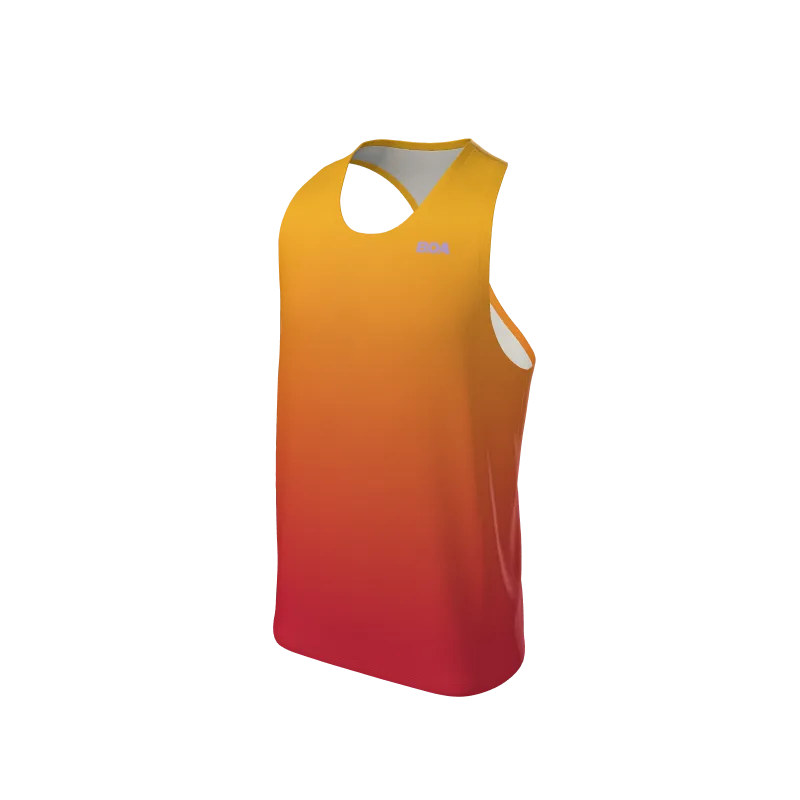
Men's Full Custom Uniforms Fade Custom Men's Premium Racerback Singlet. (x 1)
-
Men's Full Custom Uniforms Fade Custom Men's Premium Racerback Singlet. (x 1): Top gradient color: Saffron Yellow Gold (#fbb617); bottom gradient color: Pantone 187C (#C41230). Color placement is part of the fit check because a gradient shift can change how the singlet reads on different body types and in team photos.
-
Men's Full Custom Uniforms Fade Custom Men's Premium Racerback Singlet. (x 1): Note - BOA logo must be visible. The logo visibility requirement is a design constraint you must re-confirm on every reorder, not just the first one.
Fit verification points to check before you reorder
Work through these points with the actual wearer or a team representative. Each one addresses a common reason a reorder feels different from the original.
- Confirm the wearer and size: The catalog lists size as a specification but does not provide a size chart or body measurements in the supplied information. Compare the size on your previous order with the current wearer's preference and confirm the size selection at checkout.
- Re-check the racerback and shoulder fit: A racerback cut changes how the singlet sits across the shoulders and back. Ask the wearer whether the previous singlet allowed free arm movement and whether the neckline sat where they wanted. If not, note the specific area before reordering.
- Verify gradient color placement: The Fade design uses a Saffron Yellow Gold top gradient and a Pantone 187C bottom gradient. Confirm the transition point still suits the wearer and the team's current kit.
- Confirm the BOA logo is visible: The catalog note requires the BOA logo to be visible. Check that your reorder artwork keeps it unobstructed by the gradient, text, or any added elements.
- Review text and font details: The record lists text, key, font, style, stroke, and stroke width as specifications. Reconfirm spelling, font color, and stroke settings so the reorder matches the approved design.
What the catalog does not tell you about fit
The supplied information does not include a size chart, body measurements, fabric composition, stretch, or care instructions for this singlet. That means you cannot confirm fit from the catalog alone. Treat any fit decision as a conversation with the wearer and, where possible, a try-on of the previous singlet.
The absence of those details is not a defect in the product; it simply means the catalog record is not a fitting guide. Do not assume a size will behave the same across seasons or between wearers.
A practical reorder sequence
- Step 1: Gather feedback on the current singlet: Ask the wearer where the racerback, neckline, and hem sit, and whether anything restricted movement.
- Step 2: Confirm the size and quantity: The catalog shows size and quantity as order fields. Match the size to the current wearer and confirm the team quantity before checkout.
- Step 3: Re-verify the custom artwork: Check the Saffron Yellow Gold and Pantone 187C gradient placement, text spelling, font color, and stroke settings against your approved design.
- Step 4: Confirm the BOA logo remains visible: Review the final artwork against the catalog note that the BOA logo must be visible.
- Step 5: Place the reorder and keep a record: Save the confirmed size, color, and text details with your order notes so the next reorder starts from a verified reference.
When to treat a reorder as a new fit decision
If the previous singlet was ordered for a different athlete, or if the team has changed its kit colors, start the fit check from the beginning rather than repeating the last order. The Fade singlet's gradient and text are custom inputs, and the catalog record shows they are part of the order specification, not fixed defaults.
For a like-for-like replacement with the same wearer and the same approved artwork, the checklist above is usually enough to catch the common fit and design issues before you reorder.