Quick Answer
Uneven stitches usually come from incorrect thread tension, a bent or dull needle, or improper threading. Start by rethreading the machine with the presser foot up, then check the needle for damage. If the problem persists, adjust the upper tension dial in small increments and test on a scrap of your quilt fabric.
Common Causes of Uneven Stitches
Uneven stitches can appear as loops on the bottom, skipped stitches, or a loose, loopy top thread. The most frequent cause is incorrect tension between the upper and bobbin threads. For quilting, where you often layer multiple fabrics and batting, the machine needs a balanced tension to feed evenly. A bent or dull needle is another common culprit—it can't penetrate the layers cleanly, leading to irregular stitch formation. Finally, lint buildup in the bobbin case or feed dogs can disrupt the fabric's movement, causing uneven stitch length.
Step-by-Step Troubleshooting
Start with the simplest fix: rethread the machine completely. Raise the presser foot to open the tension discs, then thread with the foot up. This ensures the thread sits properly in the tension mechanism. Next, insert a fresh needle—use a size appropriate for your fabric (e.g., a 90/14 for quilting cotton with batting). Check the bobbin: remove it, clean the bobbin case area with a small brush, and reinsert it with the thread tail pulled through the tension spring. Test on a scrap of your project fabric. If stitches are still uneven, adjust the upper tension dial. Turn it one number at a time (higher for tighter tension, lower for looser) and test after each change. For most quilting cottons, a setting between 4 and 5 works well, but your machine may vary.
When to Check the Bobbin Tension
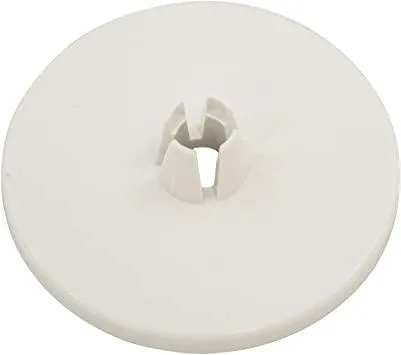
If adjusting the upper tension doesn't solve the problem, the bobbin tension might be off. You can test it by holding the bobbin case by the thread tail and giving it a gentle shake—the thread should unwind a little but not drop freely. For Janome, Elna, and Necchi machines, a compatible spool holder cap like the Janome Large Spool Holder Cap (product ID 1221212) can help keep the thread feeding smoothly from the spool, preventing tension fluctuations. If the bobbin tension is too tight or too loose, you'll need to adjust the small screw on the bobbin case. Turn it clockwise to tighten, counterclockwise to loosen—but only a quarter turn at a time, as small changes have a big effect.
Uneven Stitch Diagnosis
- Symptom: Stitches look different on top vs. bottom; loops or puckers appear; thread breaks or skips. Check both thread paths and needle condition first.
- Likely Cause: Incorrect upper tension, bent/dull needle, improper threading, or lint in the bobbin area. Start with the simplest fix: rethread and change the needle.
- Corrective Action: Rethread with presser foot up, install a fresh needle, clean bobbin case, adjust upper tension dial in small steps. Test on a fabric scrap after each adjustment. If still uneven, check bobbin tension.
- Stop or Choose Another Option: If adjusting both tensions and cleaning don't resolve the issue after 15 minutes of troubleshooting, the problem may be mechanical (e.g., timing or feed dogs). Consult your machine manual or a professional technician. Do not force the machine.
Products That Help Maintain Stitch Quality
- Spool holder (large) Janome 809810002: The Janome Large Spool Holder Cap works with Janome, Elna & Necchi models listed below. Use with: 1000CP, 1000CPX, 1110DX, 1600P, 1600P-DB, 1600P-DBX, 1600P-QC, 2040, 3022, 3160QDC, 4045LX, 4045NX, 4048/8048/HF8048, 4119 (QUILTER'S DELIGHT), 434DR, 4618LE, 4623LE, 509, 521, 525S, 6019QC, 6125QC, 6147, 625E, 6260QC, 634D, 644D, 659, 662, 7061NX, 7318, 7330, 734D, 744D, 888 COMPULOCK, 900CP, AQS2009, AQS2009,… A secure spool holder cap prevents the thread from slipping or catching, which can cause uneven tension and stitch quality issues. If your machine is compatible, this small accessory can make a big difference in consistent feeding.