Start with the kit you actually have
The Fujifilm X-T4 with 16-80mm Lens Kit pairs the X-T4 body with the XF 16-80mm f/4 R OIS WR lens. That combination covers a useful everyday range and adds in-body image stabilization (IBIS) — a first for the X-T series. Before you change any menu settings, confirm you have the core items: the camera body, the 16-80mm lens, the NP-W235 battery (7.2V, 2200mAh), and the AC power adapter and plug. The box also includes front and rear lens caps, a lens hood, a headphone adapter, a USB cable, and a shoulder strap.
Because the lens has optical image stabilization (OIS) and the body has IBIS, you will want to understand how the two work together. The supplied information confirms both systems exist but does not specify whether they can be used simultaneously or how they interact. Treat that as a setting to verify in your camera menu rather than a fixed rule.
What the kit includes
-
Fujifilm X-T4 with 16-80mm Lens Kit: FUJIFILM XF 16-80mm f/4 R OIS WR Lens This is the standard zoom in the kit; its OIS works alongside the X-T4’s IBIS, so stabilization settings matter for handheld everyday shooting.
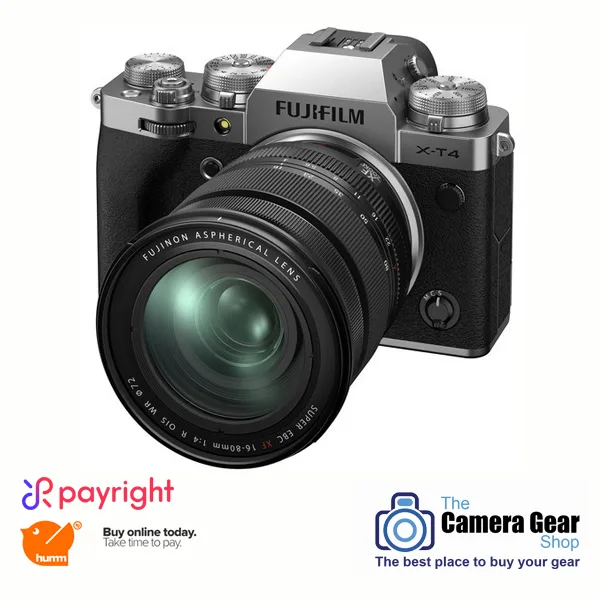
Fujifilm X-T4 with 16-80mm Lens Kit
-
Fujifilm X-T4 with 16-80mm Lens Kit: NP-W235 Lithium-Ion Battery (7.2V, 2200mAh) Knowing the exact battery model helps you plan charging and spares; the supplied information does not state battery life, so judge runtime from your own use.
-
Fujifilm X-T4 with 16-80mm Lens Kit: AC Power Adapter and Plug Useful for powered setup at home or tethered work, but the supplied information does not describe charging procedure or times.
A practical setup sequence for everyday shooting
These steps focus on decisions the supplied specifications support. Where a detail is not confirmed, the step says so rather than guessing.
- Charge and insert the NP-W235 battery: Use the supplied AC power adapter and plug. The record does not include charging time or whether the camera can run while charging, so check the camera display for charging status.
- Mount the XF 16-80mm f/4 lens: Attach the lens and remove the front and rear caps. The kit includes a lens hood; use it when shooting in bright conditions to reduce flare, though the supplied information does not specify hood compatibility beyond this lens.
- Decide on stabilization for handheld vs. tripod: The X-T4 has 6.5-stop in-body image stabilization, and the 16-80mm lens has OIS. For handheld everyday shooting, leaving stabilization on is a sensible starting point. For tripod work, many photographers turn stabilization off, but the supplied information does not give a manufacturer instruction for this lens/body pair, so test and decide based on your results.
- Set autofocus for quick, quiet acquisition: The X-T4 is described as focusing quickly and quietly, with the fastest autofocus performance in an X Series camera thanks to a new algorithm. For everyday scenes, a flexible AF mode with eye detection (if available in your firmware) is a reasonable start. The supplied information does not list specific AF mode names, so explore the menu for the options your camera offers.
- Choose a film simulation: The X-T4 offers 18 Film Simulation modes, including ETERNA Bleach Bypass, which simulates traditional film processing for low saturation and high contrast. For everyday shooting, start with a standard simulation and switch to ETERNA Bleach Bypass when you want a distinctive look. The record does not describe other individual simulations, so try the ones available in your camera.
- Set drive mode and shutter type: The X-T4 can shoot up to 15fps in burst mode and has a new shutter unit designed to be fast, durable, and quiet. For everyday stills, single-shot drive is usually enough; switch to burst for action. The record does not specify electronic vs. mechanical shutter options, so check the menu for quiet or silent shutter choices.
- Configure video basics if you shoot both: The X-T4 records 4K 60p video. For everyday clips, 4K 60p gives smooth motion and room to crop. The kit includes a headphone adapter for monitoring audio. The supplied information does not list frame rates below 60p or bitrates, so review the camera’s video menu for those options.
Everyday settings worth reviewing before you head out
Use this as a checklist of what to confirm in the menu, not as a set of universal values. The right choice depends on light, subject, and whether you are handheld or on a tripod.
- Image stabilization: The X-T4’s IBIS is rated at 6.5 stops, and the 16-80mm lens has OIS. For handheld shooting, stabilization helps; for tripod use, consider turning it off. The supplied information does not state how the two systems combine, so test both on and off in your own shooting.
- Autofocus mode: The X-T4 focuses quickly and quietly. For everyday subjects, a wide or zone AF area with face/eye detection (if present) is a practical starting point. The record does not name specific AF modes, so look for the options your camera provides.
- Film simulation: With 18 modes available, you can assign a favorite to a custom setting. ETERNA Bleach Bypass is one option for low-saturation, high-contrast scenes. The record does not describe the other simulations, so experiment to find your everyday default.
- Continuous shooting: 15fps is available in burst mode. For everyday shooting, single-shot is often enough; use burst for movement. The record does not specify buffer depth or how long you can sustain 15fps, so monitor the camera’s behavior in your own tests.
- Video resolution: 4K 60p is supported. For everyday video, that gives smooth motion; if you need smaller files, check the menu for other frame rates or resolutions, which the supplied information does not list.
Where the kit leaves you to decide
The supplied information confirms the X-T4’s 26.1MP APS-C sensor, 6.5-stop IBIS, 15fps burst, 18 film simulations, and 4K 60p video. It also confirms the 16-80mm lens and NP-W235 battery. What it does not provide is equally important: there are no specific menu paths, no recommended settings for particular scenes, and no details on how OIS and IBIS interact. Rather than invent those details, use the camera’s menu and your own tests to fill the gaps.
For everyday shooting, the most useful habit is to set a baseline you can trust — stabilization on for handheld, a flexible AF mode, a film simulation you like, and single-shot drive — then adjust one variable at a time when a scene demands it. That approach works with the gear you have and keeps you shooting rather than menu-diving.