Why the GoPro 3.5mm Mic Adapter is the simplest audio upgrade
If you want better sound from your GoPro Hero camera, the official GoPro 3.5mm Mic Adapter is the most direct route. It lets you connect a wide range of external 3.5mm microphones to your camera, so you can capture clearer voice audio in action environments or higher-quality sound for music and interviews. The adapter is designed for Hero 9, Hero 8, Hero 7, Hero 6, and Hero 5 models, and it's a plug-and-play solution that doesn't require firmware updates or complex settings.
This guide walks you through the setup process, highlights the key compatibility and power details, and helps you choose the right microphone for your needs. Whether you're vlogging, recording a ride, or capturing a live performance, adding an external mic is one of the most effective ways to improve your GoPro footage.
What the GoPro 3.5mm Mic Adapter provides
-
GoPro 3.5mm Mic Adapter for Hero 9 Hero 8 Hero 7 Hero 6 Hero 5: Connects a wide range of external 3.5mm mics to your GoPro Hero camera. This is the core function: it opens up your camera to the vast world of external microphones, from lavaliers to shotgun mics.
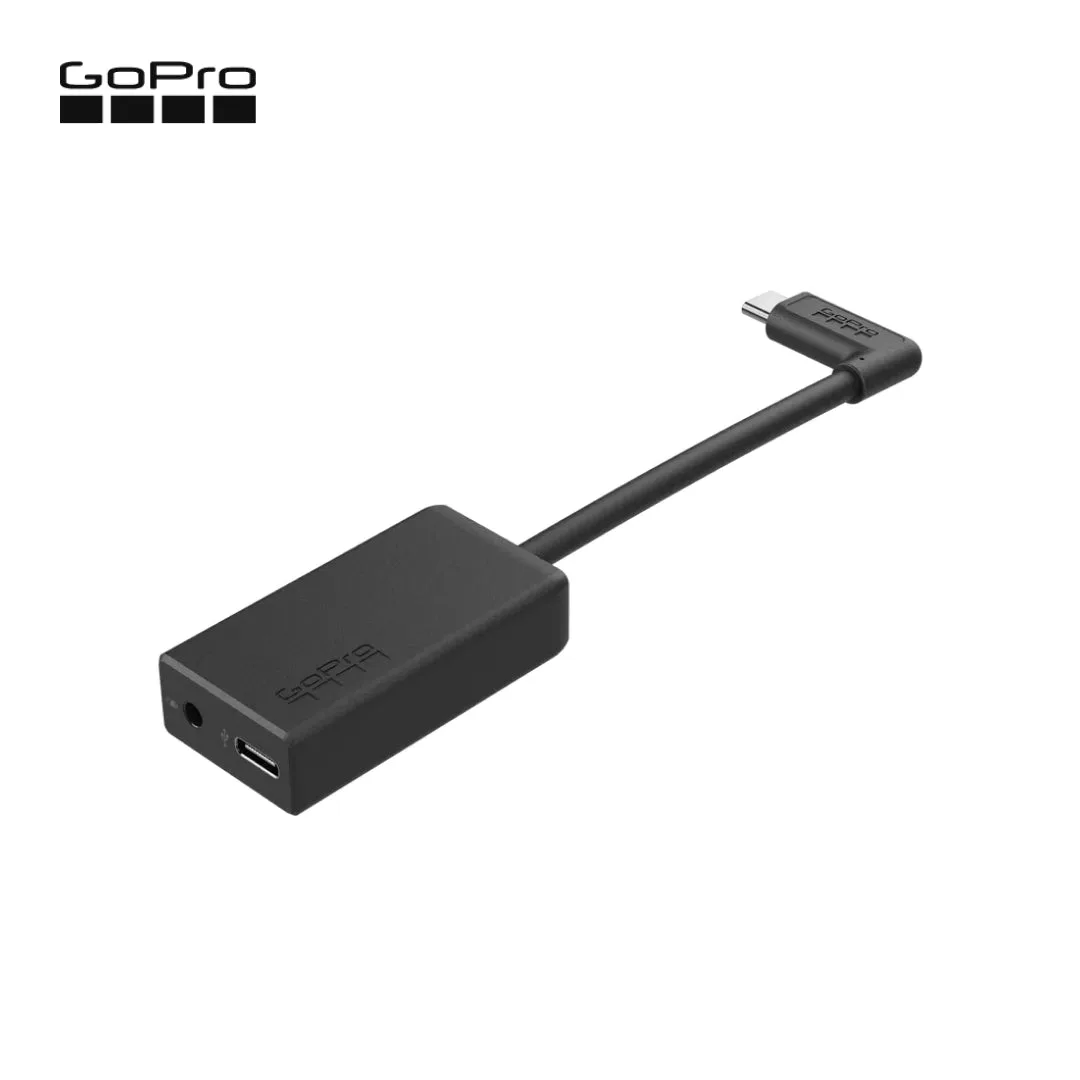
GoPro 3.5mm Mic Adapter for Hero 9 Hero 8 Hero 7 Hero 6 Hero 5
-
GoPro 3.5mm Mic Adapter for Hero 9 Hero 8 Hero 7 Hero 6 Hero 5: Enables high-quality audio capture when using a pro-level external mic. The adapter is designed to preserve the audio quality of professional microphones, so you get cleaner sound than the built-in mic.
-
GoPro 3.5mm Mic Adapter for Hero 9 Hero 8 Hero 7 Hero 6 Hero 5: USB-C power and data extension with 90° connector. The 90° connector keeps the cable out of the way when mounted on a gimbal or helmet, and the USB-C pass-through means you can power the camera while using the adapter.
-
GoPro 3.5mm Mic Adapter for Hero 9 Hero 8 Hero 7 Hero 6 Hero 5: Enables stereo mic and line input for external audio sources like an audio recorder or mixer. You can record stereo audio or take a line-level feed from a mixer, which is useful for interviews, music, and event recording.
-
GoPro 3.5mm Mic Adapter for Hero 9 Hero 8 Hero 7 Hero 6 Hero 5: 106dB stereo analog-to-digital converter. A high-quality ADC ensures low noise and accurate conversion, so your external mic's signal is captured faithfully.
How to set up the GoPro 3.5mm Mic Adapter
The setup is straightforward, but a few checkpoints will ensure a smooth experience. Follow these steps to connect your external microphone.
- Check your camera model: The adapter is compatible with Hero 9, Hero 8, Hero 7, Hero 6, and Hero 5. It is not listed for other models, so confirm yours before purchasing.
- Connect the adapter to your GoPro: Plug the adapter's USB-C connector into your camera's USB-C port. The 90° design helps the cable stay out of the way.
- Plug in your microphone: Connect your 3.5mm microphone to the adapter's 3.5mm input. The adapter supports both mic and line-level input, so it works with a wide range of devices.
- Power the adapter if needed: The adapter includes USB-C power and data extension. If your microphone requires power, or if you want to charge your camera while recording, connect a power source to the adapter's USB-C port. The supplied information does not specify whether the adapter draws power from the camera or requires external power for basic operation, so test your setup before a critical shoot.
- Select the audio source in your GoPro settings: In your camera's audio settings, choose the external mic option. The exact menu path varies by model; consult your camera's manual for details.
- Test your audio: Record a short clip and listen back with headphones. Adjust the microphone position or gain settings as needed. The adapter's 106dB stereo ADC should deliver clean sound, but mic placement matters.
Choosing the right microphone for your GoPro
The adapter accepts a wide range of 3.5mm microphones, but not all mics are equally suited to action sports. For vlogging, a compact shotgun or lavalier mic that rejects wind noise is ideal. For music or interviews, a stereo mic or a feed from a mixer can work well. Keep in mind that the adapter supports both mic-level and line-level input, so you can use powered microphones or devices like audio recorders.
If you're recording in windy conditions, consider a mic with a foam or furry windshield. The adapter itself doesn't include wind protection, so that's an accessory you'll need separately. Also, check that your microphone's plug is a standard 3.5mm TRS or TRRS; the adapter's input is designed for a wide range of 3.5mm mics, but the supplied information does not specify whether it supports TRRS or only TRS. Test before relying on it.
Power and mounting considerations
The adapter's USB-C power and data extension is a thoughtful feature. It means you can power the camera and the adapter simultaneously, which is useful for long recordings. The 90° connector also helps when mounting the camera on a gimbal or helmet, as it keeps the cable tucked away.
However, the supplied information does not specify whether the adapter requires external power to operate, or whether it draws power from the camera's battery. If you're planning a long shoot, it's wise to bring a power bank and test the setup beforehand. Also, note that the adapter adds a small amount of bulk to your camera; ensure your mount or cage can accommodate it.
What the supplied information does not cover
The product record does not include detailed operating instructions, such as specific menu settings or firmware requirements. It also does not specify whether the adapter supports TRRS microphones or only TRS. For these details, refer to GoPro's official documentation or test with your specific microphone. The adapter is a straightforward tool, but verifying compatibility with your exact mic and camera model is always a good practice.