Quick answer
Clean the Glowee 2.0 canopy with plain water and a soft cloth only, and never with solvent or alcohol. Before each flight, spin the rotor by hand, check the blades for cracks or bends, and replace damaged blades as a set. If the motor drags or the gear teeth are worn, fit the Revell Motor w/Pinion Gear (24830/24831) or the Main & Pinion Gear (2pcs) - Air Hunter (23860) rather than forcing a stiff drivetrain.
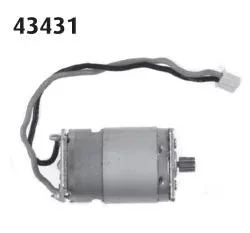
Motor w/Pinion Gear (24830/24831)
The Glowee 2.0 (23891) is a small Revell helicopter, and most of its problems start in two places: the clear canopy and the rotor head. Cloudy plastic, a wobbling rotor or a motor that whines without lifting the model are all symptoms you can diagnose at home before you buy anything.
This guide separates each symptom from its likely cause, gives a corrective action, and tells you when to stop and choose a different option. It uses only Revell parts that are actually listed for this model family, so you can order the right piece once.
Canopy care: why clear plastic clouds and how to clean it
A cloudy canopy is usually caused by fingerprints, dust, or cleaning with the wrong product. Alcohol, acetone and household glass cleaners attack the surface of clear polystyrene and leave a permanent haze. The fix is simple: rinse the canopy under lukewarm water, wipe it with a soft cotton cloth or a clean microfibre towel, and let it air-dry. Do not rub hard, and do not use paper towels, which scratch.
If the canopy is already hazy, the damage is often in the plastic, not on it, and polishing will not bring it back. In that case, treat the canopy as a wear part and keep the model for display or gentle indoor use. For paint touch-ups around the canopy frame, use Revell Aqua Color acrylics, which are water-dilutable and have a mild odour, so they are easier to control near clear parts.
- Clean with water only; never use alcohol, thinner or glass cleaner on clear parts.
- Dry with a soft cloth, not paper towel, to avoid fine scratches.
- Store the helicopter with the canopy covered or in a box to slow dust build-up.
Rotor check: tracking, blade condition and balance
A rotor that wobbles or tracks unevenly is almost always a blade problem. Spin the rotor slowly by hand and watch the blade tips: if one tip sits higher or lower than the others, that blade is bent, cracked at the root, or not seated properly. Remove each blade, check the mounting hole for cracks, and refit it fully. If a blade is cracked, replace it.
Blades are sold as a set, and that matters. The Revell Rotor Blades (5pcs) Helicopter Red Kite (23834) gives you five blades in one pack, so you can replace a damaged blade and keep spares for the next knock. Mixing a new blade with four worn ones can reintroduce vibration, so replace the whole set when several blades show wear.
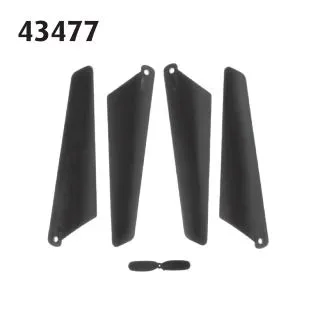
Rotor Blades (5pcs) Helicopter Red Kite (23834)
- Do a hand-spin check before every flight, not after a crash.
- Replace cracked blades immediately; do not glue a cracked blade root.
- Keep the rotor head screw snug but not overtightened, so blades can still align.
Motor and gear diagnosis: whine, drag and lost lift
If the motor spins but the rotor does not, or the model whines and barely lifts, the drivetrain is binding. Remove the rotor and turn the gear by hand. A gritty or stiff feel points to worn gear teeth or a dry, dragging motor. Check the pinion gear on the motor shaft for flattened teeth, and check the main gear for missing teeth or plastic shavings.
For a worn motor or pinion, the Revell Motor w/Pinion Gear (24830/24831) is the direct replacement. If the main gear or pinion is stripped instead, the Main & Pinion Gear (2pcs) - Air Hunter (23860) provides a two-piece gear set. Fit the part, spin the drivetrain by hand again, and only then power up. If it still binds, stop and inspect the shaft and housing for damage rather than running the motor hot.
- Never run a binding motor to 'loosen it up'; heat shortens motor life.
- Keep small gears and blades away from children during repairs.
- If the shaft itself is bent, a gear swap will not fix the vibration.
Safe handling and storage between flights
Most Glowee 2.0 damage happens on the ground, not in the air. Pick the helicopter up by the body, never by the rotor head or blades, and set it down on a flat surface before switching on. Let the rotor stop completely before you touch it. When you are finished, remove the battery if the model uses one, and store the helicopter where it cannot fall or be knocked off a shelf.
For longer storage, keep the model out of direct sunlight and away from radiators, because heat can warp thin plastic blades and canopy frames. A simple box with a soft cloth underneath is enough. If you display the model, keep it high enough that pets and small children cannot reach the rotor.
- Carry the model by the fuselage, not the rotor head.
- Let blades stop fully before handling or folding them.
- Store away from heat and direct sun to prevent warping.
Symptom-to-fix diagnosis
- Cloudy or hazy canopy: Usually caused by fingerprints, dust, or cleaning with alcohol or glass cleaner, which etches clear plastic. Clean with lukewarm water and a soft cloth only. If the haze remains after a water clean, the plastic itself is damaged; stop polishing and treat the canopy as a wear part.
- Rotor wobble or uneven blade tracking: Check each blade for cracks at the root and for full seating in the rotor head. Replace cracked blades and consider replacing the whole set at once. If a new set of blades still wobbles, the rotor head or shaft is bent; stop flying and inspect the head before buying more blades.
- Motor whines but rotor does not turn: Turn the gear by hand to feel for binding. Worn pinion or main gear teeth are the usual cause; fit the Revell motor with pinion gear or the two-piece gear set. If the drivetrain still binds after a gear swap, do not run the motor hot; the shaft or housing needs inspection instead.
- Model loses lift after a crash: Check blades first, then the gear mesh, then the motor. Damage usually travels in that order, so diagnose from the rotor down. If blades and gears are sound but lift is still poor, the motor is the remaining suspect and should be replaced rather than pushed harder.
Revell parts that fit this diagnosis
- Rotor Blades (5pcs) Helicopter Red Kite (23834): Revell Rotor Blades (5pcs) Helicopter Red Kite (23834) is a set of five rotor blades offered under the Revell brand, standard option code 434779090. Five blades in one pack let you replace a cracked blade and keep spares, which is cheaper than buying several single blades.
- Motor w/Pinion Gear (24830/24831): Motor with Pinion Gear (24830/24831) from Revell is offered as a Standard option, identified by part numbers 24830 and 24831. If the motor drags or the pinion teeth are flattened, this is the direct drivetrain replacement rather than a workaround.
- Main & Pinion Gear (2pcs) - Air Hunter (23860): Main & Pinion Gear (2pcs) from Revell is a two-piece gear set associated with the Air Hunter (23860) reference, Standard option SKU 435519090. A stripped main gear or pinion is a common cause of a whining motor that will not lift the model; this set covers both gears.
- Matt "Beige" (RAL 1019) Aqua Color Acrylic - 18ml: Revell Aqua Color acrylics come in 88 shades in 18 ml containers, can be diluted with water, have a mild odour and are not flammable. Water-dilutable acrylic is easier to control near clear canopies and small detail parts than solvent-based paint.
Diagnose the Glowee 2.0 from the rotor down: clean the canopy with water, check blades by hand before every flight, and replace worn gears or the motor with the correct Revell part instead of forcing a binding drivetrain. When a symptom survives the right fix, stop and inspect the next component rather than flying it harder.