Quick answer
Center the accessory on the case's built-in MagSafe magnet ring, press it flat until it seats, then give it a gentle tug to confirm the hold. For wallets and car mounts, attach them after the case is fully on the phone so the magnets can align with the phone's own MagSafe array. If the accessory slides or feels weak, the issue is almost always alignment or debris between the surfaces, not the case.
Why a clear COVERT case works with MagSafe accessories
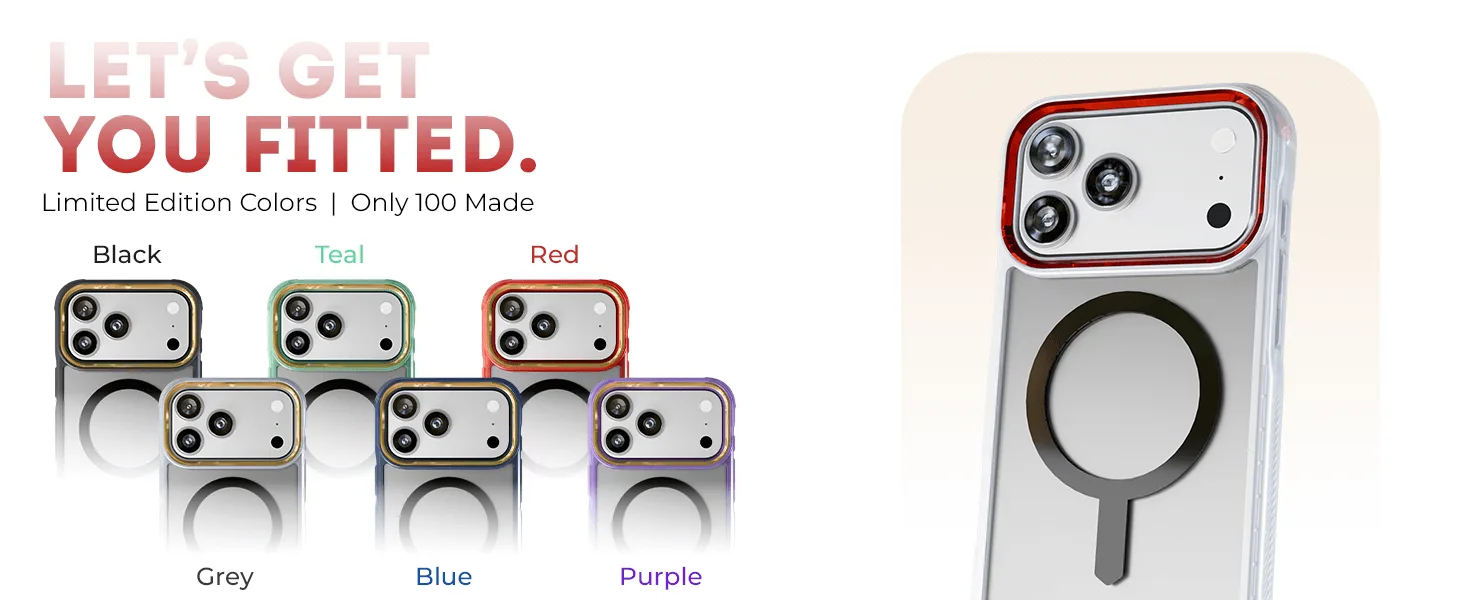
A clear case only blocks MagSafe if it lacks a magnet array or if the plastic is thick enough to push the accessory too far from the phone's magnets. GHOSTEK's COVERT cases are built with MagSafe compatibility, so the case itself contains the magnet ring that accessories grip. That means you do not need a separate adhesive ring or a metal plate, and you should not add one. Extra plates can interfere with the case's own magnets and often leave a visible bulge through the clear back.
The clear design matters here for a practical reason: you can see exactly where the magnet ring sits inside the case. Use that as your alignment guide the first few times you attach an accessory. Once you know the position, it becomes muscle memory.
What to check before you attach anything
Wipe the back of the case with a dry, lint-free cloth. Dust and grit between the case and a wallet or mount reduce grip and can scratch the clear finish over time. Remove any existing adhesive metal plate or ring from a previous case or from the accessory itself. If your wallet has a magnetic shield or a thick card holder built in, test it on its own first, because some third-party wallets are designed for bare phones and sit too far from the case's magnets.
Confirm the case is fully snapped onto the phone at all four corners. A partially seated case shifts the magnet ring slightly off-center, which is enough to make a charger connect intermittently.
Step-by-step: attaching MagSafe accessories to your COVERT case
- Seat the case fully on the phone: Press all four corners until the case is flush. A case that is not fully seated shifts the magnet ring off-center, which is the most common reason a charger connects and disconnects. Checkpoint: run a finger around the edge. Any lip that lifts away from the phone means it is not fully on.
- Clean both mating surfaces: Wipe the back of the case and the accessory's magnetic face with a dry, lint-free cloth. Grit between them reduces grip and can dull the clear finish. Mistake to avoid: using a wet wipe or glass cleaner. Moisture can leave a film that makes the accessory slide.
- Find the magnet ring through the clear back: Hold the phone face-down under a light. The COVERT case's built-in magnet ring is visible through the clear or smoke-tinted back. That ring is your target. If you cannot see the ring, tilt the phone until light catches it. Do not guess the position.
- Center the accessory on the ring and press flat: Lower the wallet, charger, or mount straight down onto the ring rather than sliding it into place. Press with even pressure for a second or two so the magnets seat. Mistake to avoid: sliding the accessory sideways to position it. Sliding wears the case's coating and can misalign the magnets.
- Test the hold with a gentle tug: Pull the accessory straight off with light force. It should resist before releasing. If it falls away on its own, re-center it and try again. Checkpoint: a wallet that shifts when you press a card into it is misaligned or overloaded.
- Attach car mounts to the case, not the bare phone: For a MagSafe car mount, put the case on the phone first, then bring the phone to the mount. This keeps the case's magnet ring aligned with the mount's magnets. Mistake to avoid: sticking an adhesive metal plate to the case. It blocks the built-in magnets and can show through the clear back.
- Re-check alignment after a drop or a case removal: If the case comes off, repeat the seating step before using MagSafe again. A case that is even slightly loose will weaken the magnetic connection. Next step: if the hold still feels weak, remove any cards from the wallet and test again before assuming the case is at fault.
COVERT cases with built-in MagSafe
- iPhone 17 / Air Series Protective Clear MagSafe Cases — COVERTiPhone 17e / Smoke Matte: COVERT Snap Case for iPhone 17 and Air Series, including iPhone 17e, with a clear design and smoke matte finish and built-in MagSafe compatibility. If you use a wallet or mount daily, the smoke matte finish hides fingerprints better than a fully glossy clear back while still showing the phone.
- iPhone 17 / Air Series Protective Clear MagSafe Cases — COVERTiPhone 17 Pro / Smoke: COVERT Clear MagSafe Case for iPhone 17 Pro with a smoke tint and built-in MagSafe compatibility. The smoke tint gives you the same MagSafe magnet ring as the clear version but with a darker look, so accessory alignment is still visible through the back.
- iPhone 17 / Air Series Protective Clear MagSafe Cases — COVERTiPhone 17 Pro / Blue: COVERT Clear MagSafe Case for iPhone 17 Pro in Blue, with a clear design and MagSafe compatibility. The clear back lets you see the phone's color and the magnet ring at the same time, which makes first-time accessory alignment easier.