Quick Answer
To attach the KeySmart MagConnect, simply snap the magnetic connector onto your KeySmart or keychain, then attach the included metal plate to your car key fob or other items. For quick detach, just pull the two magnetic halves apart—no more fumbling with split rings or carabiners.
If you're tired of wrestling with split rings and carabiners every time you need to separate your car key from the rest of your keys, the KeySmart MagConnect is the upgrade you've been looking for. This small magnetic connector lets you attach and detach items in a second, making it perfect for drivers, gym-goers, or anyone who frequently swaps keys.
In this guide, we'll walk you through the simple setup process, show you how to use it effectively, and point out common mistakes to avoid. Whether you're attaching a car fob, a bag, or a tool, you'll learn how to get the most out of this clever accessory.
What Is the KeySmart MagConnect?
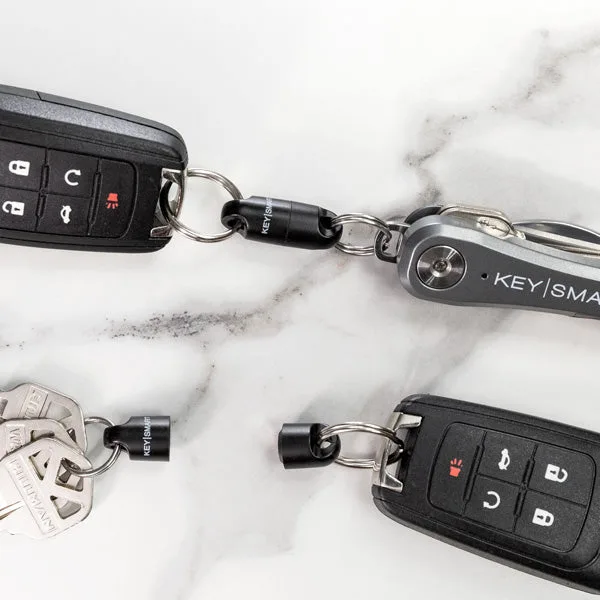
The KeySmart MagConnect is a magnetic connector designed to work with your KeySmart key organizer or a standard keychain. It consists of two parts: a magnetic base that attaches to your keychain and a smaller magnetic piece (or metal plate) that you attach to the item you want to quickly swap—like a car key fob, a bag, or a tool.
The strong magnet ensures a secure hold, so you don't have to worry about accidental drops. It's the most convenient way to attach car keys and other tools to your KeySmart or keychain, and it's a great alternative to bulky carabiners or fiddly split rings.
- Works with KeySmart or any standard keychain
- Strong magnet for secure and reliable attachment
- Great for car key fobs and other keychain accessories
Step-by-Step: How to Attach the MagConnect
Attaching the MagConnect is straightforward, but there are a few things to keep in mind. First, identify which part goes where. The larger magnetic base attaches to your KeySmart or keychain, while the smaller piece (often a metal plate or another magnet) attaches to the item you want to detach.
Start by placing the magnetic base onto your KeySmart's key ring or directly onto the key organizer's body. If you're using a standard keychain, simply slide the base onto the ring. Then, attach the smaller piece to your car key fob or other item using the adhesive backing or a small split ring, depending on the model.
Once both parts are in place, bring them together—they'll snap into place with a satisfying click. To detach, simply pull them apart. That's it!
- Make sure the adhesive is clean and dry before attaching the plate to your fob.
- If you're using a keychain, ensure the magnetic base is securely on the ring before attaching the item.
Common Mistakes to Avoid
One of the most common mistakes is attaching the magnetic base to a keychain that's too thick, which can weaken the hold. Stick to a standard-sized key ring or attach it directly to your KeySmart for the best fit.
Another mistake is forgetting to check the magnet's orientation. The MagConnect has a specific polarity, so if it doesn't snap together, flip one of the pieces. Also, avoid placing the magnet near credit cards or other magnetic-sensitive items, as it could interfere with them.
Finally, don't overload the magnetic connection. While the magnet is strong, it's designed for everyday items like a car fob, not heavy tools or multiple keys. Keep the load light to ensure a secure hold.
- Always test the connection before walking away from your car—give it a firm tug to make sure it's secure.
Using the MagConnect in Daily Life
The MagConnect shines in scenarios where you need to quickly separate your keys. For example, when you get to your car, you can detach the fob without taking the entire keychain out of your pocket. When you're at the gym, you can leave your house keys in a locker and just attach your gym bag's clip to the magnetic base.
It's also handy for swapping between different sets of keys—like a work key and a personal key—without having to fumble with rings. The convenience is unmatched, and once you've used it, you'll wonder how you managed without it.
- Pair the MagConnect with a KeySmart organizer to keep your keys flat and reduce pocket bulk.
Step-by-Step: Attach and Use the MagConnect
- Prepare Your Keychain: Remove any existing keys or accessories from your KeySmart or keychain to have a clean workspace. This makes it easier to attach the MagConnect base. Checkpoint: Ensure the key ring or KeySmart body is accessible and not overcrowded.
- Attach the Magnetic Base: Slide the larger magnetic base onto your key ring or clip it onto your KeySmart. If your KeySmart has a key ring, use that; otherwise, you can attach it directly to the organizer's body if it has a compatible attachment point. Checkpoint: Give the base a gentle pull to confirm it's secure on the ring.
- Attach the Magnetic Plate to Your Item: Peel off the adhesive backing (if applicable) and press the smaller magnetic plate onto the back of your car key fob or other item. Hold it firmly for about 30 seconds to ensure a strong bond. Checkpoint: Wait at least an hour before using to allow the adhesive to fully cure.
- Connect and Test: Bring the two magnetic parts together and listen for the click. Then, try to pull them apart with moderate force to ensure the magnet is strong enough for your item. Checkpoint: If it detaches too easily, check the alignment and ensure the surfaces are clean.
- Use the Quick Detach Feature: When you need to separate your keys, simply hold the keychain and pull the item away—the magnet releases instantly. To reattach, just bring them close again. Checkpoint: Practice a few times to get the hang of the motion; it becomes second nature.
KeySmart MagConnect at a Glance
- MagConnect® | Quickly Attach Detach Items | Strong Magnet | Convenient: MagConnect is the most convenient way to attach car keys and other tools to your KeySmart or keychain. Quickly Attach/Detach Items From Keys Works with KeySmart or Keychain Strong Magnet Secure and Reliable Great for Car Key Fob And Other Keychain Accessories This is the exact product you need for quick detach and reattach. Its strong magnet ensures a secure hold, and it's compatible with both KeySmart organizers and standard keychains.
- Quick Disconnect | Quickly Attach or Disconnect Objects From Keychains: Quickly attach or disconnect from car fob, pants, bags, or other everyday devices. NEW FEATURE: Now with black locking mechanism to prevent unwanted disconnects. Nite Ize® S-Biner® Microlock® The S-Biner® is designed and engineered by Nite Ize, Inc. in Boulder, CO USA. If you prefer a mechanical quick-release over a magnetic one, the Quick Disconnect offers a locking mechanism for extra security, making it a great alternative or complement to the MagConnect.
The KeySmart MagConnect is a simple yet transformative accessory that makes quick detach and reattach effortless. By following these steps, you'll avoid common pitfalls and enjoy the convenience of a magnetic key holder every day. Whether you're a driver, a busy professional, or just someone who hates fumbling with keys, this little gadget is a game-changer.