Quick answer
Choose a 98-key keyboard for a compact layout that keeps navigation keys intact. The NJ98-ISO Europe layout is a strong pick for users who prefer ISO key placement and multi-device connectivity.
Why 98 keys instead of full-size or 60%?
A 98-key layout keeps dedicated arrow keys, a number row, and a navigation cluster while trimming the width compared to a full 104-key board. That saves desk space without forcing you to memorize layers of function-key shortcuts. The trade-off is that some secondary keys (like a separate Print Screen or Scroll Lock) are moved to a function layer. If you rely on those keys daily, a full-size layout may suit you better.
ISO layout vs ANSI layout: what changes?
The ISO layout moves the left Shift key to the left of the Z row and gives you a taller Enter key (often called the big-ass Enter). The right Shift key is shorter. This arrangement is standard across Europe and preferred by many typists who want a more deliberate Enter key position. The ANSI layout, common in the US, has a wide left Shift and a smaller Enter key. If you learned to type on a European keyboard, the NJ98-ISO Europe layout will feel natural. If you switch between US and EU keyboards, the NJ98-ISO requires a short adjustment period for the right Shift and Enter keys.
Connectivity matters when you own multiple devices
Many 98-key mechanical keyboards only offer wired USB or Bluetooth. The NJ98-ISO adds a 2.4 GHz wireless mode alongside Bluetooth and cable connections, letting you switch among up to five devices without unplugging. That is useful if you work across a desktop, laptop, tablet, and phone. The catch is that the 2.4 GHz dongle occupies a USB port, so plan for that if your devices have limited ports.
Customization depth varies by model
Basic 98-key boards let you remap keys and change backlight colors. The NJ98-ISO goes further with a programmable knob, a small screen for macros or status, and per-key RGB backlight zones. That extra flexibility helps if you want to assign shortcuts to the knob or display system info on the screen. If you never use macros or status displays, the added complexity may not justify the price premium over a simpler board.
Decision rules
- Choose a 98-key layout if: You want a compact keyboard that keeps dedicated arrow keys and a number row, and you rarely use dedicated keys like Print Screen or Pause.
- Choose ISO layout if: You prefer a taller Enter key and a left Shift key positioned to the left of Z. This is common in Europe and preferred by many touch typists.
- Choose multi-device connectivity if: You switch between a desktop, laptop, tablet, and phone during the day. The NJ98-ISO supports up to 5 devices via Bluetooth, 2.4 GHz dongle, or USB cable.
- Choose deep customization if: You want to assign macros or shortcuts to a knob, view status on a small screen, or control per-key RGB backlighting. Verify that the software tools support your operating system before ordering.
Product facts
-
NJ98-ISO Europe Layout: This is the Europe layout; check layout before ordering. Supports Windows, Mac, Android, iOS, and Linux. Bluetooth + 2.4 GHz + cable connections for seamless usage among 5 devices. If you work across multiple operating systems and devices, this board connects to all of them without needing separate keyboards for each platform.
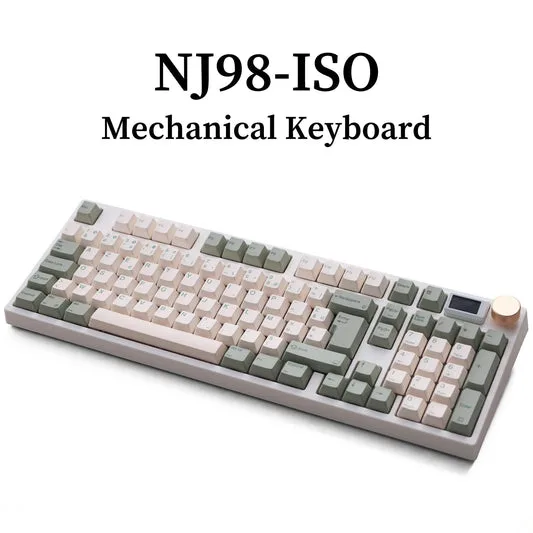
NJ98-ISO Europe Layout
Who this is for
Best for
- Users who prefer an ISO keyboard layout and want a compact mechanical board
- Anyone who works across multiple devices (Windows, Mac, Android, iOS, Linux) daily
Not for
- Users who rely on a full-size keyboard with separate dedicated keys for every function
- Gamers who want a standard ANSI layout with a wide left Shift key for certain key combinations