Quick Answer
For a camera rig, choose a MagSafe mount with a strong magnet and a secure locking mechanism—especially if you'll be moving or tilting the rig. The Rode Magnetic Mount MagSafe is a solid choice for attaching mics or lights to your phone.
Why magnet strength matters more than you think
A weak magnet might hold your phone on a desk, but on a camera rig with cables, lenses, and movement, it can slip. Look for mounts that specify a strong magnetic hold, and consider how much weight you'll attach. The Rode Magnetic Mount MagSafe features an ultra-powerful magnet for secure attachment even during intense use, which is a good benchmark for rig work.
Weight and balance: keep your rig stable
Adding a MagSafe mount changes your rig's balance. A heavy mount on one side can make handheld shots tiring and gimbal work difficult. Choose a mount that's light but still sturdy. Also, think about where you'll place it—on a cage, a handle, or directly on the camera—and how that affects the center of gravity.
Access to ports and buttons: don't block your controls
When your phone is mounted, you still need to reach the charging port, headphone jack, or side buttons. Some mounts cover these. Look for designs that leave ports accessible, or that allow you to adjust the phone's position. The Rode mount, for example, is designed to attach accessories like microphones and lights, so it might not be ideal if you need full access to your phone's screen and ports.
Decision Rules for Choosing a MagSafe Mount
- Assess your gear weight: List everything you'll attach—phone, mic, light, cables. Add up the weight. Choose a mount with a magnet strength rated for at least that total, with a safety margin of 20%. If your total exceeds 300g, consider a mount with a mechanical lock or clamp.
- Check port and button access: Before buying, look at the mount's design. Does it block the charging port, headphone jack, or power button? If you need frequent access, choose a mount that leaves these open or allows repositioning. If you can't find clear images, search for video reviews that show the mount in use.
- Consider the mounting point: Decide where the mount will sit on your rig: on a cage, a cold shoe, or a handle. Ensure the mount has a compatible attachment (like a 1/4" thread) and that it won't interfere with other gear. Measure the space on your rig before ordering to avoid fit issues.
- Think about versatility: If you plan to use the mount for different setups—vlogging, interviews, product shots—choose a mount that can hold various accessories, not just a phone. The Rode Magnetic Mount MagSafe is designed to attach mics and lights, making it a versatile choice. A mount that only holds a phone may limit your rig's growth.
Product Spotlight
-
Rode Support magnétique MagSafe – Support: The Rode Magnetic Mount MagSafe is a versatile magnetic mounting system designed to attach microphones, lights, and other accessories to any MagSafe iPhone or smartphone with a magnetic case. This mount lets you build a compact rig by attaching essential audio and lighting gear directly to your phone, saving space and setup time.
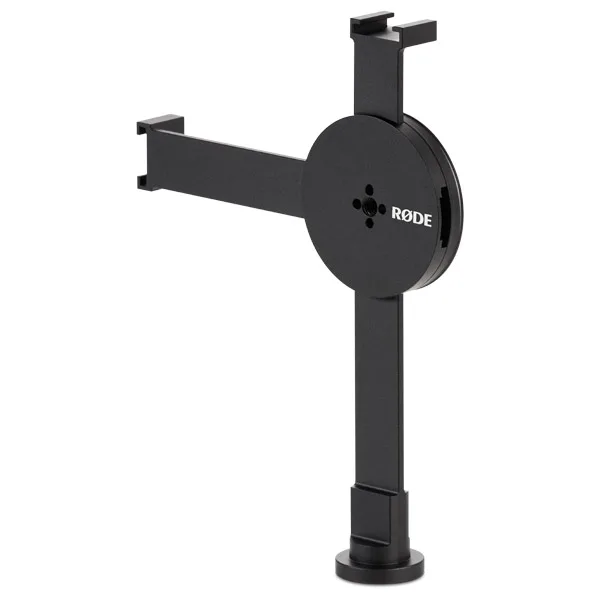
Rode Support magnétique MagSafe – Support
Who Should Choose What
Best for
- Mobile journalists and content creators who need a compact rig with a mic and light
- Vloggers who want to quickly attach and detach their phone from a gimbal or tripod
Not for
- Filmmakers using heavy cinema cameras and large lenses—MagSafe mounts are not designed for that weight
- Users who need full access to the phone's screen and ports while mounted—choose a mount with more adjustability


