Quick Answer
Clean your camera sensor at home by first using the camera's built-in sensor shake, then a blower, and finally a wet cleaning method with a proper sensor swab and solution. Never use compressed air or canned air, and always work in a dust-free environment.
When to Clean Your Sensor
You'll see dust spots in the same place on every image, especially at small apertures like f/16 or f/22. If you only see spots in one or two photos, it's likely dust on the lens or filter, not the sensor.
Check your sensor by taking a photo of a white wall or clear sky at f/16. Review the image at 100% magnification on your computer. If you see dark specks, it's time to clean.
What You'll Need
A sensor cleaning kit typically includes a blower (not compressed air), sensor swabs in the correct size for your camera, and a sensor-safe cleaning solution. For mirrorless cameras, you'll also need a fully charged battery to keep the shutter open during cleaning.
If you use a green screen background system like the Lastolite Adapter Pano Green connect kit 2.3m, dust on your sensor can become very visible in post-production. Keeping your sensor clean saves hours of cloning out spots in green screen work.
Common Mistakes to Avoid
Never use canned air or compressed air—it can blast liquid propellant onto your sensor. Avoid touching the sensor with anything not designed for sensor cleaning, and never use a microfiber cloth or lens tissue.
Don't clean your sensor more often than necessary. Over-cleaning can wear down the sensor's anti-static coating. If you only see one or two small dust spots, consider using the spot removal tool in Lightroom or Photoshop first.
Step-by-Step Sensor Cleaning Process
- Prepare Your Workspace: Work in a clean, still-air room—ideally a bathroom after running a hot shower to settle dust. Charge your camera battery fully. Set the camera to 'Sensor Cleaning' mode (found in the setup menu). For DSLRs, this locks up the mirror; for mirrorless, it opens the shutter. Common mistake: Cleaning in a dusty room or with a low battery. A dying battery can close the shutter mid-clean, trapping the swab inside.
- Use a Blower First: Hold the camera with the sensor opening facing downward. Use a rubber blower (never compressed air) to gently puff air across the sensor surface. This removes loose dust without contact. Common mistake: Touching the sensor with the blower tip. Keep the tip at least an inch away to avoid scratching.
- Inspect and Repeat if Needed: Take another test photo at f/16. If dust remains, proceed to wet cleaning. If all dust is gone, you're done. Checkpoint: If you see new dust after blowing, it may be coming from inside the camera body. Consider having it professionally cleaned.
- Wet Clean with a Sensor Swab: Apply 2-3 drops of sensor cleaning solution to a fresh sensor swab (use the correct size for your camera's sensor). Wipe gently from one side to the other in a single, smooth motion. Flip the swab and repeat in the opposite direction. Use a fresh swab for each pass. Common mistake: Using too much solution or pressing too hard. A light, even pressure is all that's needed.
- Final Inspection: Take another test photo at f/16 and check for remaining dust. If spots persist, repeat the wet cleaning with a new swab. If spots remain after two attempts, stop and consult a professional. Checkpoint: If you see streaks or residue, you may have used too much solution or a dirty swab. Wait for the sensor to dry and try again with a fresh swab.
Recommended Gear for Sensor Cleaning
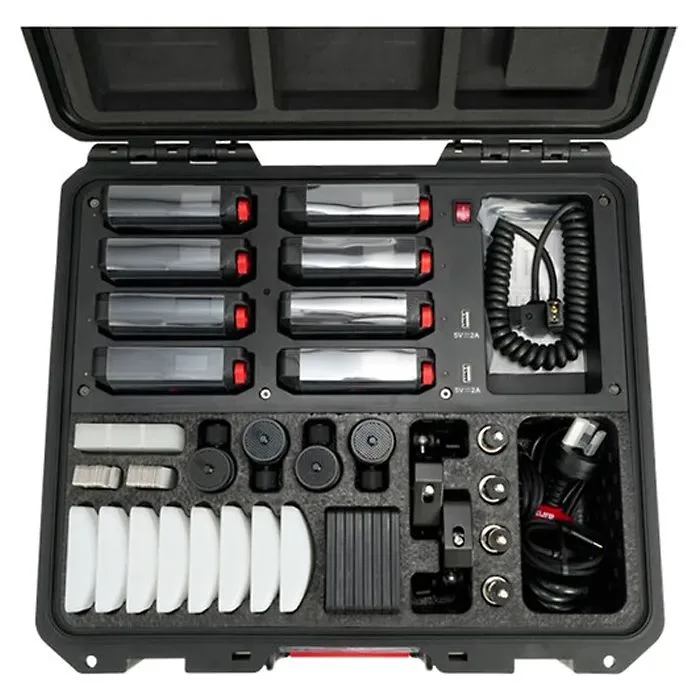
- Aputure MC Pro RGB 8 Light Kit With Charging Case: Eight Lights with Charging Case Output: 396 Lux at 1m per Light 2000-10,000K CCT; RGB Colour Control 2-Hour Runtime Battery CRI 96 | TLCI 96 | CQS 95 | TM-30 Rf 94 Onboard, DMX/RDM, CRMX & App Control Tighter 45° Beam Angle 0-100% Dimming, 15 Special Effects 1/4"-20 & Magnetic Mounting, IP65-Rated Includes Mounting Accessories & Cables While not a sensor cleaning tool, the Aputure MC Pro RGB 8 Light Kit provides bright, even, color-accurate light that makes dust spots on your sensor visible when checking for cleanliness. Use it as a portable light source to inspect your sensor after cleaning.