Quick answer
Regular cleaning with gentle tools and the right technique keeps your headphones hygienic, comfortable, and performing well for years. Focus on ear pads, headband, and mesh grilles using dry or slightly damp cloths — never soak or submerge.
Why regular headphone maintenance matters
Earwax, sweat, and dust build up on ear pads and mesh covers over time, affecting sound clarity and comfort. For over-ear headphones, dirty pads can harden or flake, reducing the seal that gives you good bass response. A quick weekly wipe prevents grime from becoming stubborn stains.
Cables and headband padding also wear faster if left unchecked. The Rode NTH-50 Professional Over-Ear Headphones, for example, use a bespoke driver array with an innovative resonant chamber — keeping the ear pads and mesh clean ensures you hear the full acoustic design as intended.
What not to do when cleaning headphones
Never use alcohol, bleach, or abrasive cleaners on any headphone surface. These can strip coatings, dry out foam, and crack plastic parts. Avoid running headphones under water or submerging them — moisture can damage drivers and electronics even if the headphones seem sealed.
Skip cotton swabs for deep mesh grilles; they push debris further in. Instead, use a soft, dry brush or compressed air. For wireless models like the Sony CH500 Wireless Headphones, keep moisture away from charging ports and buttons.
Step-by-step headphone cleaning routine
- Gather your tools: You need a soft microfiber cloth, a small dry brush (like a clean makeup brush or toothbrush), a bowl of lukewarm water with a drop of mild dish soap, and a separate dry cloth. For mesh grilles, use compressed air or a soft brush — never cotton swabs. Using the wrong tool, like paper towels or alcohol wipes, can scratch surfaces or damage foam.
- Remove ear pads (if detachable): Check your headphone manual to see if pads pop off. For the Sony MDR-7506, the ear pads are replaceable and can be gently pulled away from the housing. Wash fabric pads by hand in soapy water, rinse, and air-dry completely. For leather or leatherette pads, wipe with a damp cloth only — do not soak. Never machine-wash ear pads; the heat and agitation can warp foam and loosen adhesive.
- Clean the headband and outer surfaces: Dampen a microfiber cloth with the soapy water (wring until barely moist). Wipe the headband, outer ear cups, and cable. For the Sony CH500 Wireless Headphones, avoid the charging port and buttons. Dry immediately with a separate cloth. Excess moisture near buttons, ports, or driver vents can cause electrical damage or mold.
- Clear the speaker mesh and grilles: Use a dry brush to gently sweep away dust and earwax from the mesh covering the drivers. Hold the headphones upside down so debris falls out. For stubborn wax, use compressed air in short bursts — never blow with your mouth, as moisture can enter. Pushing debris into the mesh can block sound and create permanent muffled audio.
- Reassemble and store properly: Once all parts are dry, reattach ear pads. Store headphones in a cool, dry place away from direct sunlight. Use a case or hang them on a stand to avoid crushing the headband padding. For folding models like the Sony MDR-7506, collapse them gently. Storing headphones with the cable tightly wrapped or under heavy objects can break internal wires and deform pads.
Products that benefit from proper care
-
Rode NTH-50 Professional Over-Ear Headphones: The NTH-50 features a bespoke driver array with an innovative resonant chamber, meticulously tuned for professional monitoring. Keeping ear pads and mesh grilles clean preserves the precise acoustic tuning, so you hear the full frequency range during mixing or critical listening.
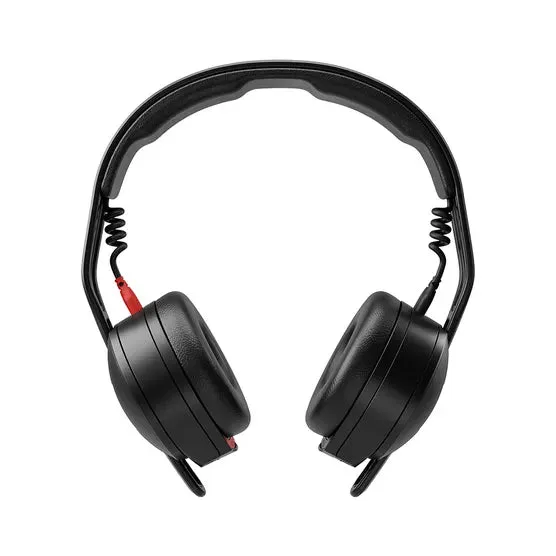
Rode NTH-50 Professional Over-Ear Headphones
-
Sony CH500 Wireless Headphones (Black): Wireless headphones designed for effortless, all-day listening with up to 20 hours of battery life. Regularly cleaning the charging contacts and keeping the USB port free of lint helps maintain reliable charging and extends battery lifespan.

Sony CH500 Wireless Headphones (Black)