Quick answer
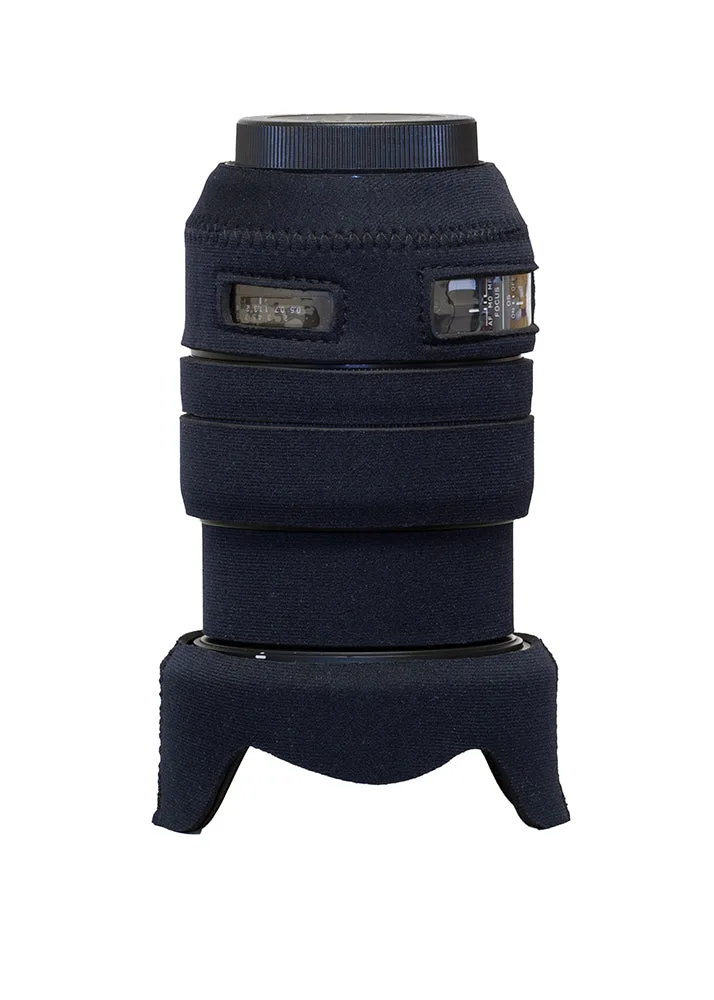
To cover a Sigma 24-70mm f2.8 ART lens, start with the lens fully retracted at 24mm, align the cover's switch windows over the AF and focus limiter controls, and work the neoprene around the barrel. Add the included zoom extension piece when you zoom to 70mm. The LensCoat® Sigma 24-70mm f2.8 DG OS HSM ART is designed for this exact lens, so no trimming is needed.
Why the ART zoom needs a two-part cover
The Sigma 24-70mm f2.8 ART extends as you zoom toward 70mm. A single-piece cover would either bunch up at 24mm or leave the barrel exposed at 70mm. That's why the LensCoat kit includes an optional piece for when the lens is zoomed out to 70mm, which can be quickly and easily put on and taken off. Plan your install around that movement: fit the main body first, then decide whether you'll shoot mostly at the wide end or need the extension piece attached.
Prep the lens and cover before you start
Wipe the barrel with a microfiber cloth to remove grit; trapped dust under neoprene can abrade the finish over time. Work in a clean, well-lit area so you can see the switch windows and alignment marks. If you're installing in cold weather, let the cover warm to room temperature first—cold neoprene is stiff and harder to stretch into place.
Align the windows and switch cutouts
The cover has clear plastic windows over the auto focus and focus limiter switch, and also the distance scale on some models. Before pulling the cover tight, rotate it so those windows sit directly over the corresponding controls. Check that the small hole for the zoom lock or other features lines up. If a window sits over solid barrel instead of a switch, the cover is rotated wrong—reposition it before continuing.
Work the cover around the zoom ring and barrel
Stretch the neoprene over the front of the lens first, then roll it back toward the mount. Keep the zoom ring free to rotate; the cover should not bind it. Once the main body is seated, test zoom from 24mm to 70mm. If the cover pulls or gaps at the joint, you may need to adjust its position slightly forward or back.
Add the zoom extension piece when needed
When you zoom out to 70mm, the barrel extends and exposes a section that the main cover doesn't reach. The included optional piece fills that gap. Attach it before you extend the lens, or slide it on after zooming if you prefer. Take it off when you return to 24mm if you want the most compact setup. This piece is specific to the 24-70mm ART; don't force it onto other lenses.
Step-by-step installation
- Set lens to 24mm and clean the barrel: Retract the zoom fully and wipe down the barrel with a microfiber cloth to remove dust or grit. Checkpoint: no visible debris before you stretch the cover on.
- Identify the switch windows and alignment holes: Locate the clear plastic windows for the AF and focus limiter switches, and the small hole for any lock or feature. These must line up with the actual controls. Common mistake: installing the cover rotated so a window covers solid barrel instead of a switch.
- Slide the main cover over the front and work it back: Stretch the neoprene over the front element area first, then roll it toward the mount. Keep the zoom ring free to turn. Checkpoint: zoom ring moves without binding and windows stay aligned.
- Test zoom to 70mm and attach the extension piece: Zoom out fully. If the barrel extends beyond the main cover, add the included optional piece over the exposed section. It can be put on and taken off quickly. Common mistake: forcing the extension piece on when the lens is at 24mm—it's designed for the extended position.
- Final fit check and field test: Zoom through the full range, operate all switches through the windows, and confirm the cover doesn't slip. Take a few shots to ensure nothing blocks the view or controls. Next step: if you often switch between focal lengths, leave the extension piece in your bag for quick access.
Product facts
- LensCoat® Sigma 24-70mm f2.8 DG OS HSM ART: LensCoat® Sigma 24-70mm f2.8 DG OS HSM ART lens cover offers protection from scrapes and bumps, preserving resale value, and helps break up the shape of your lens, making it less noticeable to wildlife. It comes with an optional piece for when the lens is zoomed out to 70mm, which can be quickly and easily put on and taken off. The two-part design means you can protect the lens at both 24mm and 70mm without leaving the extended barrel exposed.