Quick answer
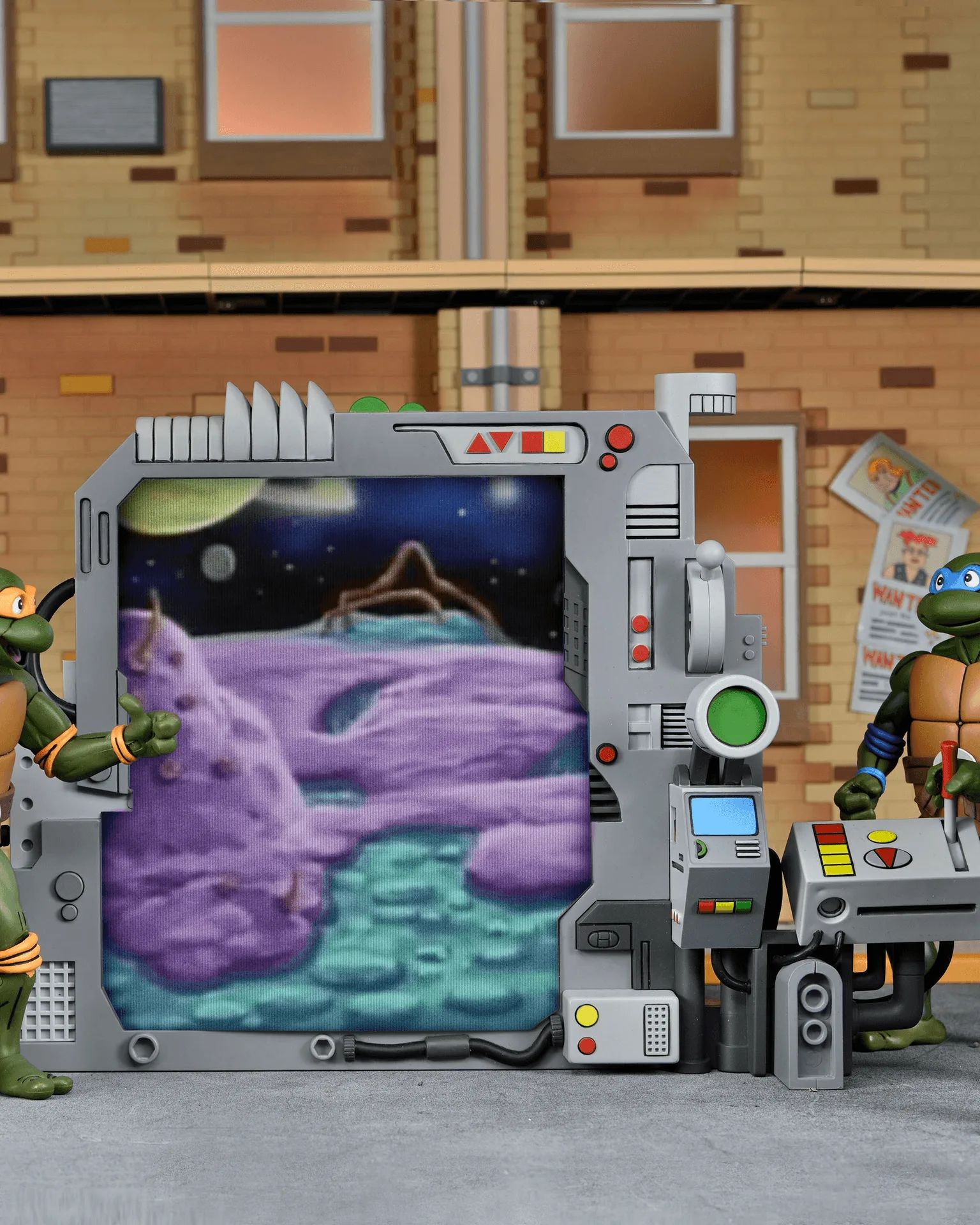
To display Donatello's Portable Portal Generator effectively, start by unboxing carefully, then choose a spot that shows off its lenticular features, and finally secure it in place—whether standalone or inside the NECA TMNT Sewer Diorama.
Why the lenticular effect changes your display
The Portable Portal Generator features three interchangeable lenticular panels that create a shifting image when you move around it. This means your display should allow viewers to approach from different angles. Avoid placing it flush against a wall or in a tight corner where the effect won't be visible.
If you're using it as a standalone piece, consider a rotating display stand (not included) to make the most of the lenticular effect. If you're placing it in the Sewer Diorama, make sure the front is oriented toward the main viewing direction.
Standalone vs. diorama placement
This accessory is designed to work both ways. As a standalone piece, it can anchor a small TMNT cartoon scene on a shelf. Inside the Sewer Diorama, it fits comfortably and adds a tech-heavy focal point that contrasts with the gritty sewer environment.
Consider the scale: it stands in 7” scale, so it pairs well with most NECA TMNT figures. If you have other cartoon-accurate accessories, group them to create a cohesive story.
Step-by-step display setup
- Unbox and inspect: Carefully remove the Portable Portal Generator from its packaging. Check that all three lenticular panels are present and free of smudges. Avoid touching the lenticular surface with bare fingers to prevent fingerprints. Common mistake: peeling off protective films too quickly can cause scratches.
- Choose your display location: Decide between a standalone shelf or inside the NECA TMNT Sewer Diorama. Ensure the spot has enough clearance for viewers to move side to side to see the lenticular effect. Checkpoint: test the viewing angles before committing to the spot.
- Secure the piece: If using a display stand, attach it to the base. For diorama placement, position the generator so it sits flat and stable. Use a small amount of museum putty on the base if needed to prevent tipping. Common mistake: using regular tape can leave residue; use putty designed for collectibles.
- Adjust the lenticular panels: Swap in your preferred lenticular panel. Push gently until it clicks into place. Ensure the image is oriented correctly for the main viewing direction. Checkpoint: verify the panel is fully seated to avoid it popping out later.
- Add figures and lighting: Place your TMNT figures around the generator to create a scene. Use a small LED spotlight to highlight the portal effect without washing out the lenticular image. Common mistake: direct overhead lighting can create glare; position light at a 45-degree angle.
Product facts
-
Teenage Mutant Ninja Turtles (Cartoon) – Donatello’s Portable Portal Generator: This diorama piece from the classic TMNT cartoon features three interchangeable lenticular panels and stands in 7” scale. The lenticular panels give you multiple display options, and the 7” scale matches NECA TMNT figures for a cohesive scene.
Teenage Mutant Ninja Turtles (Cartoon) – Donatello’s Portable Portal Generator