Quick answer
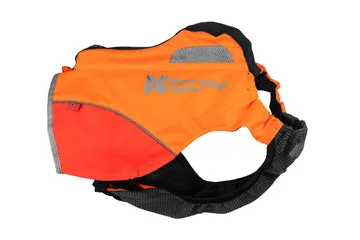
Fit the Protector Vest GPS by measuring your dog's chest girth and back length, then adjust the vest so it sits snug but allows two fingers under the straps. Check that the vest covers the ribcage without restricting the shoulders, and confirm the GPS tracker sits securely on the back. Recheck the fit after the first few walks, because movement and coat condition can change how the vest sits.
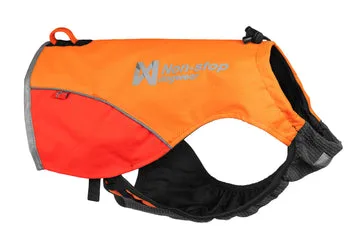
Protector Vest
Measure before you adjust
Use a soft tape measure to record two numbers: chest girth at the widest point behind the front legs, and back length from the base of the neck to the base of the tail. These two measurements tell you whether the vest length and circumference are in the right range for your dog. For dogs with a deep chest or a narrow waist, chest girth matters most; for dogs with a long back, back length decides whether the vest stays in place.
The Protector Vest GPS is available in a standard fit, so sizing depends on matching those measurements to the vest's coverage rather than choosing between multiple cut options. If your dog falls between two sizes, prioritize chest girth for comfort and use the adjustment points to fine-tune the rest.
Adjust the vest in the right order
Start with the vest unclipped and loose. Place it over your dog's head or lay it on the back and bring the straps around the chest, depending on the vest's closure style. Fasten the chest strap first, then the belly or girth strap, tightening each side evenly. This order prevents the vest from twisting and keeps the back panel centered over the spine.
Once the straps are fastened, check that the vest does not slide side to side when your dog walks. A vest that shifts will rub the shoulders and can move the GPS tracker off-center. If the vest has a back loop or leash attachment point, confirm it sits on the back rather than the side.
Check comfort at three points
After adjusting, run your fingers under every strap. You should be able to slide two fingers under each one without forcing. Check the front of the chest for chafing, the armpits for pinching, and the belly for gaps that could let a leg slip through. A vest that is too loose can catch on brush or allow the GPS unit to bounce; one that is too tight restricts breathing and shoulder movement.
Watch your dog move: walk, trot, and turn. The vest should stay in place without riding up the neck or sliding back toward the tail. If your dog stops, scratches, or tries to bite the vest, loosen the nearest strap by one increment and test again.
Fit the GPS tracker and check visibility
The Protector Vest GPS is designed to be compatible with GPS tracking, so the tracker should sit on the back panel where it can get a clear signal. Attach the tracker according to its own instructions, then confirm it does not hang loose or press into the spine. A tracker that swings side to side can be uncomfortable on long walks and may affect signal consistency.
Visibility is part of the fit. The vest should cover the ribcage and back without covering the tail or neck. If reflective or high-visibility elements are present, make sure they face outward and are not folded under a strap. Recheck the tracker position after the first ten minutes of movement, since a settling vest can shift it.
Recheck after the first walk
New vests often settle after a few minutes of movement. After the first walk, take the vest off, inspect the inside for rub marks, and check the straps for loosening. Re-measure chest girth if your dog was excited or holding its breath during the first fitting. A fit that felt snug indoors can feel tight after a run.
Seasonal coat changes matter too. A thick winter coat adds circumference, while a summer clip removes it. Plan to adjust the vest when your dog's coat changes significantly, and always recheck the two-finger rule before a long outing.
Fitting steps at a glance
- Measure chest girth and back length: Use a soft tape at the widest part of the chest and from neck base to tail base. Write the numbers down so you can compare them after adjustment. Checkpoint: if your dog is between sizes, prioritize chest girth for comfort.
- Fasten the chest strap first: Lay the vest on the back, bring the straps around the chest, and fasten the chest strap before the belly strap. Tighten both sides evenly. Mistake to avoid: fastening the belly strap first can twist the back panel off-center.
- Apply the two-finger rule: Slide two fingers under every strap. Adjust until each strap is snug but not tight, and check the armpits and chest for pinching. Checkpoint: if you cannot fit two fingers, loosen by one increment and retest.
- Attach and center the GPS tracker: Place the tracker on the back panel according to its instructions. Confirm it does not hang loose, press into the spine, or slide side to side. Mistake to avoid: a swinging tracker can be uncomfortable and may affect signal consistency.
- Test movement and recheck after the walk: Walk, trot, and turn your dog. After the first walk, inspect for rub marks, recheck strap tension, and re-measure if the vest settled. Next step: adjust again when your dog's coat changes with the seasons.
Product facts
- Protector Vest Gps: The Protector Vest GPS is a safety-focused garment designed to provide protection and visibility for your dog, with a standard fit and compatibility with GPS tracking. This means the fit process centers on matching chest girth and back length to a single cut, then using the adjustment points to keep the vest stable during outdoor activity.
- Harness Back Loop: The Harness Back Loop is a back loop design that allows for easy leash attachment and reduces strain on your dog's neck. If you use a back loop with the vest, the loop should sit on the back panel and stay centered; an off-center loop can twist the vest and pull the GPS tracker to one side.