Quick Answer
Installing the ASRock Z690 Taichi Razer motherboard involves preparing the case, mounting the I/O shield, securing the board, and connecting all power and data cables. Follow these steps carefully to avoid damage and ensure proper function.
Before You Begin: Safety and Preparation
Work on a clean, flat surface and ground yourself to avoid static discharge. Have a Phillips-head screwdriver, zip ties for cable management, and thermal paste if you plan to install a new CPU cooler. The ASRock Z690 Taichi Razer is an E-ATX board, so double-check that your case supports this size.
Installation Steps
- 1. Prepare the Case: Place the case on its side and remove both side panels. Install the I/O shield that came with the ASRock Z690 Taichi Razer from inside the case, pressing firmly until it clicks into place. Common mistake: forgetting the I/O shield. You cannot install it after the motherboard is in place.
- 2. Install Standoffs: Screw the brass standoffs into the case mounting tray at the holes that match the E-ATX layout of your motherboard. Use the motherboard as a guide to verify alignment. Using extra standoffs can short-circuit the board. Only install standoffs where the board has mounting holes.
- 3. Mount the Motherboard: Align the motherboard with the I/O shield and rear ports, then lower it gently onto the standoffs. Secure it with the provided screws, tightening in a cross pattern to avoid stress. Do not overtighten screws. Snug is enough; overtightening can crack the PCB.
- 4. Connect Power Cables: Attach the 24-pin main power cable from your PSU to the motherboard’s ATX connector. Then connect the 8-pin (and optional 4-pin) CPU power cables to the top-left corner of the board. A loose CPU power connection can cause boot failures. Push until the clip clicks.
- 5. Install CPU and Cooler: Open the CPU socket lever, align the CPU with the triangle marker, and gently place it in. Close the lever. Apply a pea-sized dot of thermal paste, then mount your cooler according to its manual. Never force the CPU. It should drop in without pressure. Bent pins are not covered by warranty.
- 6. Install RAM: Open the RAM slot clips, align the notch on the DIMM with the slot key, and press firmly until the clips snap back. For dual-channel, populate slots A2 and B2 first (second and fourth from the CPU). Common mistake: not seating RAM fully. If the clip does not lock, the stick is not in all the way.
- 7. Connect Front Panel Headers and Data Cables: Refer to the motherboard manual to connect the power switch, reset, LED, and USB headers from your case. Then attach SATA cables for drives and any case fan cables to the appropriate headers. Front panel headers are easy to miswire. The manual’s pinout diagram is your friend—use it.
Product Facts
-
ASRock Z690 Taichi Razer: The ASRock Z690 Taichi Razer features stunning RGB brought to you by Razer Chroma allowing for maximum customization with Razer Synapse. If you use Razer peripherals, this motherboard integrates lighting control into your existing ecosystem, so you can sync effects without extra software.
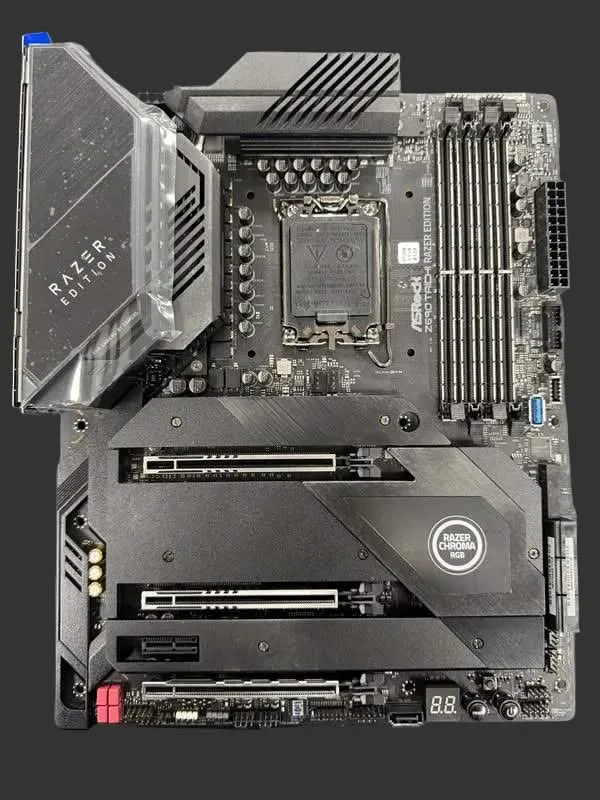
ASRock Z690 Taichi Razer