Quick answer
Load 35mm film into the Lomography Action Sampler, advance the film with the thumb wheel, and press the shutter button to capture four sequential images on one frame. The camera uses fixed settings, so focus on timing and subject movement.
Understanding the four-lens design
The Lomography Action Sampler has four single-element lenses that fire sequentially when you press the shutter. This means each press captures four small images in quick succession on a single 35mm frame. The camera has a fixed aperture, shutter speed, and focal length, so you don't need to adjust any settings. Your main creative control is choosing when to press the shutter and how your subject moves through the frame.
Film and flash limitations
The Action Sampler accepts standard 35mm film but has no built-in flash and no ISO adjustment. This means it works best in bright outdoor light or with an external flash. If you shoot indoors without additional light, expect underexposed or dark images. The camera also supports multiple exposures, so you can double-expose frames for creative effects if you remember not to advance the film between shots.
Step-by-step guide to loading and shooting
- Open the camera back: Slide the latch on the bottom of the camera to release the back cover. Pull the cover open gently. Do not force the latch; if it sticks, check that the film rewind knob is fully pushed down.
- Insert the 35mm film canister: Place a fresh 35mm film canister into the left chamber with the spool end facing down. Pull the film leader across the film gate and insert it into the take-up spool on the right. Make sure the sprocket holes align with the camera's advance gear teeth. If they skip, the film won't advance properly.
- Close the back and advance the film: Close the back cover until it clicks. Use the thumb wheel on the top right to advance the film until the counter shows frame 1. The shutter will cock automatically. If the thumb wheel feels loose or doesn't advance, reopen the back and reseat the film. A common mistake is advancing before the film is properly engaged.
- Frame your subject and press the shutter: Look through the viewfinder and press the shutter button once. The camera fires all four lenses in rapid succession, capturing four images on one frame. Hold the camera steady during the entire sequence. Moving the camera mid-sequence blurs the later images.
- Advance to the next frame: Turn the thumb wheel again until it stops. The counter increments by one. Repeat the framing and shutter press for each new set of four images. Do not advance the film if you want to create a multiple exposure. The Action Sampler allows multiple exposures, so you can shoot another set on the same frame for layered effects.
- Rewind the film when finished: When the counter reaches the end of the roll (typically 36 exposures), press the rewind button on the bottom of the camera. Turn the rewind knob clockwise until you feel the film release. Open the back and remove the canister. Stop rewinding as soon as you feel the tension release. Over-rewinding can pull the film leader back into the canister, making it harder to develop.
What you need
-
Lomography Action Sampler - Clear: Four single element sequentially operated lenses capture four images on one 35mm frame. You get a strip of four action shots per frame without any electronics or batteries.
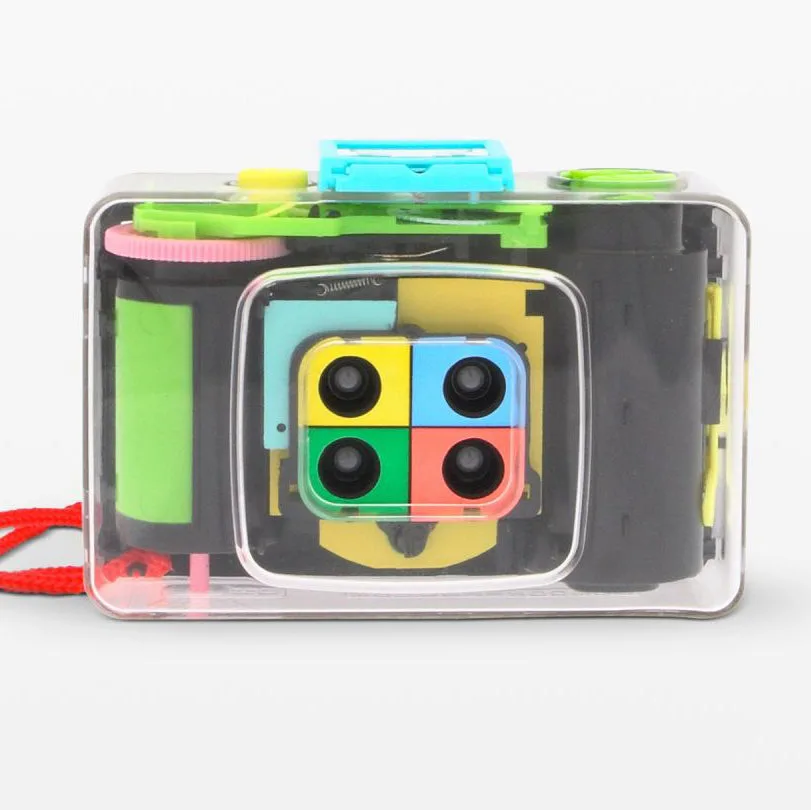
Lomography Action Sampler - Clear
-
Lomography Action Sampler - Clear: Fixed aperture, shutter-speed, and focal length with no flash or ISO adjustment. You must shoot in bright conditions or use an external flash; the camera cannot adapt to low light.


